A bio page might get 500 visits but only a handful of clicks on the link that actually matters. The problem could be an unclear button, poor link placement, or a mismatch between what visitors expect and what the page offers.
Rather than redesigning everything, creators can test individual elements to see what improves results. A good bio page test identifies a specific problem, changes one thing, and measures whether more visitors take the intended action.
Start With One Clear Goal
Before testing a bio page, identify the action that matters most. A page promoting digital products needs different priorities from one built to attract brand partnerships.
For example, a photographer might display a portfolio, Instagram profile, booking form, and equipment recommendations. If the main objective is attracting clients, booking inquiries should take priority over clicks on equipment links.
Different goals require different measurements.
| Creator goal | Primary metric | Supporting metric |
| Sell digital products | Completed purchases | Product link clicks |
| Secure brand partnerships | Qualified inquiries | Media kit views |
| Grow an email list | Confirmed signups | Signup page visits |
| Book consultations | Completed bookings | Booking link clicks |
| Promote a YouTube channel | Video views from referred traffic | YouTube link clicks |
Choose one primary outcome before testing. Secondary metrics can help explain visitor behavior, but they should not replace the result the page is supposed to produce.
Identify Where Visitors Leave
When a bio page underperforms, the first question should be where visitors lose interest. There are three useful stages to examine: people who open the bio page, people who click the intended link, and people who complete the action on the destination page.
Consider a creator selling a $99 digital planner. Their bio page receives steady traffic from Instagram, but sales remain low.
If few visitors click the planner link, its position, wording, or relevance may need attention. If plenty of people click but few purchase, the product page, price explanation, or checkout experience may be responsible.
These problems require different solutions. Moving the button higher will not fix a checkout form that fails to load. Start with the earliest stage showing weak performance, then investigate what prevents visitors from progressing.
Pick a Testable Change
A useful experiment begins with a specific observation rather than a random design adjustment. Identifying common link in bio mistakes can help pinpoint problems such as unclear buttons, poor link placement, or too many competing destinations before deciding what to test.
For example, "My product link receives fewer clicks than my social links" identifies a measurable issue. "My page looks outdated" expresses a preference but does not explain which visitor behavior needs improvement.
A test should connect the problem to a possible solution.
● Low clicks on the main offer: Move the offer above secondary links and measure whether its share of page visits increases.
● Confusing destination labels: Replace unclear descriptions with wording that identifies what visitors will receive.
● Too many competing links: Remove outdated campaigns and duplicate destinations to examine whether visitors focus more on important actions.
Change one major element at a time. If link order, design, and button wording change together, it becomes difficult to determine which adjustment influenced the result. The purpose is to learn what works, not merely produce a different-looking page.
Test Link Order and Placement
Link order affects what visitors notice, especially on mobile devices where only part of the page appears before scrolling. The first visible links should reflect what the creator wants visitors to do and what those visitors are likely looking for.
Imagine a fitness creator selling a training program. Their bio page begins with a YouTube channel, podcast, affiliate discount, and latest Reel. The training program appears below them. Visitors interested in purchasing may never scroll far enough to find it.
Moving the program near the top creates a focused experiment. Compare its click-through rate before and after the change while checking whether overall traffic and promotional activity remain reasonably similar.
One useful alternative is to group links by purpose. Keep the primary offer prominent, followed by supporting resources and secondary social destinations.
However, the most important commercial link is not automatically the best first link. If most visitors arrive from an educational Reel promising a free checklist, that checklist may deserve temporary priority. Placement should reflect both the creator's objective and the visitor's immediate expectation.
Rewrite Buttons That Hide Their Purpose
A button labeled "Explore" gives visitors almost no information about where it leads. A more descriptive label can reduce the uncertainty involved in clicking. This is especially relevant when several destinations appear similar, such as a creator's portfolio, service page, media kit, and booking form.
| Current button | Alternative to test |
| My Shop | Browse My Notion Templates |
| Work With Me | View My Freelance Services |
| Free Stuff | Download My Content Planner |
| Let's Connect | Send a Brand Collaboration Inquiry |
| Book Now | Schedule a 30-Minute Consultation |
Good button labels communicate the destination or action without unnecessary promotional wording. A label such as "Download My Content Planner" is clearer than "Free Stuff" because the visitor knows exactly what the resource contains.
There is also a distinction between increasing clicks and attracting suitable visitors. A button promising a free template may receive more clicks than one describing a paid product, but those clicks will not necessarily produce more sales. Test clarity and expectation-setting, not just attention-grabbing language.
Check the Mobile Experience
A bio page may look organized on a desktop while requiring unnecessary scrolling on a phone. Open the page through Instagram and TikTok's in-app browsers, not only through a regular desktop browser. Check what appears immediately, how quickly the page loads, and whether external links open correctly.
Pay particular attention to the space occupied by the profile photograph, bio description, and decorative elements. A large header can push the primary link below the first screen.
Button spacing matters too. Closely positioned links make accidental taps more likely, while tiny text forces visitors to inspect labels before choosing.
Test the entire journey rather than stopping at the bio page. A booking button that opens a form requiring repeated zooming or difficult typing creates friction after the initial click.
For pages promoting products, also check whether payment and checkout options function correctly inside in-app browsers. These checks can reveal usability problems that ordinary click analytics do not explain.
Test Design With a Purpose
Changing colors and backgrounds is easy, but visual experiments should answer a specific question.
If every button uses a different bright color, visitors may struggle to identify the main action. Testing a consistent button style with one clearly emphasized offer can establish whether visual hierarchy improves navigation.
Likewise, an attractive background photograph may interfere with button readability when text and background colors lack sufficient contrast.
Three design elements are particularly useful to examine:
● Visual hierarchy: The primary link should be identifiable without requiring visitors to compare every button equally.
● Text contrast: Button labels and descriptions should remain readable on mobile devices and in different lighting conditions.
● Image usefulness: Profile images, product previews, and branding should provide recognition or context rather than occupy space purely for decoration.
Do not assume a minimalist design will always outperform a colorful one. Some creators rely on distinctive visual branding, and simplifying too aggressively can make the page less recognizable. The useful question is whether the design helps visitors identify their next action.
Measure More Than Total Clicks
Bio page analytics become useful when each metric answers a specific question. Understanding which analytics matter helps creators distinguish page visits and link clicks from meaningful outcomes such as purchases, bookings, and email subscriptions, which often require data from connected services
The main measurements serve different purposes:
● Page visits indicate how many visits reach the bio page and help establish the traffic available for testing.
● Individual link clicks show which destinations attract attention and whether visitors select the intended action.
● Click-through rate compares link clicking with page traffic, making it easier to evaluate periods with different visitor volumes.
● Completed conversions reveal whether visitors actually purchase, subscribe, or finish the action after clicking.
Consider an illustrative example of a creator testing two button labels for a paid workshop.
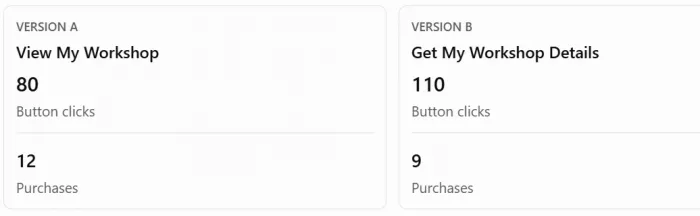
Illustrative example only, assuming comparable traffic and tracking conditions.
Version B attracts more clicks, but Version A generates more purchases. If workshop sales are the goal, the higher click count is not enough to justify changing the button. This is why conversion data matters. The most-clicked link is not always the most valuable one.
Run a Fair Bio Page Test
A before-and-after comparison is simple to organize, but results can be misleading when traffic conditions change. Suppose a creator moves their product link to the top on Monday. A Reel goes viral on Wednesday, sending thousands of new visitors to the bio page. The increase in clicks cannot automatically be attributed to the new link position.
Ideally, an A/B test shows two versions to randomly assigned visitors during the same period. This helps reduce differences caused by timing and audience conditions.
Not every bio page builder provides that functionality. When randomized testing is unavailable, a before-and-after comparison can still offer directional evidence. Keep a record of the original version, the specific change, test dates, visitor numbers, click results, and any major promotional activity.
Also avoid stopping a test because the first few visitors respond positively. A change that receives five clicks instead of three has very little evidence behind it.
Creators with limited traffic should focus on larger, meaningful improvements and gather observations over longer periods rather than expecting reliable answers from daily fluctuations.
Understand What the Results Mean
Once a test finishes, evaluate the result against the original objective rather than whichever number improved most. A change may increase the primary button's clicks while reducing traffic to secondary links. That could be desirable if the primary destination generates revenue, but less useful if those secondary links support important partnerships.
It is also possible for a change to improve one stage while exposing a problem later in the journey.
For example, a clearer booking button might increase visits to a consultation form without increasing completed bookings. That suggests visitors understand the offer but encounter difficulty or hesitation after clicking.
The next test should therefore focus on the booking experience rather than repeatedly rewriting the bio button. Treat small improvements based on limited data cautiously. If performance changes only slightly, retaining the existing version and collecting more information may be better than declaring a winner.
An unsuccessful test is still useful when it eliminates an assumption and identifies what should be investigated next.
Match the Page to Traffic Sources
Bio page visitors arrive from different sources with different expectations. Someone clicking from an Instagram Story promoting a new template is likely looking for that template. A visitor arriving from a creator's general profile may instead want to explore their work, products, and contact information.
When those expectations differ, a single unchanging link order may not serve every campaign equally well.
Consider a creator who publishes a tutorial on YouTube and promotes a downloadable worksheet. If their bio page places the worksheet below unrelated affiliate links, viewers may struggle to find the resource they were promised.
For creators running frequent campaigns, destination-specific links or campaign-specific pages can reduce that problem. Tracking parameters can also help distinguish traffic from different promotions when supported by the destination's analytics.
However, referral information is not always complete, particularly when social apps and browsers restrict tracking data. The practical principle is to maintain a clear connection between the content that brought someone to the page and the action presented after arrival.
Keep a Simple Testing Routine
Testing a bio page should become part of ordinary content maintenance, not a constant redesign project. A useful routine begins with reviewing the most important page goal and checking whether visitors are reaching the related destination. Identify the clearest problem, select one adjustment, and record the results.
For a creator selling several digital products, this might mean testing the main product's placement first, then evaluating its button description once the placement decision is settled.
Maintain a simple log containing the change, reason, dates, traffic conditions, and outcome. This prevents creators from repeating unsuccessful experiments or forgetting which updates improved results.
Review the page whenever the creator's priorities change. A media kit may deserve more visibility during a brand partnership campaign, while a new product launch may require a different primary link.
Pages receiving little traffic need fewer tests and longer observation periods. Larger pages can experiment more frequently because they have more opportunities to collect useful evidence. The objective is to improve the page when there is a reason to do so, rather than changing it simply to keep it looking new.
Final Take
The best bio page improvements often come from identifying specific obstacles rather than redesigning the entire experience. A clearer button, better link order, or easier mobile journey can improve results when it addresses a genuine visitor problem.
Creators should judge changes through meaningful actions such as purchases, bookings, subscriptions, and qualified inquiries, not clicks alone. Testing one adjustment at a time and interpreting the results carefully makes it easier to understand what actually helps visitors move forward. A useful bio page is one that consistently connects people with the information or action they came looking for.



Comments