Finding good stock footage is rarely the difficult part of editing. Finding footage that matches the project, looks professional, and doesn't require a paid subscription is where things become frustrating. Mixkit makes that process easier by offering videos, music, sound effects, and editing templates in one place.
What I like about Mixkit's approach is its simplicity. There is no complicated workspace, subscription selection, or mandatory registration. However, the real value of the platform comes down to the quality of its assets, how easily they can be found, and whether the licensing terms suit the finished content.
Mixkit at a Glance
Mixkit is a free creative asset platform operated by Envato. It provides downloadable footage, audio, and editing templates rather than an online video editing application.
| Feature | Details |
| Provider | Envato |
| Pricing | Free |
| Stock videos | HD, 4K, and vertical footage |
| Music | Instrumental tracks across genres |
| Sound effects | Transitions, notifications, environmental audio |
| Templates | Premiere Pro, After Effects, Final Cut Pro, DaVinci Resolve |
| Account required | No, for standard downloads |
| Watermarks | None on stock video downloads |
| Commercial use | Permitted under applicable licenses |
The platform brings together several resources commonly needed during video production. This is useful because footage, music, and effects are often sourced separately, even when they belong to the same project.
Exploring Mixkit's Interface
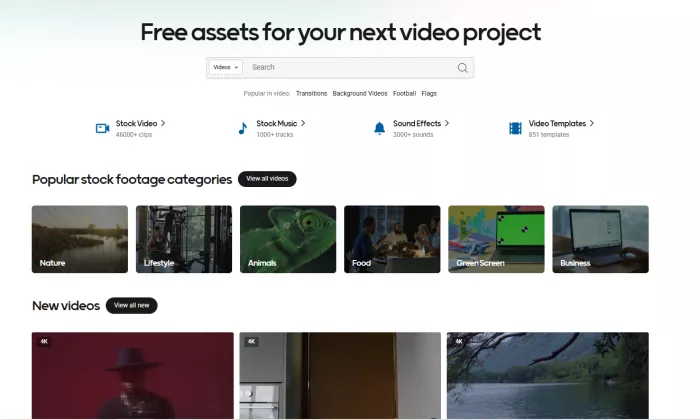
The first thing that stands out about Mixkit is how little setup it requires. The homepage provides direct access to its main content categories, and the browsing experience is built around searching, previewing, and downloading assets.
I appreciate that the platform doesn't introduce unnecessary features. There is no editing timeline, project dashboard, or complicated account system. It concentrates on helping users find media they can bring into their preferred editing software.
The stock footage section is organized around familiar subjects, including nature, lifestyle, technology, food, business, and travel. This makes browsing manageable, particularly when the exact clip isn't known in advance.
What deserves attention, though, is the difference between finding a relevant search result and finding footage that fits an edit. The visual subject, camera movement, lighting, orientation, and duration all influence the final decision.
Mixkit makes previews accessible, but selecting the right footage still requires careful judgment.
Stock Videos: Where Mixkit Performs Best
The video library is Mixkit's most compelling feature. It includes cinematic landscapes, urban scenes, people, workplaces, abstract visuals, and everyday activities. Many of these clips work well as supporting footage, particularly for narration-led videos, montages, and short-form edits.
Footage quality and selection
Mixkit offers HD and 4K stock videos, including vertical footage suitable for mobile-first content. The videos are available without watermarks, which removes one of the more frustrating restrictions associated with some free media websites.
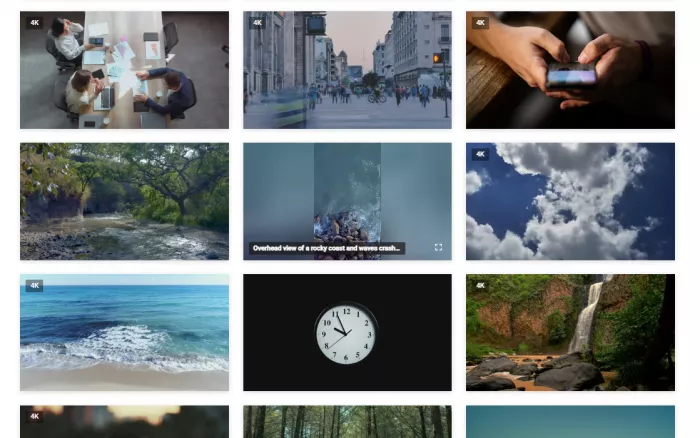
The important distinction is that high resolution doesn't automatically make a clip suitable for a project. Composition matters just as much. A sharp horizontal shot may lose its strongest visual elements when cropped into a vertical frame, while an HD clip with the right framing can fit naturally.
There are several details I focus on when assessing footage:
● Subject placement and orientation: The central subject needs to remain visible after the clip is placed in the intended video format.
● Movement and visual pacing: Smooth camera movements work well with voiceovers, while faster shots are more appropriate for energetic edits.
● Lighting and color consistency: Footage with dramatically different visual styles requires additional color correction to create a coherent sequence.
The library is particularly practical for general B-roll. It gives creators access to supporting visuals without needing to record every background scene themselves.
The limits of its collection
Mixkit has a broad selection, but it isn't equally strong across every subject. General footage involving cities, nature, workplaces, and lifestyle activities is easier to source than specialized demonstrations or highly specific technical material.
Another limitation is exclusivity. Mixkit's assets are available to many users, which means the same attractive clip can appear across unrelated projects.
For this reason, I see the footage as material to build upon rather than finished content. Original narration, thoughtful editing, custom graphics, and relevant context make stock visuals far more useful.
Music and Sound Effects
Mixkit's audio collection is another reason the platform deserves attention. It includes background music and sound effects, allowing creators to source different types of audio without moving between several websites.
Exploring the music library
The music section covers categories such as cinematic, ambient, acoustic, electronic, hip-hop, and other genres. Tracks can be explored by style and mood, with previews and duration information helping narrow the selection.
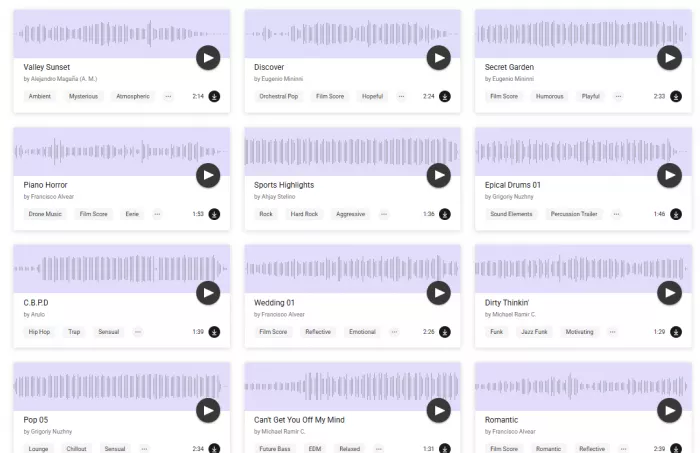
What I appreciate here is the practical organization. Music isn't presented simply as an enormous collection of unrelated tracks. The categories help connect different styles to their intended uses, including background narration, promotional edits, travel videos, and montages.
The library is particularly useful for instrumental background music. These tracks provide atmosphere without competing as heavily with spoken content, although the final audio balance still needs adjustment in an editor.
There are limitations worth understanding. Mixkit's music license covers many online uses but excludes certain applications, including television and radio broadcasting, video games, and physical media distribution. Creators need to distinguish royalty-free usage from unrestricted ownership.
Exploring sound effects
The sound effects library includes clicks, notifications, transitions, environmental sounds, and other short recordings.
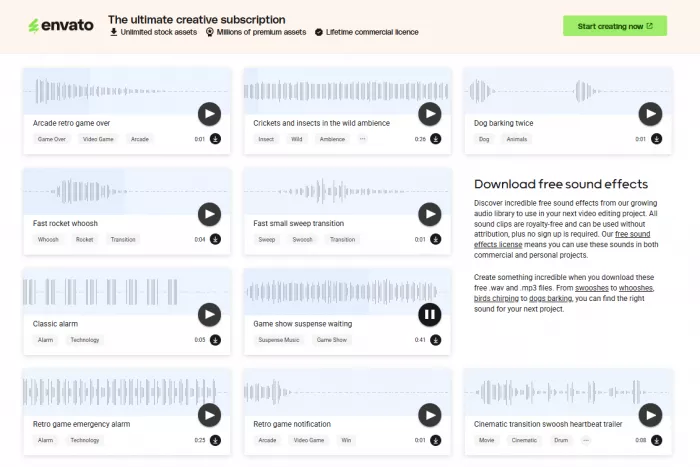
These assets serve a different purpose from background music. They help emphasize specific actions, connect scenes, and support animated elements within a video.
The collection is useful for editors working with motion graphics, captions, product demonstrations, and short visual sequences. At the same time, the quality of an edit depends on using effects selectively. Adding sound to every transition or text movement can make content feel cluttered.
Video Templates and Compatibility
Mixkit also provides downloadable editing templates for Adobe Premiere Pro, After Effects, Final Cut Pro, and DaVinci Resolve.
The collection includes animated titles, transitions, openers, slideshows, lower thirds, and other motion graphics. These resources can reduce repetitive editing work, particularly for projects that need recurring visual elements.
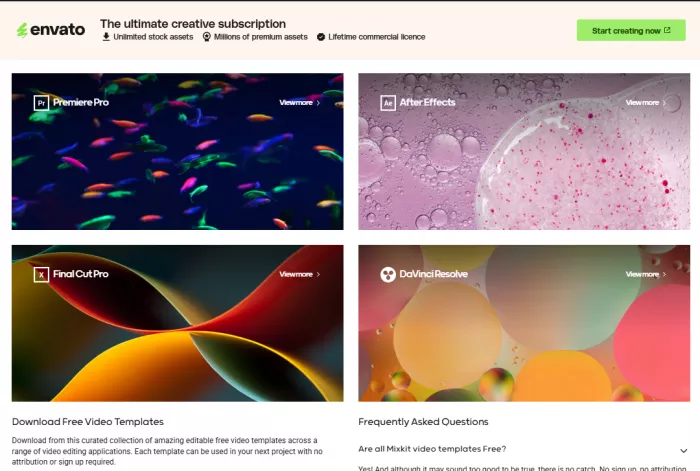
However, the templates require more preparation than stock footage. They are editable project resources, not finished videos. Text, imagery, timing, and other elements generally need to be customized inside the appropriate software.
The compatibility requirement is important. A template designed for After Effects won't automatically work in CapCut or a mobile editing application.
I consider this section a useful addition to Mixkit rather than its defining strength. The templates are most relevant to creators who already use supported desktop editing programs and are comfortable adjusting project files.
How Mixkit Fits Into Content Creation
One thing that becomes clear about Mixkit is that its different libraries serve different stages of video production. The footage provides supporting visuals, music establishes the atmosphere, sound effects emphasize specific moments, and templates handle recurring graphic elements.
The platform is particularly relevant to creators producing Reels, Shorts, tutorials, promotional content, and longer YouTube videos.
| Content type | Useful Mixkit assets | Main consideration |
| Instagram Reels and TikTok | Vertical B-roll, music, effects | Footage composition and originality |
| YouTube Shorts | Short clips, transitions, background audio | Pacing and relevance to narration |
| YouTube tutorials | Supporting footage, titles, effects | Accurate visual representation |
| Promotional videos | Product-related visuals, music, graphics | Commercial licensing |
| Travel and lifestyle edits | Cinematic footage, ambient music | Consistent visual style |
What matters most here is that Mixkit doesn't dictate the editing process. Assets can be downloaded and imported into a separate editor, leaving creators free to organize their footage, add captions, adjust audio levels, and build their own visual style.
However, stock footage should not become a substitute for original material where accuracy is important. Tutorials, product demonstrations, and educational content benefit from real screenshots, recordings, and subject-specific visuals.
Is Mixkit Completely Free?
Yes, Mixkit provides free downloads without requiring a paid subscription, and its stock videos don't contain watermarks. However, free access and commercial usage rights are separate considerations.
Mixkit has several licenses covering different asset categories. The most important distinction concerns its stock footage.
● Stock Video Free License: Allows commercial and non-commercial use in eligible projects, including online videos, advertisements, and promotional content.
● Stock Video Restricted License: Permits personal, non-commercial use but does not provide the same rights for business or monetized projects.
● Stock Music Free License: Supports various online uses, including YouTube videos and advertising, but excludes certain applications such as television broadcasts and video games.
● Sound Effects and Templates: May be incorporated into commercial productions under their respective licensing conditions, but redistributing the original assets as standalone downloads is restricted.
The platform's official licensing information explains these differences.
For creators working on sponsored content, monetized videos, or client projects, checking the license of an individual asset is essential. Royalty-free material can still have usage restrictions, and downloading a file does not transfer ownership of the original content.
What I Liked and What Needs Improvement
Mixkit has several qualities that make it practical for regular content production, although its usefulness depends on the type of material being created.
What works well
● The browsing process is uncomplicated. Finding and previewing assets doesn't require registration or navigating multiple subscription screens.
● The content library covers several editing needs. Stock videos, music, sound effects, and templates are available through the same website.
● Video formats suit different projects. HD, 4K, and vertical footage provide flexibility for both traditional and mobile-first videos.
● There are no download charges for the free collection. This is particularly valuable for independent creators who don't want another recurring software expense.
What could be better
● Specialized footage is harder to find. The library is better suited to general supporting visuals than detailed product demonstrations or niche subjects.
● Templates have compatibility requirements. Creators working exclusively with mobile editors won't benefit equally from the available project files.
● Licensing isn't identical across assets. The distinction between Free and Restricted video licenses introduces an additional check before commercial publishing.
● The collection isn't exclusive. Popular footage can appear in many different videos, making original editing and visual customization important.
These limitations don't necessarily reduce Mixkit's usefulness. They establish where it fits best: providing supporting creative assets rather than replacing original production or a dedicated editing application.
Mixkit vs Other Free Platforms
Mixkit sits alongside several established stock media websites, including Pexels, Pixabay, and Videvo.
| Platform | Main strength | Best suited for |
| Mixkit | Videos, music, sound effects, templates | Video production |
| Pexels | Stock photography and video | Visual content requiring images and clips |
| Pixabay | Images, illustrations, videos, audio | General creative projects |
| Videvo | Stock footage and motion graphics | Video editing and visual effects |
Mixkit's advantage is its focus on video-related resources. Pexels and Pixabay offer broader options for creators who also work with still images, while Videvo provides another source of stock footage and motion graphics.
I wouldn't rely on a single media library for every project. Mixkit covers many everyday production requirements, but alternative platforms provide more choices when a particular subject or visual style is missing.
Final Verdict: Is Mixkit Worth Using?
Mixkit earns its place as a useful free resource for content creators, editors, and marketers who regularly need footage and audio for their projects. Its simple interface, watermark-free downloads, and combination of creative assets make it particularly accessible.
The stock video library is its biggest strength, followed by its music and sound effects collections. Templates add further value for editors working with compatible desktop software. Its limitations are mostly related to specialized content, non-exclusive footage, software compatibility, and licensing differences. These are worth understanding, but they don't outweigh the convenience of the platform for general video production.
My overall assessment : Mixkit works best as a free supporting asset library, not a replacement for original content or editing software. It provides plenty of useful material for improving videos without introducing another subscription, making it a practical resource to keep in a creator's toolkit.



Comments