Quick answer For a link-in-bio page, three to seven links is the range that performs best. Push past ten and clicks tend to fall, because visitors get overwhelmed and leave without tapping anything. For native platform bios, use only what the platform allows and only what you truly need: Instagram caps you at five, while TikTok, Pinterest, and X give you effectively one primary slot. Fewer, well-ordered links almost always beat a long list. |
That is the short version. In the rest of this guide I will show where that number comes from, how it shifts by platform, what the psychology says, and the exact framework I use to decide the count for my own properties. No fluff, just what actually moves clicks.
Why "how many links" is the wrong first question
When people ask me how many links to put in their bio, they are usually asking the wrong thing first. The real question is where your bio lives and what single action you want a visitor to take. A creator sending people to one newsletter has a very different answer than a brand juggling four product drops in the same week.
So before I count links, I fix the destination. I decide the one thing I most want a profile visitor to do. Then I let the platform and the data set the ceiling. Once you work in that order, the number almost chooses itself, and the whole page gets easier to build.
Platform limits in 2026: what you can actually add
The number you are allowed to add is not the same everywhere, and a lot of older advice is simply out of date. Here is where things stand right now.
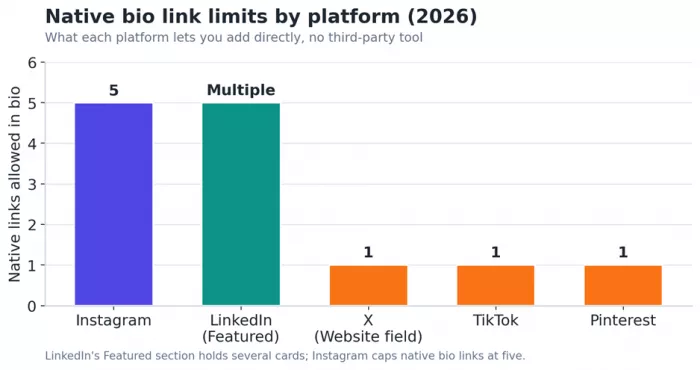
Figure 1. Native bio link limits by platform in 2026. Instagram allows five; most others give you one primary slot.
| Platform | Native limit | How it displays | Practical note |
|---|---|---|---|
| Up to 5 | First link shows, rest behind a menu | Rolled out in April 2023, stable in 2026 | |
| TikTok | 1 | Single profile link | Still one profile link only |
| 1 | Single profile link | Still one profile link only | |
| X (Twitter) | 1 primary | Website field with a link icon | 160-char bio; Expanded Bio pulled early 2026 |
| Multiple | Featured section cards | Closest thing to a native multi-link hub |
Two things are worth flagging. On Instagram, only the first link displays natively while the rest appear as a count such as “and 4 other links”, so ordering matters more than sheer quantity. And Meta has been testing clickable links directly in post captions for Meta Verified subscribers, capped at ten a month and mobile-only for now. Interesting to watch, but not something I would build a strategy around yet.
The link-in-bio page: where the real debate happens
Most people asking this question are really talking about a link-in-bio page, the single URL that opens into a menu of destinations. This is a mature category now, not a workaround. One 2025 market report put Linktree at roughly 80 percent share of the space, with about 62 different companies offering a tool, and Linktree's own reporting describes it powering more than 21 million profiles worldwide as of 2026.
On a page like this you can technically add as many links as you want. That freedom is exactly the problem.
What the data says about the sweet spot
The consistent finding across engagement research is that a tight set wins. Pages with three to seven links tend to outperform pages with ten or more, because a long list of equal-priority links produces decision paralysis and people leave without clicking. This matches what I see in my own analytics: the more I add, the flatter the click distribution gets, and my top link stops doing its job.
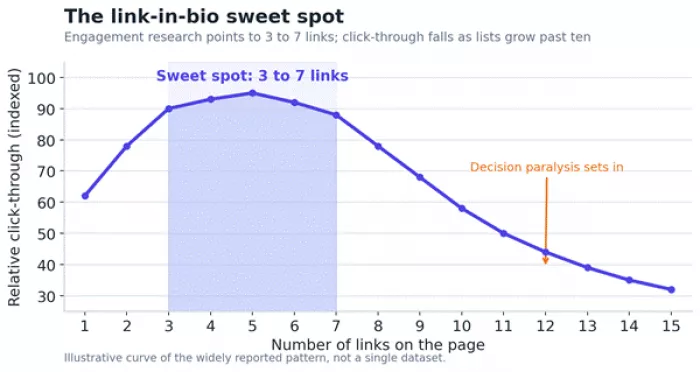
Figure 2. Click-through tends to peak in the 3 to 7 range and slides once a list grows past ten.
The psychology behind the number
I find this easier to trust once you see why it happens. Two ideas explain almost all of it.
Hick's Law: every option adds friction
The Hick-Hyman law says the time it takes someone to decide grows logarithmically as you add choices, often written as T = a + b · log₂(n). The useful, slightly counterintuitive part is that the first few options you add are the most expensive in cognitive terms. The jump from one link to two costs the brain more than the jump from nine to ten. More links do not just slow the decision. Past a point, they stop it entirely.
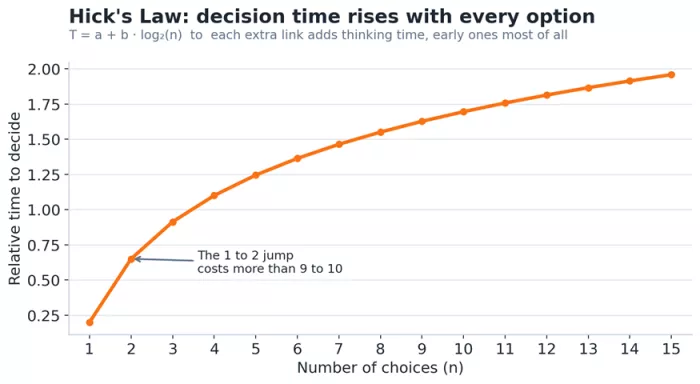
Figure 3. Decision time rises with each option, and the earliest options carry the highest cost.
The jam study: more choice, fewer sales
The classic illustration is Iyengar and Lepper's supermarket experiment from 2000. They ran a tasting display, and the version showing 24 jams converted at roughly 4 percent, while the version showing only six jams converted at around 31 percent. The bigger display pulled more attention but killed the follow-through. Your bio is the same shelf, and your links are the jars.
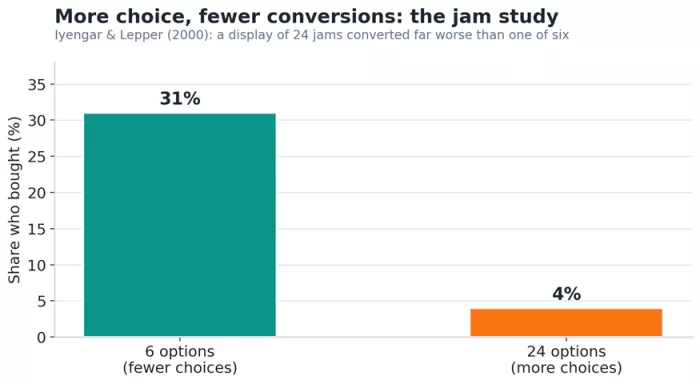
Figure 4. Fewer options, far more purchases. The paradox of choice in one chart.
| Principle | What it means for your bio |
|---|---|
| Hick's Law | Every extra link adds decision time, and the earliest links cost the most attention |
| Choice paralysis | Past a threshold, visitors stop choosing at all and simply leave |
| The jam effect | A smaller, curated set converts far better than a large one |
Native links or a link-in-bio page? How I choose
Neither option is better on its own. What matters is your situation. Here is the split I use.
| Use native links when | Use a link-in-bio page when |
|---|---|
| You have five or fewer evergreen destinations | You rotate offers or campaigns often |
| You want links to load instantly inside the app | You need per-link click analytics |
| You want zero extra cost or setup | You want your own branding on the page |
| Speed and simplicity are the priority | You need more than five destinations or grouping |
A neat 2026 trick if you want both: use your native slots for your top time-sensitive links, then point one slot at a link-in-bio page that holds everything else. You get the speed of native links for the big items and unlimited depth behind a single slot.
How many links I actually recommend, by goal
Rather than a single magic number, I set the count from the job the bio has to do. A solo creator and a multi-brand operator should not run the same list.
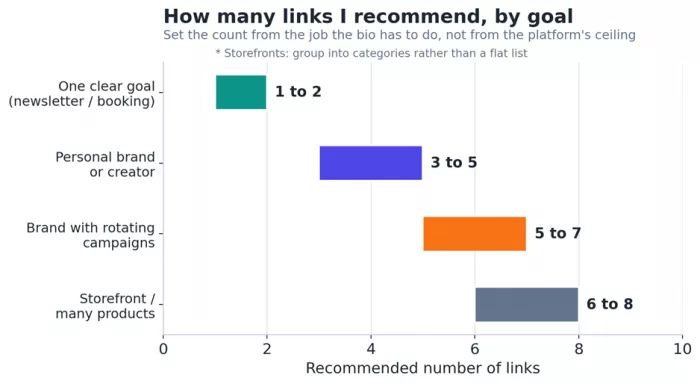
Figure 5. My working ranges. Start from the goal, not the platform's ceiling.
| Your situation | Links | Why |
|---|---|---|
| One clear goal (newsletter, booking, one product) | 1 to 2 | Send the click straight to the action, no friction |
| Personal brand or creator | 3 to 5 | Room for a current priority plus a couple of staples |
| Brand with rotating campaigns | 5 to 7 | Enough for launches and evergreens, still scannable |
| Storefront or many products | Use categories | Group so the page never becomes a wall of links |
Order beats quantity: the three-tier system
Once the count is set, the order carries most of the weight. I run a simple three-tier layout on every page I build.
Tier 1 (top 1 to 2 slots): the single most important, most time-sensitive destination, tied to what I am posting about this week.
Tier 2 (middle 2 to 3 slots): always-on links such as my main site, shop, or newsletter.
Tier 3 (everything else): secondary links that must earn their place, and many of them eventually get removed.
Timing matters too
For time-sensitive traffic, timing helps. Bio-link traffic tends to peak roughly 30 to 60 minutes after a post goes live for most accounts, so I make sure my top link matches the post before I hit publish. Updating the order right before a big post is a small habit with an outsized payoff.
The prune test: how to know you have too many
This is the highest-leverage habit and almost nobody does it. Check your per-link clicks. Any link sitting at zero clicks over 30 days is occupying a slot a clicked link could use, so remove it or replace it. That single discipline usually does more for a page than any redesign.
A reason to invest in real analytics One analysis of 1,521 active creator profiles found that creators using advanced features like email capture and A/B testing achieved about 2.3 times higher conversion than those using a plain link list. The count matters, but measuring what happens after the tap matters just as much. |
A note on author bios and guest-post bios
Since “bio” does not only mean social profiles, a quick word on the author bio at the end of an article or a guest post, which is where a lot of link questions come from in the SEO world. My rule there is one to two links, no more. Usually that means one link to your site or a relevant resource, and at most one social profile.
Most editors cap it anyway, and stuffing three or four links into an author box reads as a link grab. It gets trimmed, nofollowed, or the whole pitch gets rejected. One clean, relevant link does more for both the reader and your standing with the publication than a cluster of them ever will.
Common mistakes I see (and avoid)
- Treating the bio like a storage drawer, dumping every URL you own into one list.
- Leaving all links at equal priority, so nothing stands out and the top slot is wasted.
- Never updating the order, so a launch from three months ago still sits at the top.
- Using raw, ugly URLs instead of short, clearly labelled links people actually want to tap.
- Adding links you never measure, so you have no idea which ones are dead weight.
A simple bio-link checklist
1. Name the single action you most want a visitor to take.
2. Set your count: 1 to 2 for one goal, 3 to 7 for a full page, or the platform limit for a native bio.
3. Put your most time-sensitive link in the top slot.
4. Label every link clearly instead of leaving a bare URL.
5. Turn on analytics and check per-link clicks.
6. Every month, cut any link with zero clicks in the last 30 days.
My bottom line
I stopped thinking of my bio as a storage drawer for every URL I own, and that changed my results. Pick the one action you want, cap the list at three to seven for a link-in-bio page or the platform limit for a native bio, order the links ruthlessly, and delete anything the data shows nobody clicks. Fewer links, chosen on purpose, will almost always outperform a longer list.



Comments