Linkrify caught my attention because it puts several everyday link-management tasks in one place. Instead of focusing only on link-in-bio pages, it brings URL shortening, QR codes, analytics, and additional web utilities into the same platform.
I spent time exploring its homepage, available tools, and pricing details to understand how much the platform offers and where the experience becomes less straightforward. Some parts were surprisingly extensive, while others raised questions about usability and free-plan access.
My First Look at Linkrify
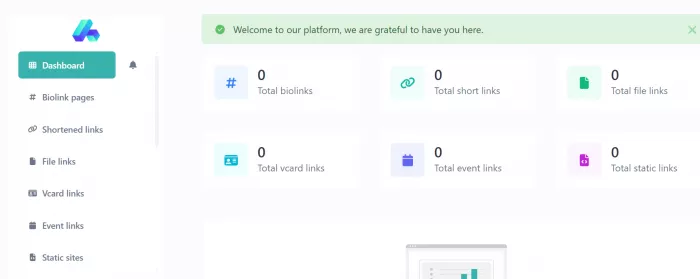
I began at Linkrify.com, where the main features were presented as separate categories. Bio pages, short links, QR codes, file transfers, digital contact cards, event links, and website hosting were all visible near the top.
What stood out was the number of tasks covered by a single service. Most bio-link platforms concentrate on profile design and destination links, but Linkrify also includes technical utilities and campaign-management features.
I moved through the feature descriptions and interface previews to understand how the tools were organized. The homepage showed examples of the bio-page editor, link settings, QR-code generator, and reporting dashboard.
These previews were useful for understanding the intended workflow, although they did not provide the same experience as working inside an account. I could inspect the product's structure, but couldn't verify how its logged-in dashboard responds to editing or publishing.
One detail that became clear early was that Linkrify is not exclusively a bio-link builder. Its broader utility collection is a substantial part of the product.
Exploring the Bio Page Builder
The bio page builder was the first major feature I examined. I focused on the available page elements, customization settings, and controls that would matter when assembling a public profile.
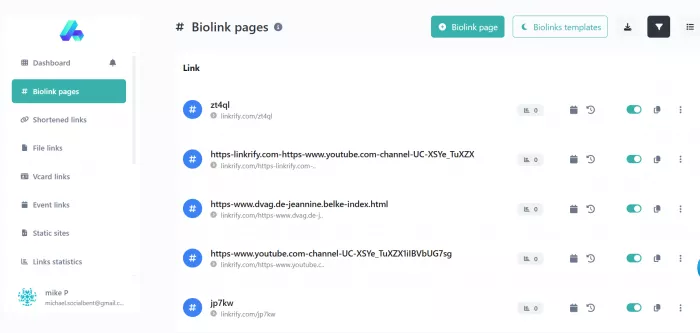
The editor preview showed a system designed around adding content components to a profile page. Linkrify also includes settings for page branding, SEO information, password protection, and content warnings.
I organized the important parts of the workflow into three areas:
● Profile information and presentation: The editor is built around a profile identity, including a name, description, and appearance settings that determine how the page is presented.
● Destination management: The central purpose of the page is to place several destinations under one shareable address, with individual links organized as page elements.
● Publishing and access controls: Linkrify includes features beyond basic page creation, including SEO settings and options for restricting access to content.
The structure makes sense for a creator or business managing several destinations. It separates the identity of the page from the links that visitors eventually open.
However, I found an inconsistency while examining the free-plan allowances. The pricing section showed both zero and seven bio-link blocks. That made it difficult to determine how many components could actually be added without upgrading.
The bio page builder looks like a central part of the platform, but the visible pricing details weren't clear enough to establish the exact free-plan experience.
Looking at the Customization Controls
After examining the bio page builder, I moved to its design options. Linkrify includes themes, templates, custom colors, branding, and additional appearance settings. I also found references to fonts, custom CSS, and JavaScript in the pricing feature list.
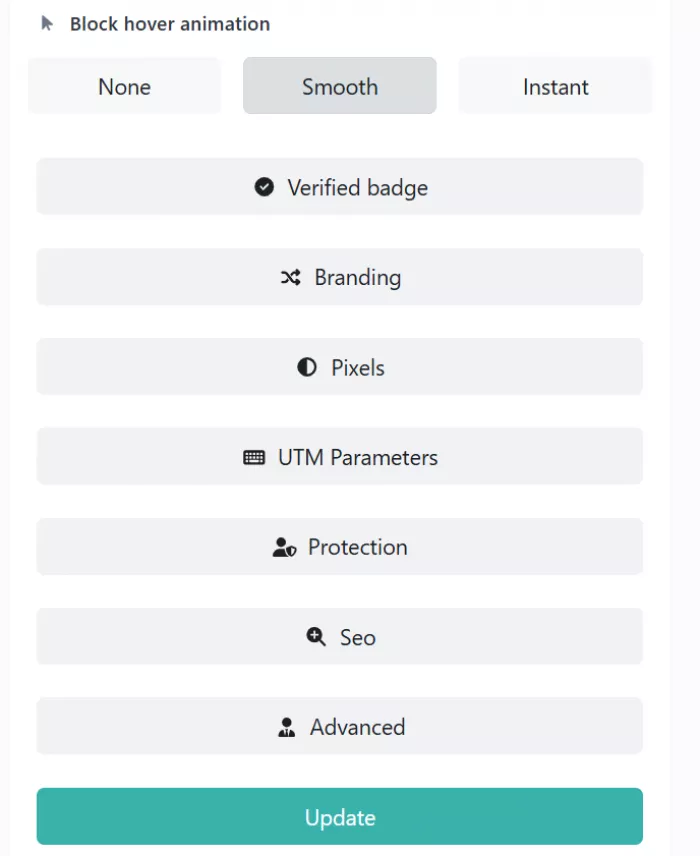
The interesting part wasn't simply the availability of color customization. It was the separation between regular styling and more advanced controls.
Changing a page's visual appearance is one task. Managing its structure, branding, and additional behavior is another. Linkrify brings these controls together rather than limiting personalization to a small collection of predefined designs.
I also noticed that the free-plan listing showed zero themes and zero templates, despite those being promoted among the product's customization features. That doesn't establish whether basic manual styling is restricted, but it makes the distinction between free and premium customization less obvious.
For me, the biggest unanswered question was how much control a user gets without writing code or upgrading. The available information confirmed that several customization systems exist, but not how comfortably they work together.
Examining the URL Shortener
The URL shortener was the next feature I explored, and this was where Linkrify began to look more like a link-management platform than a basic creator tool.
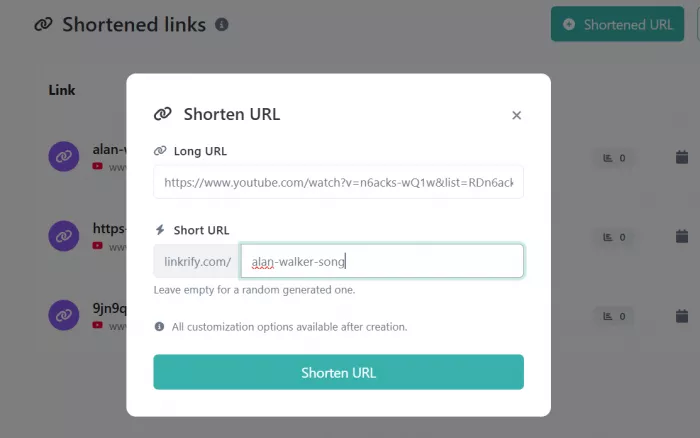
The feature overview included custom URL endings, scheduling, expiration limits, password protection, device targeting, country targeting, language targeting, A/B rotation, and mobile deep links.
I separated these capabilities according to the problems they address.
| Link feature | Practical purpose |
| Custom URL endings | Make shared addresses easier to identify |
| Scheduling and expiration | Control the period during which a link remains available |
| Device and country targeting | Apply different destination rules to visitors |
| Password protection | Restrict access to a destination |
| A/B rotation | Distribute visitors between different destinations |
| Mobile deep linking | Direct visitors toward supported mobile applications |
What interested me most was the amount of control surrounding a single URL. There is a significant difference between shortening an address and managing how that address behaves over time. Scheduling, expiration, and targeting place Linkrify closer to a campaign-management tool.
I could examine the available settings and their intended functions, but I couldn't generate a working Linkrify short URL from an authenticated account. As a result, I don't have a redirect result or published short link to report. That distinction matters because the reliability of a shortening service is determined by its redirects, not the number of options in its settings.
Exploring the QR Code Features
Next, I examined Linkrify's QR-code functionality. The available options included custom colors, gradients, logos, background branding, QR shapes, and decorative frames. The platform also supports several categories of QR content, including contact details, Wi-Fi information, calendar events, and locations.
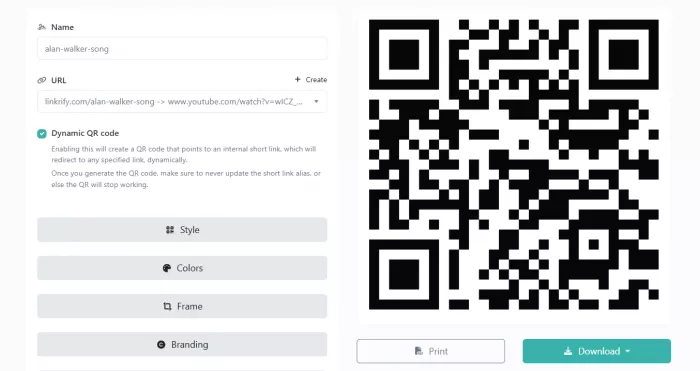
I found this collection more interesting than a simple website QR-code generator because the available formats cover different types of information.
A QR code containing a website address is fundamentally different from one containing calendar or contact details. The latter needs to follow a compatible data format so another device can interpret the information properly.
The design controls also introduced a practical concern. Adding logos, changing colors, and modifying shapes can make a QR code more recognizable, but scan reliability remains more important than visual appearance.
I wasn't able to export and scan an authenticated Linkrify QR code during this review, so I couldn't confirm the quality of the generated files. The free-plan listing showed an allowance of one QR code. That is useful information for anyone exploring the service, but it also suggests that QR generation is not unlimited under the free tier.
Understanding the Analytics System
Analytics was one of the features I examined most closely because it has a direct effect on how useful Linkrify becomes for ongoing publishing and marketing.
The platform includes reporting categories for geography, browsers, devices, operating systems, referrers, languages, and UTM parameters. Its interface preview also shows a dedicated analytics area.
I was interested in three aspects of the reporting system.
1. First, geographical information helps distinguish where link traffic originates.
2. Second, device and browser data provide context about how visitors access the destination.
3. Third, referral and UTM information help connect traffic to individual distribution channels or campaigns.
The supported integrations also caught my attention. Linkrify includes tracking-pixel options associated with services such as Google Analytics, Google Tag Manager, Meta, LinkedIn, Pinterest, and TikTok.
That gives the platform a wider marketing focus than link-click counting alone. However, the pricing section introduced one of the biggest concerns I found: the free plan displayed zero days of statistics retention.
I couldn't establish from that listing whether historical reports are unavailable to free users or whether the displayed value reflects an error. I also couldn't compare recorded clicks against actual visits without a published test link. For that reason, I wouldn't treat the advertised analytics categories as proof of reporting accuracy.
The reporting feature set is extensive, but its usefulness depends on data access, retention, and reliability.
Exploring the Additional Web Tools
This was one of the more revealing parts of my exploration. Linkrify has a separate tools directory containing utilities for text, conversions, generators, development, images, and other common tasks.
I opened the public tools listing and found several recognizable utilities, including a character counter, case converter, duplicate-lines remover, URL parser, HTML minifier, UTM link generator, and image converters.
Unlike the bio-page editor and link-management dashboard, these utilities have public pages that can be inspected without first creating an account.
The collection covers quite different types of work:
● Text utilities: The directory includes tools for counting characters, changing text case, reversing text, and removing duplicate lines.
● Developer utilities: I found tools for processing HTML, parsing URLs, converting markup, and examining user-agent information.
● Marketing and link generators: The available directory includes a UTM link generator, mailto-link generator, and other tools related to producing shareable addresses.
● Image utilities: The collection includes image optimization and format-conversion tools, including PNG-to-JPG and PNG-to-WebP conversion.
One issue was immediately visible in the tools directory. Several listings displayed PHP warnings referencing an undefined property in the website's template files. These warnings appeared alongside ordinary tool descriptions rather than being hidden from visitors.
That was a concrete quality issue I could observe, and it affected my impression of the site's overall polish. It didn't prove that the underlying converters or generators were broken, but it indicated that some server-side warnings were being exposed publicly.
The tools collection adds considerable breadth to Linkrify, although the presentation needs attention.
Checking the Other Link Features
I also examined the additional link categories displayed on the homepage, including downloadable file links, digital contact cards, event links, splash pages, and static website hosting.
These features serve different purposes, so I didn't treat them as interchangeable additions.
File links are concerned with distributing downloadable resources. Digital contact cards package contact information. Event links generate calendar-oriented resources, while splash pages introduce an intermediate destination before a visitor reaches the final URL.
Static website hosting is the most technically distinct feature in this group. Linkrify includes support for HTML, CSS, JavaScript, and media files, along with access controls and analytics.
I found that these features significantly broaden the product's scope, but the free plan showed zero allowances for file links, contact cards, event links, and static websites. That limited what I could conclude about their availability without moving into a paid account.
It also reinforced an important distinction: a tool being included in the platform's overall feature collection doesn't necessarily mean it is accessible under every plan.
Considering Mobile Use
Mobile behavior is especially important for a platform built around profile links and shared URLs. I examined Linkrify's mobile-focused features, particularly its deep-linking support. This functionality is intended to direct visitors toward supported applications instead of relying exclusively on browser-based destinations.
That capability fits naturally with bio pages because many profile links are encountered inside mobile applications.
However, the mobile experience involves more than application redirects. The published bio page itself needs to remain readable, buttons must be usable on smaller screens, and destinations must open reliably.
I couldn't access a published test page or conduct device-based redirect checks, so I have not assigned a mobile performance score. The available mobile features are relevant to the platform's purpose, but their actual behavior remains an important part of a complete product test.
Looking More Closely at Pricing
The free plan was one of the last areas I examined, and it changed how I interpreted the platform's overall feature set.
The public pricing section included the following allowances:
| Free-plan item | Displayed allowance |
| Bio pages | 15 |
| Bio-link blocks | Conflicting values: 0 and 7 |
| Shortened links | 25 |
| QR codes | 1 |
| File links | 0 |
| Digital contact cards | 0 |
| Event links | 0 |
| Static websites | 0 |
| Statistics retention | 0 days |
The number of bio pages initially looked generous. However, a page allowance doesn't tell the full story when the number of supported components is unclear.
I also found it unusual that statistics retention was listed as zero days while analytics occupies such a prominent place in the product. Those details make it difficult to evaluate the free plan from headline allowances alone.
The website references premium capabilities, including advanced targeting, additional styling, custom scripts, and more detailed statistics. I couldn't verify a complete paid-plan comparison through the publicly accessible information.
My main concern with the pricing presentation is clarity. The platform includes many features, but the free-plan listing does not consistently explain how much of that functionality is available without payment.
What Worked and What Fell Short
After going through the main sections and public tools, I had a clearer understanding of Linkrify's strengths and the areas that need closer attention.
What stood out positively
● The product covers several related tasks. Bio pages, shortened links, QR codes, and analytics are organized under one service instead of being presented as unrelated products.
● The URL-management controls are extensive. Scheduling, expiration, targeting, rotation, and deep linking give Linkrify a broader purpose than basic address shortening.
● The additional utilities are substantial. The tools directory contains practical text, developer, marketing, and image utilities rather than only a handful of supporting features.
● The public feature previews provide useful context. The homepage includes examples of the core interfaces, making it easier to understand the different parts of the product.
Where the experience fell short
● The free-plan information needs clarification. Conflicting bio-block values and zero-day statistics retention make the account limits difficult to interpret.
● The tools directory displayed technical warnings. Visible PHP warnings detracted from the quality of an otherwise extensive utility collection.
● Several advertised features have no free allowance. File links, digital contact cards, event links, and static hosting are listed as unavailable in the free tier.
● Some important performance details remain unverified. The public experience doesn't establish redirect reliability, editor responsiveness, QR scanning accuracy, or analytics performance.
These findings are based on the areas I could actually inspect, without assigning results to account features I couldn't operate.
Who Would Benefit From Linkrify?
After exploring the platform, I see its strongest appeal in the combination of different link-related tools.
For someone who only needs a simple collection of profile links, the extensive feature set may be more than necessary. The free bio-page allowance makes Linkrify worth investigating, although the block restrictions need clarification.
For marketers and businesses managing multiple URLs, the additional targeting, analytics, scheduling, and tracking capabilities are more relevant.
The web utilities add another layer of usefulness for people regularly working with text, URLs, or small development tasks.
However, the decision to use Linkrify for ongoing campaigns should depend on the quality of its actual outputs and the limits of the selected plan. The platform's broad feature range is an advantage only when the tools work reliably and remain accessible at a reasonable cost.
My Take on Linkrify
After exploring Linkrify's public features, tools directory, and pricing structure, I came away with a mixed but generally interested impression. The platform offers more than the usual link-in-bio setup. Its combination of bio pages, URL management, QR codes, analytics, and web utilities makes it a broad toolkit for creators and marketers.
The additional tools collection was particularly interesting, although the visible technical warnings and inconsistent free-plan details made the overall experience feel less polished.
My verdict is that Linkrify deserves consideration for its range of features, but I wouldn't recommend committing to a paid plan without first testing the account dashboard, link redirects, QR-code outputs, and analytics.
I would also hold off on giving it a numerical rating. The public exploration revealed useful capabilities and some concrete presentation problems, but a fair product score requires more evidence from the tools themselves.



Comments