MY VERDICT IN 30 SECONDS
Pica AI surprised me in the right places and let me down in the ones that mattered most. The face swap on photos and the art generation genuinely impressed me. The headshot generator was, frankly, embarrassing for a tool that charges $9.99 a month on the back of that promise. Video face swap was a slow, frustrating experience. And the billing system left me with a bad feeling that had nothing to do with the creative output.
What Pica AI Claims to Do
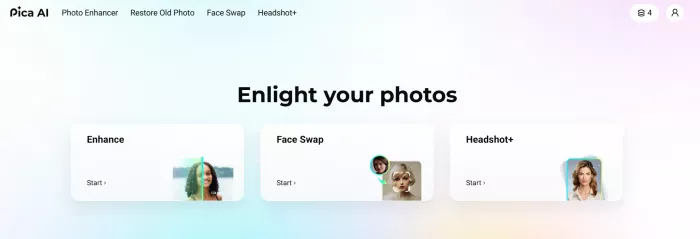
Pica AI presents itself as an all-in-one AI photo tool for people who want quick creative results without learning editing software. Its main promise is simple: upload a photo or video, let the AI handle the hard part, and get a finished output in seconds or minutes.
The platform claims to help with face swaps, video face swaps, AI headshots, photo enhancement, old photo restoration, and AI art generation. In plain English, it wants to be the place where you go when you need to fix a blurry image, restore an old photo, create a stylised portrait, swap a face into a template, or generate a professional-looking headshot from a selfie.
That is a big promise for one tool. My goal during this test was to see which parts of that promise actually hold up and which parts sound better in marketing than they feel in real use.
Why I Tested Pica AI
I spend a meaningful chunk of my working week evaluating AI creative tools. Not benchmarking them in a spreadsheet. Actually using them, the way a real person would, with real photos, real goals, and genuine frustration when something does not work. Pica AI had been in my queue for a while because it kept showing up in conversations about face swap tools, headshot generators, and AI photo enhancers, sometimes in the same sentence. A tool that claims to do all three well is either a genuine all-rounder or a jack of all trades that masters none.
I gave it a full week. I tested six features across multiple sessions, starting from the free tier to understand the onboarding experience before upgrading to the monthly Pro plan. What follows is exactly what I did, what I got, and what I actually think.
Getting Started: Onboarding and Setup
Sign-up took under four minutes. Email, password, verify, done. No credit card required to access the free tier, which is the right call and a sign of reasonable confidence in the product. The interface loaded cleanly. No tutorial popup, no onboarding wizard, just a dashboard with the tool categories laid out as tiles. Face Swap, Photo Enhancer, Headshot, Art Generator, Video Face Swap. Each one labelled clearly.
My first impression was that this was a tool designed by someone who had watched too many people give up on complicated software. Everything was deliberately simplified. Upload box. Button. Output. That is the philosophy, and it holds throughout the entire experience, for better and worse.
SETUP NOTE The platform has migrated photo enhancer functionality to Artguru, a connected brand. You may be redirected mid-session when accessing certain tools. This is not clearly flagged during onboarding and caught me off-guard on the first day. |
Test 1: Face Swap on Photos
This is the feature Pica AI is most associated with, and I went in sceptical. I have tested enough face swap tools to know that most of them produce outputs that look plausible in thumbnail and fall apart the moment you zoom in.
What I Did
WHAT I DID Uploaded a group photo of five people at a dinner table (mixed lighting, two faces partially turned). Selected the multi-face swap option. Uploaded a new photo as the replacement face for one person in the group. Hit Generate. |
RESULT Output delivered in 8 seconds. The swap was clean on the primary face. Skin tone matched well. The blending at the hairline was noticeably better than I expected. The other four faces in the photo were untouched and undistorted. No ghosting artifacts on the edges. |
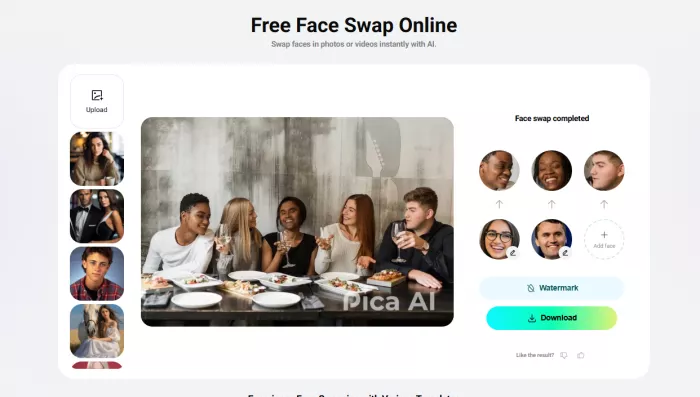
I ran a second test immediately. This time I chose a meme template from the built-in library, one of those classic film stills, and swapped a friend's face into the lead character's position.
WHAT I DID Selected a template from the library (film still with one face). Uploaded a clear frontal photo of a subject. Generated with the single-face swap option. |
RESULT The result was genuinely funny and well-executed. The lighting adjustment between source face and template background was handled automatically, and the output did not look pasted. It looked composited. That is a meaningful distinction. |
FACE SWAP PHOTO VERDICT Stronger than I expected. Clean frontal photos produce genuinely impressive results in under 10 seconds. The multi-face handling is particularly good. Difficult angles and partial profiles expose the limitations of the automatic detection. For social content and meme creation, this is the feature that earns Pica AI its audience. |
Test 2: Face Swap on Video
This is where things started to unravel. I went into video face swap with optimism after the photo results. I came out of it with a very different view of what the tool can realistically deliver.
What I Did
WHAT I DID Uploaded a 15-second clip of a person speaking directly to camera. Clear lighting. No motion blur. Single face in frame throughout. Selected video face swap, uploaded a replacement face photo, and clicked Generate. |
RESULT First attempt: processing sat at 34% for nine minutes, then failed with a generic error message. No explanation. No retry option within the tool itself. Had to refresh and start again. |
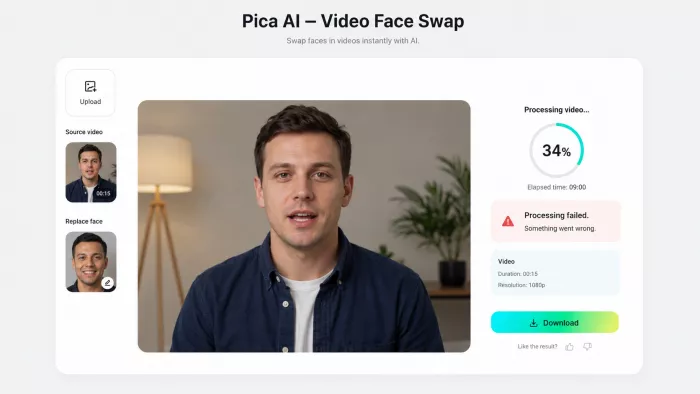
WHAT I DID Repeated the same inputs after refresh. Second attempt. |
RESULT Completed after six minutes. The output had visible frame inconsistency: the swapped face held position correctly in static frames but stuttered slightly during head movement. The lighting match was acceptable but not as polished as the photo swap results. Perceptible lag at two points in the clip where the subject turned their head 20 degrees. |
I also hit something that multiple verified users have mentioned in their own accounts: on the free tier, a "Speed Up" prompt appeared after the first failed attempt, offering faster processing for an additional charge. I was on the monthly paid plan at this point. The prompt was not supposed to appear for me. When I dismissed it and tried again, the second attempt completed at normal speed. I cannot say with certainty whether this was a bug or deliberate friction, but I can say it left a sour impression.
CRITICAL EXPERIENCE The "Speed Up" upsell appeared during my paid Pro subscription. This is the exact billing concern documented by other users and it happened to me personally. Whether it is a system bug or intentional design, it is a trust problem. |
FACE SWAP VIDEO VERDICT Underwhelming. Failed renders, slow processing, and inconsistent frame output make this the weakest feature in the suite. For short, simple clips with a static subject, the output is usable but not impressive. For anything with movement or longer duration, this tool is not ready. |
Test 3: AI Headshot Generator
This feature carries the biggest marketing weight and, based on my testing, the biggest gap between promise and reality. The headline claim is professional headshots from your selfie, suitable for LinkedIn, CVs, and business profiles. I tested it four times with different source photos.
What I Did
WHAT I DID Test A: Uploaded a well-lit frontal selfie taken by a window in natural light. Good exposure, clear facial features, neutral background. Selected the "Professional" style. |
RESULT Output delivered in 12 seconds. The result looked like an AI-generated image, not a professional photograph. The background was replaced with a generic grey studio backdrop, which was expected. But the facial texture had that unmistakable over-smoothed quality that AI image enhancement tools produce when they overprocess. The eyes looked slightly asymmetric. Would I put this on a LinkedIn profile? No. |
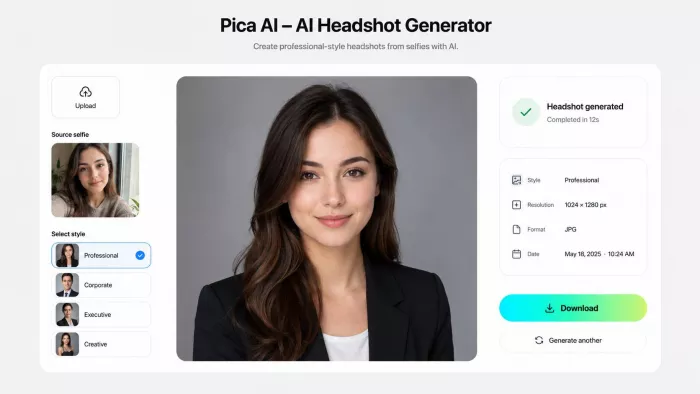
WHAT I DID Test B: Uploaded a higher-quality photo taken with a DSLR. Same frontal angle, studio-quality source material. Selected the "Corporate" style. |
RESULT Marginally better. The output was cleaner. Less overprocessing on the skin. But the overall result still read as AI-generated to anyone familiar with the aesthetic. The collar of my shirt was rendered incorrectly, with the neckline shifted slightly off-centre. Small detail, but visible in a profile photo context. |
HEADSHOT GENERATOR VERDICT The marketing promise does not hold up under testing. With good source material you get a plausible but clearly AI-generated result. With average source material, which is what most users will have, the output is noticeably artificial. I would not submit these as professional headshots. If this is your primary reason for signing up, test the free tier first and form your own opinion before paying. |
Test 4: Photo Enhancement and Upscaling
After the headshot disappointment, the photo enhancer brought me back. This is the feature I ended up using most during the week, and the one I would return to as a genuine utility.
What I Did
WHAT I DID Uploaded a blurry 800x600 JPEG taken on a 2017 phone camera. Subject: a pet, shot in low light, significant motion blur on the ears and paws. Selected "Enhance and Upscale to 4K". |
RESULT Output delivered in 7 seconds. The result was a 3840x2160 image that had recovered meaningful detail in the fur texture. Motion blur was reduced substantially, not eliminated, but reduced to the point where the photo became usable. The low-light noise in the background was cleaned up without the typical smearing artefact that other upscalers produce. |
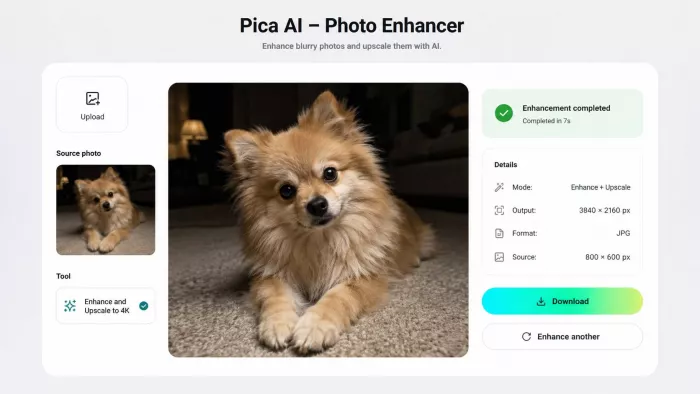
PHOTO ENHANCEMENT VERDICT Genuinely useful. Fast, clean, and the output quality-to-effort ratio is excellent. The 4K upscaling claim is marketing language rather than a technical precision, but the perceptual improvement on low-resolution source material is real. This is the feature that delivers the clearest value in the suite. |
Test 5: Old Photo Restoration
This was the test I was most personally curious about. I had access to three scanned family photographs: one from the 1970s with moderate fading and a vertical scratch, one from the 1950s with heavy yellowing and crease damage, and one from the 1990s with only mild colour shift.
What I Did
WHAT I DID Test : Uploaded the 1990s photo with mild colour shift. Activated the Restore & Enhance option. |
RESULT Clean result in under 10 seconds. The colour balance was corrected convincingly. Skin tones looked natural. This was the easiest task in the set and the tool handled it exactly as expected. Strong output. |
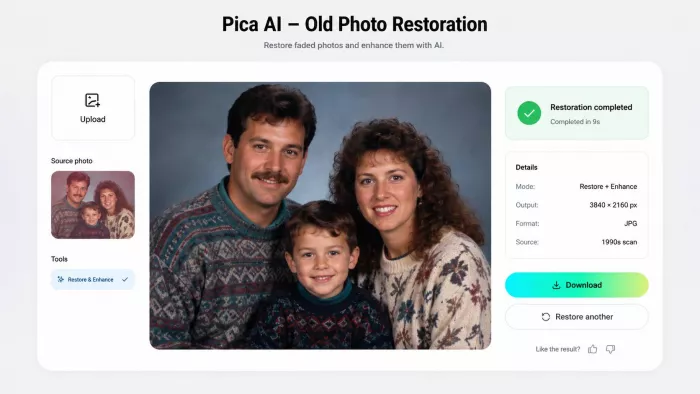
OLD PHOTO RESTORATION VERDICT Excellent for mild to moderate damage. Struggles with severe structural damage and will hallucinate reconstructed detail rather than recover it. For most family photo scenarios, the output is genuinely moving and useful. Set expectations appropriately for badly damaged originals. |
Test 6: AI Art Generation
I saved this one for last and ended up spending the most enjoyable session of the week here. The art generator is the feature that feels least like a utility and most like an actual creative tool. It accepts text prompts, image uploads, and sketch uploads, then produces stylised outputs across a wide range of aesthetic categories.
What I Did
WHAT I DID Text prompt: "A woman reading by a window on a rainy evening, soft candlelight, impressionist oil painting style." Selected the Oil Painting style. Generated 4 variations. |
RESULT All four outputs were stylistically coherent. Two were strong. One was exceptional: the light diffusion from the candle across the book pages was rendered with a level of warmth I did not expect from a consumer AI tool. I would have paid for that image as a print. The other two had compositional issues, one had the subject's hands in an unnatural position, but at four variations per run you are choosing the best, not taking whatever appears. |
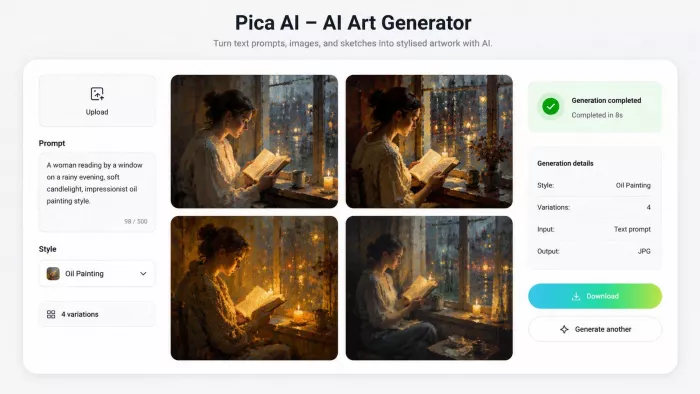
AI ART GENERATION VERDICT The standout feature of the suite. Consistently high output quality across text prompts, portrait stylisation, and sketch conversion. Multiple style options are genuinely distinct, not just variations of the same filter. If Pica AI were only this tool, it would still be worth the free tier. |
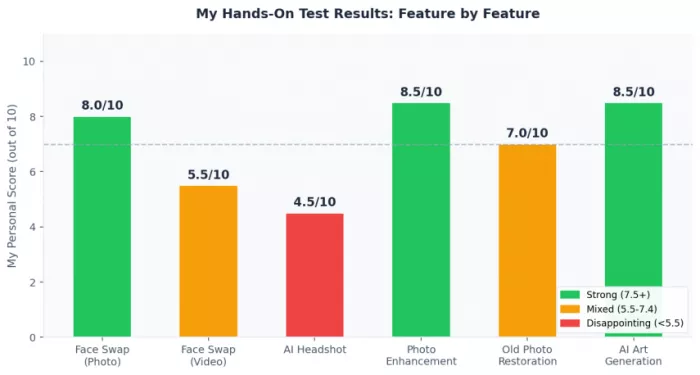
My Test Results at a Glance
The Pricing Reality: What I Found After Paying
I started on the free tier. The limits became apparent quickly: restricted output resolution, credits that ran out on day two, and watermarks on downloads. That is a legitimate way to structure a free tier. I upgraded to the monthly Pro plan at $9.99.
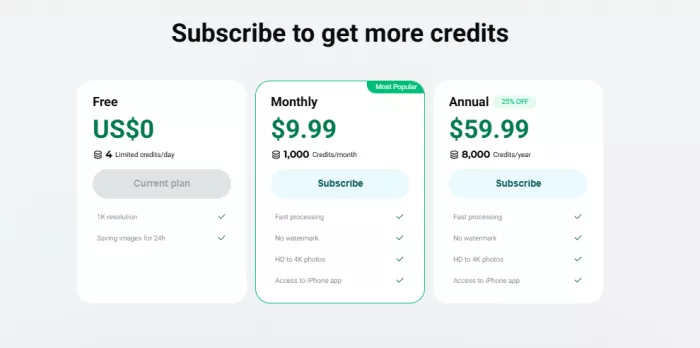
Here is what happened next.
| Billing Experience | What Happened | My Assessment |
| Speed Up upsell on paid plan | Appeared after a failed video render despite active Pro subscription | Unacceptable |
| Credit transparency | No clear indication of how many credits remain in the session | Needs improvement |
| Annual plan value | $59.99/yr vs $119.88/yr on monthly = 50% saving | Genuinely good value |
| Free tier usability | Sufficient for testing, not sufficient for any real workflow | Fair |
| Subscription cancellation | No hidden barrier, cancel is accessible in account settings | Positive |
My honest read on the pricing: the annual plan at roughly $5 a month is fair for what the tool does well. The monthly plan at $9.99 feels marginal given the headshot and video limitations. The billing system itself is the real issue, not the price point. Opacity around credits and the upsell behaviour on a paid tier erode trust in ways that the feature quality cannot fully recover.
My Overall Scorecard
| Feature | My Score | One-Line Summary |
| Face Swap (Photo) | 8.0 / 10 | Surprisingly strong. Clean blending on good source material. |
| AI Art Generation | 8.5 / 10 | The best thing in the suite. Genuinely creative output. |
| Photo Enhancement | 8.5 / 10 | Fast, effective, and the clearest value in the tool. |
| Old Photo Restoration | 7.0 / 10 | Good for mild damage. Hallucinates detail on severe damage. |
| Face Swap (Video) | 5.5 / 10 | Slow, unreliable, and the upsell experience left a bad impression. |
| AI Headshot Generator | 4.5 / 10 | Does not deliver on the headline promise. Too inconsistent. |
Real User Reviews: What Others Are Saying
My own testing told one story, but I also looked at public user feedback to see whether my experience was unusual. The review picture is mixed.
On the App Store, the signal is mostly positive. Users praise the face swap quality, avatar output, creative styles, and ease of use. That matches my own experience with the photo face swap and art generation tools. The positive reviews are usually focused on fun, social sharing, and casual creative use.
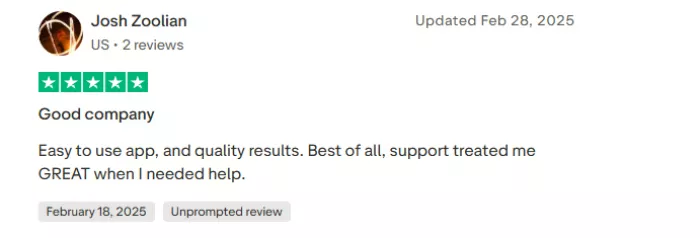
Trustpilot tells a very different story. The review count is small, so it should not be treated as a final judgment, but the complaints are hard to ignore. Users there raise issues around poor image quality, billing frustration, customer support, credit validity, and the same Speed Up behaviour I personally saw during testing.
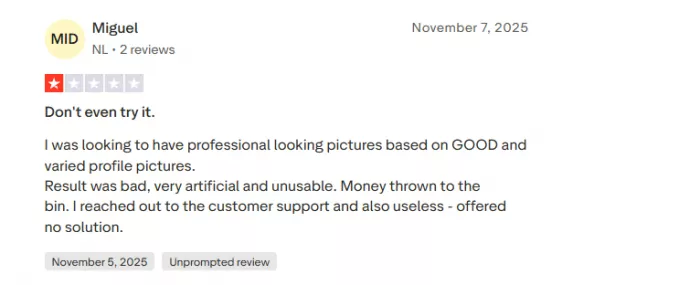
That is the important part. The public praise and public complaints are not really contradicting each other. They are describing two different sides of the same product.
Safety and Privacy: The Part You Should Not Skip
Pica AI is a face and photo tool, so privacy is not a side issue. It is central to whether the tool is worth using.
The platform works by processing personal images, videos, generated outputs, metadata, and face data. That face data is not described as identity verification or face recognition for authentication, but it is still sensitive because it involves the location and shape of facial features. For a casual meme tool, that is a serious category of data.
Pica AI says uploaded photos and videos are not used to train its AI technologies, but generated content may be used for training. That distinction matters. If you upload a private image and generate a modified version, you should understand that the generated output may be treated differently from the original upload.
The company also says users retain ownership of their photos and videos and that it does not sell them. That is good. But the policy also allows data to be stored, processed, shared with service providers, retained for legal or security reasons, and transferred across regions. That is normal for many cloud-based AI tools, but it means users should not treat Pica AI like an offline editor.
My personal rule after testing is simple: I would use Pica AI for casual photos, social content, old image cleanup, and creative avatars. I would not upload IDs, children’s photos, confidential workplace images, private family material, or anything that would cause harm if it appeared somewhere else.
The Consent Problem
There is also a separate ethical issue with face swap tools. Just because a tool allows a face swap does not mean the edit should be made.
I tested Pica AI with my own images and images I had permission to use. That should be the minimum standard. Swapping someone’s face into a meme, video, avatar, or professional-looking image without permission can quickly move from harmless editing into impersonation, harassment, or reputational harm.
This is especially important for public figures, colleagues, friends, partners, children, and private individuals who did not agree to be used in AI-generated content. The output may look funny to the creator, but the person being edited may experience it very differently.
Best Pica AI Alternatives
Pica AI is not the only tool in this category. Depending on what you actually need, there may be better options.
| Alternative | Best For | Why I Would Consider It |
| Remaker AI | Face swap and multi-face edits | More focused on face swap workflows and useful for quick creative swaps. |
| Reface | Short entertainment clips | Better known for GIFs, videos, and social-style face swap content. |
| FaceApp | Selfie edits and portrait changes | More mature for casual face edits, ageing effects, and beauty-style transformations. |
| Pixnova AI | Lightweight face swap and photo tools | Good for users who want simple online tools without a heavy workflow. |
| Akool | Business-style face swap and video use | Better suited to users testing face swap for marketing or commercial-style visuals. |
| Picsart | Broader creative editing | More useful if you want design, stickers, background edits, and AI tools in one editor. |
| Topaz Photo AI | Serious photo enhancement | Better for photographers who care more about upscale quality than face swap features. |
Who Should Actually Try Pica AI
After a week with this tool, my recommendations are specific rather than general.
Try It If You Are:
• A content creator who needs fast, entertaining face swap content for Instagram, TikTok, or meme formats. The photo face swap will serve you well.
• A digital art hobbyist who wants to generate stylised portraits, anime characters, or fantasy artwork from text or sketches without learning Midjourney prompting.
• Someone with a backlog of old family photos that need light restoration or colour correction. The enhancer is fast and the emotional payoff on mild restorations is real.
• A casual user who wants all of these things in one place without paying for three separate subscriptions. At $5 a month on the annual plan, the breadth justifies the cost.
Skip It If You Are:
• Looking for a reliable AI headshot generator for professional use. This tool is not consistent enough for that responsibility.
• Planning to use video face swap as a core part of a content workflow. The reliability is not there.
• Someone who needs complete billing transparency and predictable credit behaviour. The system as it stands is opaque in ways that cause real friction.
• An Android user expecting a native app experience. The web interface works but a dedicated Android app is not confirmed for this platform.
Final Thoughts
Pica AI is a tool at war with itself. The art generation and photo enhancement features show genuine engineering quality and deliver real value. The face swap on photos works well enough to earn a recommendation for its core audience. These are not small things.
But the headshot generator is being sold as a professional-grade product when the output is not consistently close to professional grade. The video face swap is the weakest link in a suite that otherwise holds together. And the billing experience, specifically the Speed Up upsell appearing on a paid plan, is the kind of thing that makes a user question whether they can trust the product at all.
If Pica AI fixed its headshot consistency, resolved the billing opacity, and put serious engineering time into video reliability, it would be a genuinely competitive all-in-one tool. Right now it is a strong creative companion with real limitations that its marketing has chosen not to be honest about.
Start with the free tier. Test the specific features you actually need. If art generation, photo enhancement, or casual face swap are on that list, you will likely find the value. If headshots or video are your primary goal, keep looking.
FINAL RECOMMENDATION Worth trying on the free tier. Worth paying for on the annual plan IF photo enhancement or art generation are your primary use cases. Not ready to be your primary headshot tool or video editing solution. |



Comments