Every AI tool looks brilliant on its landing page. The demo runs smoothly, the testimonials glow, and the pricing page nudges you toward the annual plan with a discount that expires in 48 hours. None of that tells you whether the tool actually fits the way you work. The only thing that does is putting your hands on it and giving it real work to chew on.
Thirty minutes is enough to find out, as long as you spend those minutes well. This guide walks through a process you can run on almost any AI tool, whether it is a writing assistant, a code helper, a research agent, or an image generator. The goal is simple. You should leave the trial knowing whether the paid plan is worth it, and be able to explain exactly why.
Why 30 Minutes Is the Sweet Spot
Five minutes is not enough to move past the honeymoon phase, where everything feels magical because you have only asked easy questions. A full afternoon is too much, because by then you have invested so much effort that walking away feels like a waste, and that feeling quietly pushes you toward buying something you do not need.
Thirty minutes sits in the useful middle. It is long enough to hit real friction, and short enough to keep you disciplined. Most tools reveal their ceiling inside half an hour. You find the point where the polish ends and the actual capability begins, and that point is exactly what you are paying for.
The 5-Minute Setup Before You Touch the Tool
The single biggest mistake people make is opening a trial and poking around at random. You end up testing the tool's demo prompts instead of your own work, and demo prompts are chosen because they make the tool shine. Spend five minutes preparing before the clock starts, so the trial measures what matters to you.
Setup checklist
| What to prepare | Why it matters |
|---|---|
| One real task you actually have this week | A genuine task exposes the tool's real strengths and gaps far better than any sample prompt. |
| Two or three test inputs from your own files | Your messy, real inputs behave nothing like the clean examples in a demo. |
| A clear picture of what a good result looks like | Without a target, you will accept whatever the tool gives you and call it impressive. |
| Your current workaround and its rough cost | You are not comparing the tool to nothing. You are comparing it to how you get the job done today. |
| A timer set for 30 minutes | A visible countdown keeps you from sliding into an hour of aimless tinkering. |
Your Minute-by-Minute Plan
Here is how to split the half hour. The largest block goes to running your real task, because that is where the decision is really made. The chart below shows the shape of it, and the table that follows tells you what to do in each window.
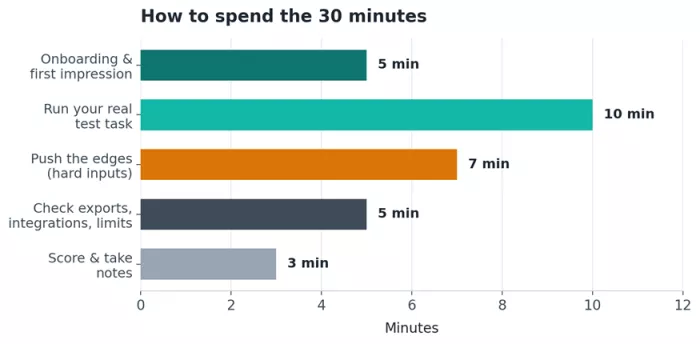
Figure 1. Suggested time split across the 30-minute test drive.
| Time | Phase | What you actually do |
|---|---|---|
| 0–5 min | Onboarding and first impression | Sign up, land in the app, and notice how quickly you reach something useful. |
| 5–15 min | Run your real task | Feed the tool your genuine task and inputs, and judge the output against your target. |
| 15–22 min | Push the edges | Throw harder, messier, or unusual inputs at it to find where it breaks. |
| 22–27 min | Exports, integrations, limits | Check how you get the output out, what it connects to, and what the trial holds back. |
| 27–30 min | Score and note | Rate each area while your impressions are fresh and write down one honest sentence. |
Minutes 0 to 5: onboarding and first impression
Time how long it takes to go from signup to your first useful moment. A good tool gets you there fast and does not bury the core feature behind a tour, a survey, and three upsell screens. Notice whether the interface explains itself or leaves you guessing. First impressions here are a fair signal, because if the easy path is confusing, the hard path will be worse.
Minutes 5 to 15: run your real task
This is the heart of the test. Give the tool the actual task you prepared, using your own inputs, and hold the result against the picture of good that you defined earlier. Ask yourself a plain question. If a capable colleague handed you this output, would you be happy, or would you send it back with edits? Count how much cleanup the result needs, because that cleanup is the real cost of using the tool every day.
Minutes 15 to 22: push the edges
Easy inputs make every tool look good. Hard inputs tell the truth. Feed it a long document, an ambiguous request, an unusual format, or a task just outside its obvious purpose. Watch what happens when it is unsure. Does it ask a sensible question, admit the limit, or confidently invent something wrong? How a tool fails matters as much as how it succeeds, because you will meet those failures again once you rely on it.
Minutes 22 to 27: exports, integrations, and limits
A great result trapped inside an app is only half useful. Check how you get the output out, whether that is copy and paste, a clean download, or a proper export. See what the tool connects to, since a tool that plugs into what you already use saves far more time than one that forces you to bounce between tabs. Note what the free trial quietly restricts, because those limits are the paywall you are being asked to cross.
Minutes 27 to 30: score and take notes
Do not skip this part. Memory fades fast, and by tomorrow every tool blurs into a vague sense of it was fine. Rate each area now, on a simple scale, and write one honest sentence about whether it beat your current way of working. That sentence is what you will actually read back when you decide.
The Five Things Actually Worth Testing
You cannot test everything in half an hour, so focus on the areas that decide whether you would keep paying month after month. The table below gives you a quick read on what to look for and what should make you nervous.
| What to test | What to check | Green flag vs red flag |
|---|---|---|
| Output quality | How close the result is to usable without heavy editing. | Green: light polish only. Red: you rewrite most of it. |
| Consistency | Whether repeated runs hold a steady standard. | Green: reliably good. Red: brilliant once, weak the next time. |
| Handling of hard cases | How it behaves on messy or ambiguous inputs. | Green: asks or flags limits. Red: invents confident nonsense. |
| Fit with your workflow | How well it slots into your existing tools and habits. | Green: exports and connects cleanly. Red: a walled garden. |
| Honesty of the trial | Whether the free version reflects the paid one. | Green: real features, clear limits. Red: crippled tease. |
Turning Impressions Into a Score
A number keeps you honest. It stops a slick interface from winning you over when the output was mediocre, and it lets you compare two tools without relying on which one you happened to try last. Rate each area from 1 to 5, then weight the areas that matter most to you, because output quality usually deserves more say than raw speed.
A simple weighted rubric
| Criterion | Weight | What a top score means |
|---|---|---|
| Output quality | 30% | Results are usable with only light editing. |
| Fit with your workflow | 20% | Slots into your tools with almost no friction. |
| Reliability and consistency | 15% | Steady quality across repeated runs. |
| Ease of use | 15% | You reached value quickly without a manual. |
| Speed | 10% | Fast enough that it never breaks your flow. |
| Value for money | 10% | The price clearly beats your current workaround. |
Multiply each score by its weight, then add them for a single number out of five. The sample below shows how one tool might land. Strong output and good workflow fit carry it, while shaky reliability drags on it.
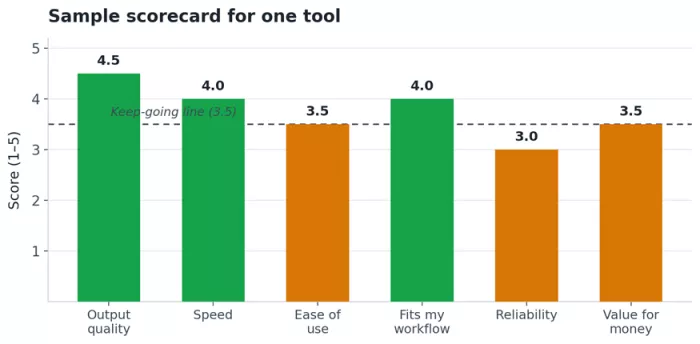
Figure 2. A sample scorecard. This tool works out to a weighted 4.3 out of 5.
Run the sample through the weights and you get 4.3 out of 5. That is a clear yes. The weak reliability score is worth watching, so a smart move would be one more real task before committing to an annual plan.
Red Flags That Justify Ending Early
Some signals are strong enough to stop the trial before your 30 minutes are up. If you hit any of these, you have your answer already.
- It makes up facts, sources, or figures and presents them with full confidence.
- The output looks impressive at a glance but falls apart the moment you read closely.
- You cannot export your own work, or it comes out in a locked or awkward format.
- The free trial hides the actual feature you came to test behind the paywall.
- It is noticeably slower than doing the task yourself, with no gain in quality.
- The pricing leans on urgency and countdown timers instead of on the product itself.
Making the Call
Once you have a weighted score, the decision almost makes itself. Match your number to the ranges below and act on it while the trial is still fresh in your mind.
| Weighted score | What it means | What to do |
|---|---|---|
| 4.3 to 5.0 | Strong fit for your work. | Buy or start the paid plan with confidence. |
| 3.5 to 4.2 | Promising, with a soft spot or two. | Run one more real task, then decide. |
| 2.5 to 3.4 | Weak fit for what you need. | Keep it on a shortlist only if nothing better exists. |
| Below 2.5 | Not worth your time or money. | Walk away, and ignore the discount countdown. |
The hardest part is trusting a low score when the marketing is loud. Remember that the countdown timer is a sales tactic, not a fact about the tool. A good product will still be good next week, and most trials can be restarted if you genuinely change your mind.
A Checklist You Can Reuse
Save this and run it every time you evaluate a new tool. It turns a vague feeling into a repeatable decision.
1. Prepare (5 min before). Pick a real task, gather real inputs, and define what good looks like.
2. First impression (0 to 5). Note how fast you reach something useful.
3. Real task (5 to 15). Run your genuine work and judge it against your target.
4. Stress test (15 to 22). Push hard inputs and watch how it fails.
5. Practical check (22 to 27). Test exports, integrations, and trial limits.
6. Score (27 to 30). Rate each area, apply your weights, and write one honest sentence.
7. Decide. Match your score to the ranges and act before the impression fades.
Thirty focused minutes will tell you more than a week of reading reviews and watching demos. You will know whether the tool earns a place in your workflow, and just as importantly, you will know why. That is the difference between paying for a tool and paying for a landing page.



Comments