Your bio link is one of the smallest parts of your profile, but it often does the heaviest work. It is where followers go when they want to explore your content, join your newsletter, book your service, buy your product, or simply understand what you do. For creators, that makes the link-in-bio page far more than a list of links. It becomes a compact business hub.
The best link in bio tools does more than stack URLs on a page. They help creators organise their offers, present their brand more professionally, track clicks, and in many cases even start monetising directly from that single link. Below are six of the best link in bio tools for creators right now, along with what they offer, who they suit best, and what they cost.
1. Linktree : The Reliable All‑Rounder
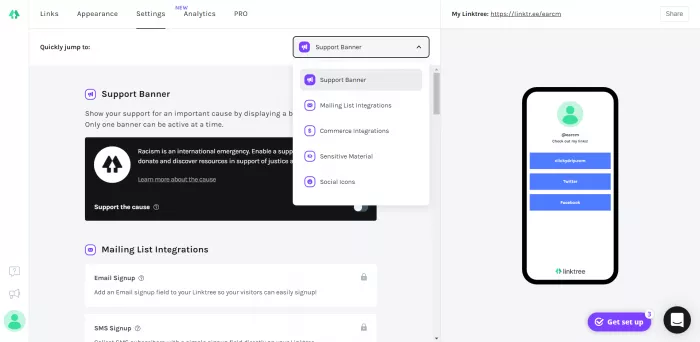
Linktree remains one of the most widely used link in bio tools because it is simple, polished, and familiar to both creators and audiences. For someone who wants to get started quickly without dealing with a complicated setup, it still does the job very well. Over the years, it has expanded from being a basic link list into a much more capable platform with support for digital products, email capture, tips, embedded content, and branded layouts.
One of Linktree’s biggest strengths is ease of use. You can add unlimited links, rearrange them in seconds, customise the design, and connect tools like Shopify, Mailchimp, and social platforms. For creators who want a central page for content, products, videos, and social channels, it offers a very balanced mix of flexibility and simplicity.
Features that stand out
Linktree now supports much more than plain buttons. Creators can add embedded videos, collect payments and tips, connect storefronts, and capture email leads without needing a separate landing page for every action. Its analytics are also useful for tracking which links get the most clicks and how audiences behave across campaigns.
Best for : Linktree is best for creators who want an easy, reliable all-round option. It suits influencers, content creators, podcasters, musicians, and small personal brands that need a clean central page without spending too much time learning a new system.
Pricing : Linktree has a free plan with unlimited links. Paid plans start at around 5 USD per month, while more advanced tiers unlock deeper analytics, stronger branding options, and more monetisation features.
2. Beacons : All‑in‑One Creator Business Hub
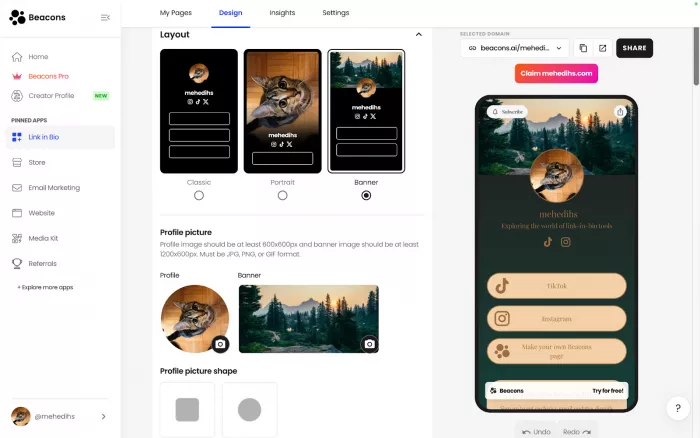
Beacons is built for creators who want their bio link to do more than just redirect traffic. It behaves more like a lightweight creator business platform, combining a link page with tools for selling products, building an email list, creating a media kit, and managing basic audience interactions. This makes it particularly appealing to creators who are already thinking beyond views and toward revenue.
What makes Beacons stand out is how much it packs into one place. Instead of stitching together multiple tools, creators can use Beacons to showcase content, sell digital products, collect leads, accept bookings, and present a more business-ready front. It feels less like a simple bio tool and more like a mini website built around creator monetisation.
What you get inside the platform
Beacons supports modules such as a storefront, email forms, booking tools, media kit pages, and even automation features for social channels. The page builder is flexible enough to let creators arrange sections according to their priorities, whether that is pushing a product, collecting leads, or highlighting fresh content.
Best for : Beacons is best for creators who are actively monetising or planning to. Coaches, digital product sellers, educators, consultants, and creators with multiple income streams will get the most value from it because it removes the need for several separate tools.
Pricing : Beacons offers a free plan, but the more useful creator-focused features come in paid plans. Its main paid plan is around 30 USD per month, with additional capabilities for email marketing, lower fees, and stronger business tools.
3. Later’s Link in Bio : For Feed‑First Creators
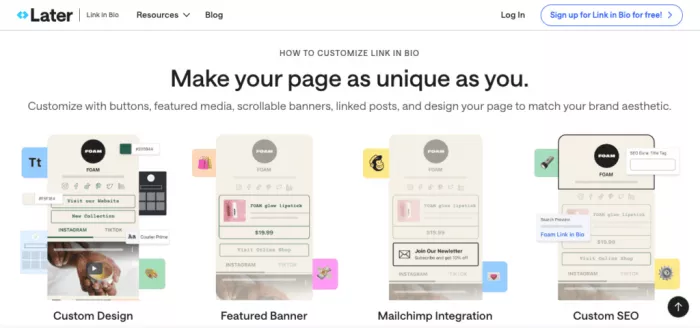
Later’s Link in Bio works especially well for creators whose audience journeys are strongly tied to visual content. Unlike a standard list-style bio page, it lets you turn your Instagram or TikTok feed into a clickable experience. That means a follower can land on a page that looks similar to your content grid and click directly on the post that caught their attention.
This visual approach is useful because it shortens the gap between discovery and action. If someone sees a post about a product, blog, or tutorial, they can click the matching image on your bio page instead of searching through a list of unrelated links. For creators who care about user flow and visual consistency, this is a major advantage.
Where it becomes useful
Later’s tool works even better if you already use Later for scheduling and social media management. It allows creators to connect link management with content planning, which saves time and keeps campaigns organised. Instead of updating your link page manually every time you publish, the system feels more integrated with your posting workflow.
Best for : Later Link in Bio is best for Instagram-first and TikTok-first creators, especially those who rely on visual storytelling. Fashion creators, beauty influencers, product reviewers, lifestyle creators, and e-commerce-led brands will usually get more value from this visual click model than from a plain button list.
Pricing : Later includes a basic version of Link in Bio in its free offering. To unlock more advanced functionality and broader social media features, paid plans begin at around 25 USD per month.
4. Campsite.bio : Clean, Brand‑Friendly Pages
Campsite.bio is one of the better choices for creators who want their link in bio page to feel more branded and carefully designed. It offers more visual control than many basic tools, which makes it attractive for creators who are particular about presentation. The interface is also clean enough that you do not need design expertise to make the page look professional.
The platform supports customisation across colours, layouts, images, buttons, and embedded content. It also includes analytics, integrations, and support for multiple profiles, which gives it a nice mix of creative flexibility and practical functionality. For creators who think their link page should feel like an extension of their brand identity, Campsite.bio makes a strong case.
Why creators like it
The appeal of Campsite.bio lies in the way it balances appearance and usefulness. It is not overloaded with unnecessary complexity, but it still gives creators more room to create a polished destination rather than a plain list of links. That matters when your bio page is part of your first impression.
Best for : Campsite.bio is best for design-conscious creators, personal brands, photographers, visual artists, agencies, and social-first businesses that care about aesthetics as much as function. It works well when presentation is part of your brand value.
Pricing : Campsite.bio has a free plan, and its Pro plan starts at around 7 USD per month. Paid users get better customisation, stronger analytics, and deeper integrations.
5. Solo.to : Minimal, Fast, and Creator‑Friendly
Solo.to takes a more minimalist route, and that is exactly why many creators like it. It is lightweight, affordable, and easy to maintain. For creators who do not need a full storefront or complex automation but still want a clean and professional link hub, Solo.to offers a very practical middle ground.
Its interface is straightforward, and the page designs feel modern without being flashy. You can create a branded page, add multiple links, connect social accounts, and offer a tip jar or simple creator support options. It does not try to be an entire business operating system, which in many cases is actually a benefit.
A cleaner, simpler experience
Solo.to is particularly useful for creators who want speed and clarity. You can set it up quickly, keep it updated with minimal effort, and still give followers a tidy central destination. That simplicity is valuable for creators who do not want to spend too much time managing backend tools.
Best for : Solo.to is best for solo creators, musicians, writers, freelancers, and creators with a minimalist personal brand. It is ideal for those who mainly need a neat hub for content, socials, and a few priority actions rather than a heavy monetisation engine.
Pricing : Solo.to has a free plan, and paid plans start at around 1 USD per month, which makes it one of the most affordable serious link in bio tools available.
6. Stan Store : Monetisation‑First Link in Bio
Stan Store is designed for creators who see their bio link as a sales channel, not just a traffic page. It focuses heavily on monetisation, allowing creators to sell digital products, book consultations, offer courses, and manage paid interactions directly from their bio. That makes it quite different from simpler tools that mainly organise links.
For creators with products, services, or educational offers, Stan Store can replace several separate tools. Instead of sending followers from Instagram or TikTok to multiple pages, you can guide them into one branded checkout flow. That can make the path from audience to customer much smoother.
Monetisation at the centre
Stan Store includes features like digital product selling, booking functionality, simple course hosting, email capture, and upsell tools depending on the plan. The platform is clearly built around conversion, so it is less about browsing and more about helping followers take a buying action.
Best for : Stan Store is best for creators who are actively selling. Coaches, consultants, course creators, educators, digital product sellers, and creators with service-based offers are the ideal users. If your goal is revenue generation directly from social traffic, Stan Store makes more sense than a basic link page.
Pricing : Stan Store plans start at around 29 USD per month. That is higher than simpler bio link tools, but for creators using it to sell products or consultations, the platform can replace multiple paid tools and justify the cost.
Quick Comparison Snapshot
Here’s a brief side‑by‑side to make selection easier:
| Tool | Best suited for | Typical starting price (2026) |
| Linktree | General creators, influencers, small brands | Free; paid from ~5 USD/month |
| Beacons | Creators selling products, services, or memberships | Free; main plan ~30 USD/month |
| Later Link in Bio | Instagram/TikTok‑first creators using Later | Included; full features from ~25 USD/month |
| Campsite.bio | Design‑conscious creators and small teams | Free; Pro from ~7 USD/month |
| Solo.to | Minimalist creators wanting speed + low cost | Free; paid from ~1 USD/month |
| Stan Store | Creators focused on selling courses/calls/products | Paid from ~29 USD/month |
Final Take: Matching the Tool to the Creator
There isn’t one universal “best” link in bio tool; there’s a best fit for each stage of a creator’s journey. If you want something safe and flexible that scales with you, Linktree or Campsite.bio are excellent defaults. If your goal is to run as much of your business as possible from that one link, Beacons or Stan Store are built for that. And if you care about speed and simplicity more than anything else, Solo.to and Later’s Link in Bio give you a streamlined experience tied directly to how you already create.
Once you know your primary objective clicks, sales, sign‑ups, or a clean portfolio the right tool becomes much easier to pick.



Comments