I have shipped enough small products solo to know the real bottleneck is never the idea. It is that one person has to be the engineer, the designer, the backend, the payments team, and the marketer all at once, and there are only so many hours in a day to be all of those people well. What has changed in the last two years is that a serious chunk of each of those roles can now be handed to an AI tool that does the tedious eighty percent and leaves you the judgment calls. That is the shift this list is built around.
The seven tools below are the ones I keep coming back to, because each one quietly removes one of those hats. I have ordered them the way an actual build unfolds, from writing the first line of code through to taking the first payment and then automating the busywork that follows. For each tool I have kept the same shape: what it does, the features that matter, the honest advantages, the limitations nobody puts on the pricing page, and a quick box telling you who it is for and who should walk away. Prices here are current as of July 2026, and because most of these run on usage-based tiers now, they move around more than they used to.
1. Cursor AI
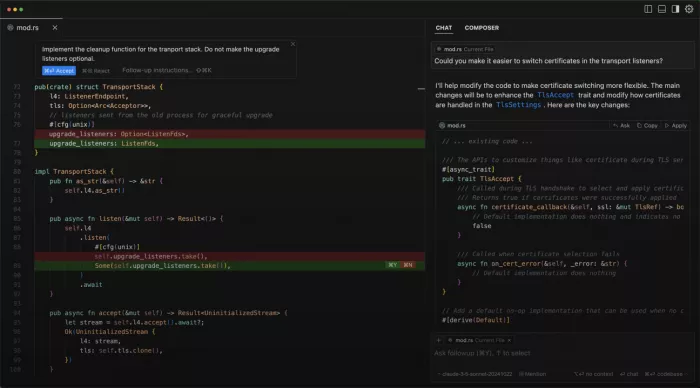
What it does. Cursor is a fork of VS Code with frontier AI models wired directly into the editing loop, so you generate, refactor, and debug through natural language instead of typing every line by hand. Its defining trait is that it reads your entire codebase as context, which means its suggestions fit the project you are actually building rather than spitting out generic snippets you then have to reshape. In practice it feels less like autocomplete and more like a second developer who has already read all your files.
Key features.
• Agent mode can scaffold entire features across multiple files from a single prompt, taking on the boilerplate and wiring that normally eats a solo founder's weekend.
• It indexes your full repository so the model understands your existing functions, types, and naming patterns before it writes anything new, which keeps generated code consistent with what is already there.
• Inline editing lets you highlight any block and rewrite it in place with a plain-English instruction, and you can switch between Claude, GPT, and Gemini depending on whether a task needs speed or depth.
Advantages. The codebase-aware context is the real differentiator, because it produces edits that respect your architecture instead of leaving you to untangle mismatched code afterwards. The VS Code foundation is the other quiet win: your existing extensions, keybindings, and muscle memory all carry straight over, so there is almost no adoption cost and no new editor to learn. For a one-person team, that combination turns hours of repetitive typing into minutes of review.
Limitations. It can confidently generate code that looks correct but hides subtle bugs, so you still need enough technical judgment to catch what it gets wrong rather than trusting it blindly. The bigger surprise is cost. Since the June 2025 shift to a usage-based credit system, heavy use of premium frontier models drains your monthly allowance faster than the flat headline price suggests, and community reports put real power-user costs closer to forty or fifty dollars a month once overages are counted. Sticking to the unlimited Auto mode for routine work keeps the twenty-dollar plan honest.
| Pricing | Free Hobby tier; Pro $20/mo (credit pool); Pro+ $60/mo; Ultra $200/mo; Teams $40/user/mo |
| No-code friendly | Partial. You need to read and sanity-check code |
| Best for | Technical or semi-technical solo founders who want to move faster |
| Skip if | You are a complete non-coder hoping to skip programming entirely |
2. Lovable AI
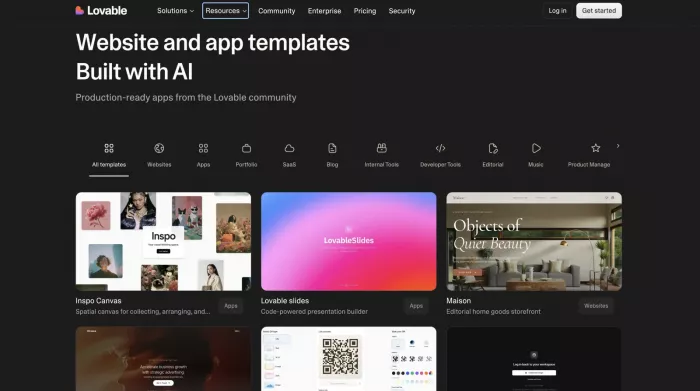
What it does. Lovable turns natural-language prompts into full-stack web applications, generating the React frontend, backend wiring, database, authentication, and even Stripe payments, then deploying the whole thing with one click. It is the leading example of what people now call vibe coding, where you describe the product in plain language and the AI assembles a working version of it. The output is a real, running app rather than a design you still have to build.
Key features.
• It ships a working app with a genuine Supabase-backed database and authentication rather than a static mockup, so what you get is much closer to a product than a prototype.
• A draw-to-build canvas lets you sketch interface elements directly and have them converted to production code, and GitHub sync means you can export the codebase and keep working elsewhere at any point.
• Credits are pooled across a workspace with unlimited seats, which makes it unusually cheap to bring in a collaborator or two without paying per head.
Advantages. Nothing else gets a non-engineer from idea to a deployed, database-backed app this quickly, and for the job of finding out whether anyone actually wants your product, that speed is the entire value. The one-click Stripe and Supabase integrations matter more than they sound, because they remove the two setup steps that usually stall a first-time builder before they have anything to show. You can go from a sentence to a shareable link in an afternoon.
Limitations. The credit model works against you at exactly the moment things get difficult. Complex logic, multiple API integrations, and stubborn bugs send the AI into retry loops that quietly consume credits, and builders regularly report burning through a full month's allowance in a single debugging session. Runtime hosting and any AI features inside your shipped app are billed separately on top of the plan, so a live production app realistically costs more than the sticker implies. The workflow most people settle into by 2026 is to build the first seventy or eighty percent in Lovable, then export to Cursor to finish the parts it struggles with.
| Pricing | Free (5 credits/day); Pro $25/mo (100 credits); Business $50/mo (SSO); hosting billed separately |
| No-code friendly | Yes. This is the most beginner-first tool on the list |
| Best for | Non-technical founders validating an MVP fast |
| Skip if | You are building complex logic and want predictable monthly costs |
3. Supabase
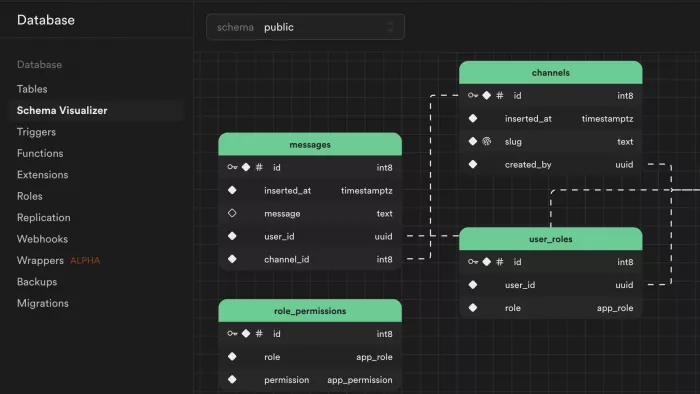
What it does. Supabase gives you a managed Postgres database with authentication, file storage, instant APIs, realtime subscriptions, and serverless edge functions, all behind a single subscription. It is pitched as the open-source Firebase alternative, but built on real SQL instead of a proprietary NoSQL store, which means the data skills you already have transfer directly. For a solo founder it stands in for the infrastructure engineer you cannot yet justify hiring.
Key features.
• One provider covers your database, auth, storage, and APIs together, so you are not stitching together and separately paying for four different services and hoping they play nicely.
• Row Level Security lets you enforce per-user data access at the database layer itself, which is exactly the kind of thing that normally needs a backend engineer to get right and safe.
• It is fully open source and self-hostable, so you are never locked in, and its MCP server lets AI coding tools connect to and manage your project directly.
Advantages. For the price of one modest subscription you get the entire backend a typical early SaaS needs, and once you account for the bundled auth and storage it works out as the cheapest real backend on the market. Because AI builders like Lovable and Cursor default to it, the integration path is already paved and there is a large body of community answers for whatever you get stuck on. That head start is worth as much as the feature set when you are working alone.
Limitations. On the Pro plan your compute instance runs twenty-four hours a day and does not scale to zero, so even an idle side project keeps paying for its tier. The base price is predictable, but egress, additional compute, and per-project charges are all metered on top, and multi-project sprawl is where bills quietly climb without you noticing. Free-tier projects also pause after a week of inactivity, which rules the free plan out for anything that needs to stay reliably live for real users.
| Pricing | Free ($0); Pro $25/mo per project (incl. $10 compute credit); Team $599/mo; usage billed on top |
| No-code friendly | Partial. The dashboard is friendly; wiring it up assumes some technical comfort |
| Best for | Any SaaS that needs a real database, auth, and storage from day one |
| Skip if | You want a fixed all-in bill with zero usage-based surprises |
4. Vercel AI
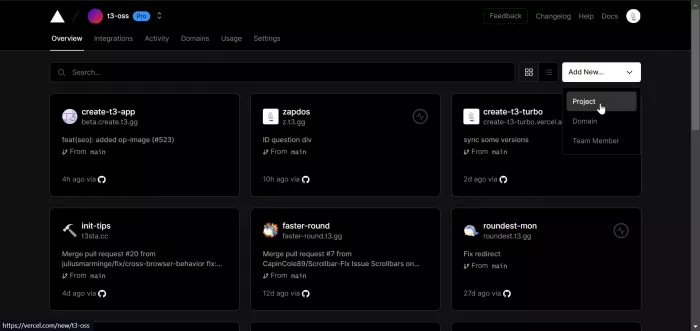
What it does. Vercel hosts and deploys modern web apps with zero configuration, giving every code push an automatic preview URL and pushing your site out across a global edge network for fast loading everywhere. It is especially tuned for Next.js, which happens to be the framework most AI tools generate by default, so the tool and the code your other tools produce fit together with almost no friction. It is the piece that takes what you have built and puts it in front of real users.
Key features.
• Connect a repository and every pull request gets its own live preview deployment, so you can see and test changes in a real hosted environment before they ever reach production.
• Deploys are zero-config with automatic CI/CD, a global CDN, and built-in DDoS and firewall protection, none of which you have to configure or maintain yourself.
• Serverless and edge functions let you run backend logic without managing a server, and a built-in AI gateway makes wiring model calls into your app more straightforward.
Advantages. The developer experience is the benchmark the entire category is measured against, and for a solo builder that translates into production-grade hosting with essentially no DevOps work. The preview URLs alone justify it, because they turn what would otherwise be a careful deployment ritual into something you get automatically on every single change, which makes shipping frequently feel safe rather than risky.
Limitations. The Hobby tier is free but strictly non-commercial, so the moment your app earns any money you are required to move to Pro at twenty dollars per seat. Pro then runs on usage-based metering, and bandwidth and edge-request overages are the usual source of surprise bills once your traffic grows beyond the included allowance. For heavy or long-running workloads, raw compute on a VPS or Cloudflare is markedly cheaper, which is why Vercel is best treated as the platform for your fast first year rather than assumed to be the forever home.
| Pricing | Hobby free (non-commercial); Pro $20/user/mo (incl. $20 usage credit); Enterprise custom |
| No-code friendly | Partial. Deploying is trivial; you still need a codebase to deploy |
| Best for | Solo builders who want production hosting with no infrastructure work |
| Skip if | You run heavy long-running workloads where raw compute is far cheaper |
5. Stripe
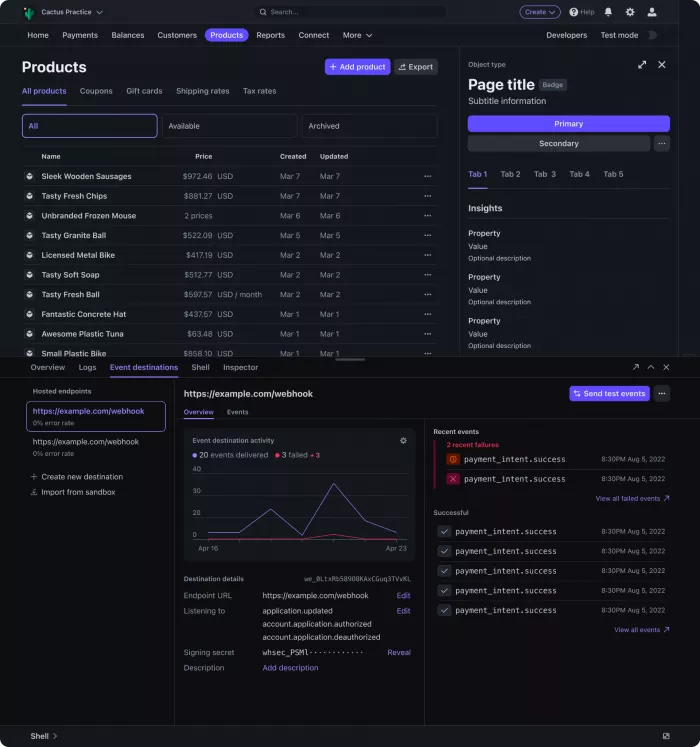
What it does. Stripe is the payment infrastructure that lets you accept cards and digital wallets, run recurring subscriptions, handle invoicing and tax, and manage the entire money-movement side of a SaaS through clean, well-documented APIs. For most solo founders it is the single component that separates a demo from an actual company with revenue coming in. It is also the piece almost every other tool on this list already knows how to talk to.
Key features.
• Stripe Billing handles recurring subscriptions, prorations, metered usage, dunning, and automatic retries on failed cards, which together amount to the entire billing department a SaaS would otherwise have to build or staff.
• There are no setup or monthly fees on the standard plan, so your account costs nothing to keep open and you only pay once a customer has actually paid you.
• Pre-built checkout, payment links, and hosted payment UIs let you take a first payment without designing a payments interface yourself, and most AI builders wire it in with a single step.
Advantages. The developer experience is famously good, the documentation is genuinely thorough, and the integration is so widely supported that nearly every tool you might pair it with connects to it natively out of the box. Because it is pure pay-as-you-go, it costs you nothing while you are pre-revenue and then scales cleanly the moment you start charging, which is exactly the risk profile a bootstrapped solo founder wants.
Limitations. The headline 2.9% plus thirty cents is only the entrance fee. Layer on Billing at 0.7% of subscription volume, international-card and currency-conversion surcharges, and a fifteen-dollar fee per dispute that you pay even when you win, and the effective rate on a global SaaS climbs well past what the sticker suggests. The fixed thirty-cent component also bites hardest on low-priced plans, so very small recurring charges lose a disproportionate share to fees. Some founders additionally report abrupt, risk-based account holds, which is worth knowing before you route every dollar of revenue through a single provider.
| Pricing | No monthly fee; 2.9% + $0.30 per card charge; Billing adds 0.7%; disputes $15 each |
| No-code friendly | Yes. Payment links and one-click builder integrations need no code |
| Best for | Essentially every SaaS that intends to charge customers |
| Skip if | You are pre-revenue and genuinely not charging anyone yet |
6. Framer AI
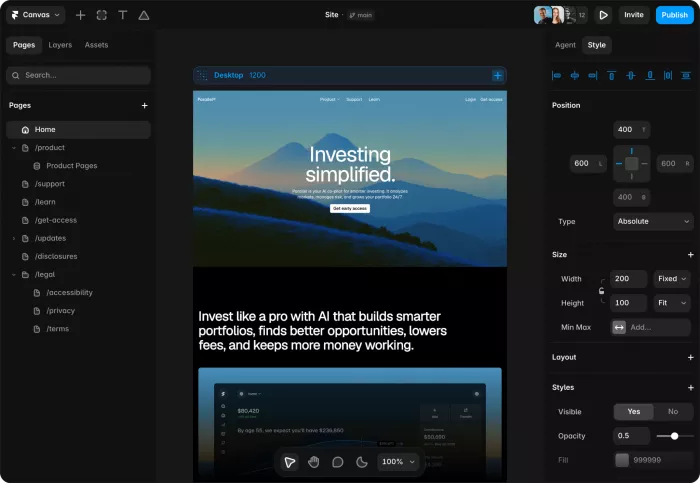
What it does. Framer is a no-code website builder with real design depth, letting you produce a polished, animated marketing site or landing page and publish it on your own custom domain. Your app needs a front door that actually converts visitors into signups, and Framer is how a single non-designer builds that front door to a professional standard. It sits alongside your product rather than inside it, handling the public-facing shopfront.
Key features.
• The visual editor gives you genuine design control with responsive breakpoints and scroll animations, so the finished site looks bespoke and considered rather than like an obvious template.
• AI features such as Wireframer can generate a full layout from a prompt, and they are included on every plan right down to the free tier, so you are not paying extra to get a head start.
• A built-in CMS handles a blog or changelog, and hosting with a free custom domain on annual billing is bundled into the plan rather than sold separately.
Advantages. It hits a balance that is genuinely hard to find: far more design freedom than Squarespace or Wix, while being dramatically faster to work in than Webflow or hand-coding a site from scratch. For a founder who is not a designer, the combination of strong templates and AI layout tools makes it realistic to ship a landing page that looks like it came out of a studio, which does real work for credibility when strangers are deciding whether to trust your product.
Limitations. The pricing is modular in a way that catches people out, because site plans and editor seats are billed separately, so the advertised price is only your true cost while you are working entirely solo. The Basic tier's tight CMS limits tend to push you up to Pro sooner than feels reasonable, and for genuinely complex content structures Webflow still offers more depth of control. It is worth remembering that this is a marketing-site tool and not an app builder, so it complements the others on this list rather than replacing any of them.
| Pricing | Free ($0); Basic $10/mo; Pro $30/mo; Scale $100/mo (all annual); extra editors billed separately |
| No-code friendly | Yes. Fully visual, no code required |
| Best for | Solo founders who need a high-converting marketing site fast |
| Skip if | You only need a bare app and no separate marketing presence yet |
7. N8n
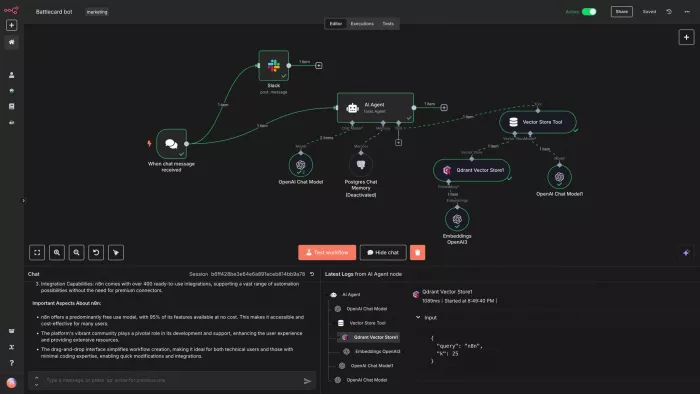
What it does. n8n is a workflow automation platform that connects your app to other services and runs multi-step processes automatically on triggers, all built through a visual node editor. It is how a solo operator handles onboarding emails, data syncs between tools, alerts, and AI agent workflows that would otherwise need a person sitting there doing them by hand. Think of it as the operations hire you take on once the repetitive tasks start piling up faster than you can clear them.
Key features.
• It bills per full workflow execution rather than per individual step, so a twenty-step automation costs one unit per run instead of twenty, which makes genuinely complex flows dramatically cheaper than step-metered rivals like Zapier.
• It runs code nodes in both JavaScript and Python and includes native AI agent nodes, so you can drop model calls and custom logic straight into the middle of a workflow when the no-code blocks are not enough.
• A free, unlimited Community Edition can be self-hosted, which gives you unlimited executions for nothing more than the cost of a small server.
Advantages. The execution-based pricing means complexity is effectively free, which is the exact opposite of how per-task tools charge, and for chained multi-step work it can come out an order of magnitude cheaper. Self-hosting drops the running cost to a few dollars a month with no execution ceiling at all, and because it is open source your automation data stays on your own infrastructure, which matters once those workflows start touching customer information.
Limitations. It carries a steeper learning curve than Zapier, and you should expect to put in several hours before the node model clicks and you become genuinely productive. On the managed cloud, execution caps are a hard wall rather than a soft overage, so a single busy polling workflow can exhaust the Starter tier in days and force you up to Pro. Self-hosting removes those limits but hands you responsibility for the server, the updates, and the backups, so the low headline price comes bundled with real ongoing maintenance time you have to account for.
| Pricing | Community Edition free (self-hosted); Cloud Starter ~$24/mo; Pro ~$60/mo; Business/Enterprise higher |
| No-code friendly | Partial. Visual to build, but the node model rewards technical comfort |
| Best for | Founders automating operations, data syncs, and AI agent workflows |
| Skip if | You have almost nothing to automate yet and want zero learning curve |
The seven tools at a glance
The breakdowns above describe each tool on its own terms, one at a time. This table does the opposite job, lining all seven up against each other on the axes that actually drive a decision, so you can narrow the field to two or three candidates that fit your situation and then jump back up to read those entries in full. The standout-strength column is deliberately compressed to a few words, not a summary, so it works as a memory hook rather than repeating the prose.
| Tool | Category | Starting price | No-code friendly | Standout strength |
| Cursor | AI code editor | Free / $20 mo | Partial | Codebase-aware edits |
| Lovable | AI app builder | Free / $25 mo | Yes | Idea to live app fast |
| Supabase | Backend (BaaS) | Free / $25 mo | Partial | Whole backend in one |
| Vercel | Deployment / hosting | Free / $20 mo | Partial | Push-to-ship, no DevOps |
| Stripe | Payments | Pay-as-you-go | Yes | Revenue with no setup |
| Framer | Design / marketing site | Free / $10 mo | Yes | Agency-grade site solo |
| n8n | Automation | Free / ~$24 mo | Partial | Complexity is free |
The verdict
If I were starting a new SaaS alone tomorrow, I would not reach for all seven at once, and neither should you. The mistake I see most often is treating a list like this as a shopping cart and signing up for everything on day one, which just spreads your attention and your money thin before you know what you actually need. The better move is to add each tool only when a real bottleneck tells you to.
My honest sequence looks like this. I would think the product through with Cursor first, because the cheapest mistakes to fix are the ones you catch before writing any code. Then I would decide the build path: if I want control and can read code, Cursor sitting on top of Supabase and Vercel; if I want raw speed to validate an idea, Lovable until it starts fighting me, then export into that same stack to finish. Stripe goes in the moment there is anything to charge for, Framer gives the product a front door that converts strangers into signups, and n8n comes last, once there are enough repetitive tasks that automating them clearly pays for itself.
The thread running through every one of these choices is the same. Each tool buys back a role I would otherwise have to fill myself at two in the morning, and spending a little to reclaim that time and attention is almost always the right trade when you are the whole company. Start with the two or three that map to wherever you are stuck right now, get comfortable with those, and let a genuine bottleneck be the thing that tells you when to add the next one.
*Note: Pricing verified July 2026. Usage-based tiers shift often, so confirm current rates before committing.



Comments