You do not need to build a website to show the world what you can do. A website is only one way to present your work, and it is often the slowest and most expensive one.
If you are a designer, writer, developer, photographer, marketer, or student, there are faster routes that get your work in front of the right people today. Many of them are free, most take an afternoon at the most, and several come with a built in audience already looking for talent like yours.
This guide walks you through seven simple, proven ways to build a portfolio without a website. Each method comes with clear steps, so you can pick the one that fits your field and get started right away. You can use just one of them or combine a few for wider reach.
Why You Do Not Always Need a Website
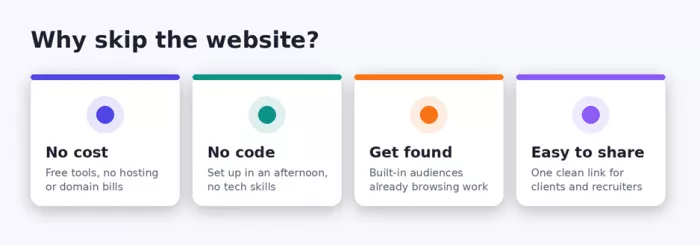
A personal website is great once your work and your budget can support it, but it is rarely the best first move. Building and maintaining a site takes time, money, and a little technical patience, and none of that actually showcases your talent. What matters is that people can see your work, understand it, and reach you.
The methods below deliver exactly that. They remove the cost and the setup headache, and many of them place your work on platforms where clients and recruiters are already spending their time. In other words, you spend your energy on the work itself, not on hosting, plugins, and page layouts.
1. Build a Behance Profile
If your work is visual, Behance is one of the fastest ways to look professional online without touching a single line of code.
Behance is Adobe's free showcase network, and it is packed with people who are actively looking for creative talent. You set up a profile, upload your projects, and your work sits in front of an audience that already cares about design, illustration, photography, and motion. Recruiters and clients browse Behance every day, so a strong profile can bring opportunities to you instead of the other way around.
How to set it up
1. Create a free account. Sign up with your Adobe ID or a Google account. This unlocks your profile and the project editor at no cost.
2. Fill in your profile basics. Add a clear photo, a one line description of what you do, and your city. Link your email or contact button so people can reach you.
3. Upload your first project. Click Create Project, then add your images, videos, or PDFs. Give the project a plain, searchable title such as Brand Identity for a Local Bakery.
4. Tell the story of the work. Under each project, write a few sentences about the goal, your role, and the result. Context is what turns a gallery into a portfolio.
5. Organise and publish. Arrange projects so your strongest piece sits first, add relevant tags, then publish. Repeat for four to six of your best pieces.
Quick tip: Pin your single best project to the top of your profile. Most visitors decide whether to keep scrolling in the first few seconds.
2. Post Your Work on Dribbble
Dribbble is built for designers who want quick exposure, honest feedback, and a shot at freelance and full time work.
Where Behance leans toward full case studies, Dribbble is about sharp, bite sized shots of your work. It suits UI designers, product designers, illustrators, and anyone who wants their visuals seen fast. The community is active, the job board is genuinely useful, and a tidy set of shots can act as a complete mini portfolio on its own.
How to set it up
1. Sign up and set your focus. Create a free account and choose the design areas you work in. This helps the right people find your shots.
2. Design a simple avatar and header. Use a clean logo or headshot and a header that reflects your style. First impressions matter here more than most places.
3. Upload shots at the right size. Post your work as 1600 by 1200 pixel images so it looks crisp. Show the final result, not a cluttered work in progress.
4. Add a short caption and tags. Explain the project in a line or two and tag it accurately. Good tags are how new viewers stumble onto your work.
5. Stay a little active. Like and comment on work you admire and post regularly. A profile with recent activity looks alive and gets more views.
Quick tip: Turn on the Available for work badge when you are open to projects. Clients filter by it when they are hiring.
3. Use the LinkedIn Featured Section
You almost certainly already have a LinkedIn profile, and its Featured section is a portfolio hiding in plain sight.
This option works for absolutely everyone, not just creatives. Writers, marketers, developers, teachers, consultants, and students can all pin their best work to the top of their LinkedIn profile. Recruiters live on LinkedIn, so a well stocked Featured section means your samples show up exactly where hiring decisions get made.
How to set it up
1. Open your profile in edit mode. Go to your profile and look for the Add profile section button near the top.
2. Add the Featured section. Under the Recommended group, choose Add featured. If it is already there, click the pencil icon to edit it.
3. Pin links, media, and posts. Add links to live work, upload PDFs or images, or feature a post you wrote. You can mix all three.
4. Write a clear caption for each item. Give every featured item a short title and description so a visitor understands the value in one glance.
5. Reorder for impact. Drag your strongest item to the front. Update the section every time you finish something you are proud of.
Quick tip: Pair your Featured section with a headline that says what you do and who you help. The two work together to build trust.
4. Design a Downloadable PDF Portfolio
A polished PDF is the most portable portfolio you can own. It works offline, attaches to any email, and looks the same on every device.
Sometimes you need something you can send directly, without asking a client to visit a link. A PDF portfolio is perfect for job applications, cold outreach, and meetings where the internet cannot be trusted. It is also completely yours, with no platform branding and no rules about how it should look.
How to set it up
1. Pick a free design tool. Canva, Google Slides, or Adobe Express all have portfolio templates you can start from in minutes.
2. Plan a simple structure. Start with a cover page, then an about page, then one page per project, and finish with your contact details.
3. Show your best work with context. For each project include a clean image, the problem you solved, what you did, and the outcome. Keep the text short.
4. Keep the design calm and consistent. Use two fonts, a small colour palette, and plenty of white space so the work is the star, not the layout.
5. Export and compress. Save as a PDF and, if the file is large, run it through a free compressor so it stays easy to email.
Quick tip: Name the file something professional like Priya-Sharma-Portfolio.pdf. A messy file name is the first thing a recruiter sees.
5. Create a Notion Portfolio Page
Notion lets you build a flexible, good looking portfolio page and share it with a single link, all for free.
Notion started as a note taking tool, but it doubles as one of the easiest portfolio builders around. You drag in text, images, videos, and links, arrange them however you like, and then flip a switch to publish the page to the web. There is no code and no design software, yet the result feels clean and modern.
How to set it up
1. Create a new blank page. Open Notion, make a new page, and give it a title such as Your Name, Writer and Editor.
2. Add a cover and a short intro. Set a cover image and write two or three lines about who you are and what you do at the top.
3. Build sections with headings. Use headings to separate About, Selected Work, and Contact. Add your projects as image blocks or link previews.
4. Embed live work. Paste links to articles, videos, or designs and Notion will turn many of them into neat visual previews automatically.
5. Share to the web. Click Share, turn on Publish to web, and copy the link. Anyone with that link can now view your portfolio.
Quick tip: Add your published Notion link to your email signature and social bios so your portfolio travels with every message you send.
6. Turn Instagram Into a Portfolio
For visual creators, a focused Instagram account can act as a living portfolio that also brings in new followers and clients.
Photographers, illustrators, makers, and designers already have a natural home on Instagram. The grid shows your style at a glance, Stories and Reels let you share process, and the platform's reach means the right people can discover you without ever searching. The trick is to treat the account like a portfolio, not a personal feed.
How to set it up
1. Switch to a professional account. In settings, change to a Business or Creator account. This unlocks contact buttons and useful insights, all for free.
2. Set a portfolio style bio. Say what you do in one line, add a location if it helps, and include a call to action such as Email for bookings.
3. Curate your grid. Post only your strongest work and keep a consistent look. A cohesive grid signals that you take your craft seriously.
4. Use Highlights as categories. Group saved Stories into Highlights like Weddings, Branding, or Sketches so visitors can browse by type.
5. Add one clear link. Put your best link in the bio, whether that is a booking form, a PDF, or a link-in-bio page covered in the next step.
Quick tip: Write captions that explain the work, not just hashtags. A short story behind each piece keeps visitors on your profile longer.
7. Set Up a Link-in-Bio Profile
A link-in-bio page pulls all your scattered work into one clean link that is easy to share and easy to update.
If your work lives in a few different places, a link-in-bio tool ties everything together. Free options such as Linktree, Beacons, and Contra let you build a single page with buttons that point to your projects, your PDF, your social profiles, and a contact form. It is fast to set up and gives you one tidy link for your Instagram bio, your email signature, and your business card.
How to set it up
1. Choose a free tool. Sign up for a link-in-bio service. Most give you a hosted page and a custom handle on the free plan.
2. Claim a simple handle. Pick a clean address like yourname so the link is easy to say out loud and easy to remember.
3. Add your key links as buttons. Create buttons for your best project, your PDF portfolio, your LinkedIn, and a way to contact you.
4. Lead with action. Put the button you most want people to click at the top, whether that is Hire me, View work, or Book a call.
5. Add a photo and a one line pitch. A friendly headshot and a short line about what you do make the page feel personal and trustworthy.
Quick tip: Keep the page short. Five focused buttons will always outperform fifteen links that pull attention in every direction.
How to Choose the Right Option for You
With seven solid choices in front of you, the best pick comes down to your field and your goal. Use this quick guide to point yourself in the right direction, then start with just one so you actually finish it.
| If you are a | Start with | Why |
|---|---|---|
| Designer or illustrator | Behance or Dribbble | Built in creative audience |
| Professional in any field | LinkedIn Featured section | Seen by recruiters |
| Job applicant | Downloadable PDF portfolio | Easy to attach and share |
| Writer or generalist | Notion page | Flexible and free to publish |
| Photographer or maker | Reach plus visual grid | |
| Someone with scattered work | Link-in-bio profile | One link ties it together |
Common Mistakes to Avoid
- Whichever route you choose, a few simple slips can undo all your good work. Keep this short list in mind as you build.
- Showing everything you have ever made. A tight set of four to six strong pieces beats a huge dump of average ones.
- Skipping the story. People want to know the goal, your role, and the result, not just a pretty picture.
- Hiding your contact details. Make it obvious how someone can reach you, and reply quickly when they do.
- Forgetting mobile. Most people will open your portfolio on a phone, so always check how it looks there first.
- Letting it go stale. Old work and dead links do more harm than an empty profile, so refresh it now and then.
A Simple Checklist Before You Share
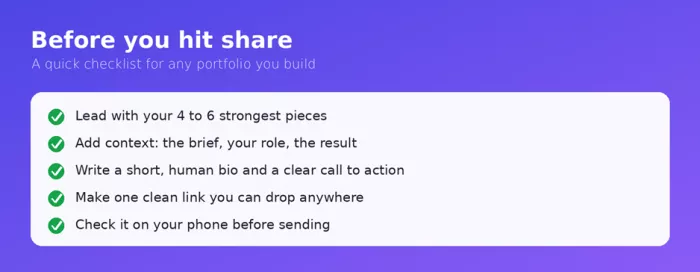
Before you send your portfolio to a single soul, run through these five points. They take a couple of minutes and make a real difference to how your work lands.
Final Thoughts
A portfolio is not about owning a fancy website. It is about making it easy for the right people to see your work, understand it, and get in touch. Every method in this guide does that without the cost, the code, or the wait.
So pick the one that fits your field, set it up today, and share your link with pride. Your next opportunity is far more likely to come from work that people can actually see than from a website that is still under construction.
Frequently Asked Questions
Can I really get clients without a website?
Yes. Plenty of freelancers land steady work through Behance, Dribbble, LinkedIn, and Instagram alone. A website can help later, but it is not what wins the job. Strong work, clear context, and an easy way to contact you are what matter most.
Which option is completely free?
All seven have a genuinely free path. Behance, Dribbble, LinkedIn, Notion, and Instagram are free to use, a PDF can be made with free tools like Canva or Google Slides, and link-in-bio services offer free plans that cover the basics.
How many pieces should a portfolio include?
Aim for four to six standout pieces when you are starting out. Quality and clarity beat quantity every time. You can always add more as your best work grows.
Should I use more than one of these methods?
Combining a couple works well. A common setup is one main showcase, such as Behance or a Notion page, tied together with a link-in-bio profile that you drop into your social bios and email signature.



Comments