InSnoop caught my attention for one simple reason: it offers a way to watch public Instagram Stories without signing into Instagram or appearing in the usual viewer list. No account connection, no registration, and no subscription.
But viewing Stories is only part of what matters. I wanted to understand how the search works, what the tool reveals about public profiles, whether Highlights and downloads are useful, and how much privacy it actually provides. InSnoop has some genuinely practical features, but its limitations become clearer once you look beyond the homepage.
What Exactly Is InSnoop?
InSnoop is a free Instagram Story viewer available at insnoop.com. It allows visitors to search for public Instagram profiles, browse available Stories and Highlights, and download supported media without signing into Instagram.
The website focuses on a narrow set of functions rather than attempting to replace Instagram. It doesn't provide a traditional social feed, messaging, or follower analytics. Its core offering is straightforward: enter a public Instagram username and access the available Story content through a browser.
A few details define the service:
● No Instagram account is required. The viewer works independently of a personal Instagram login, so there's no password or account authorization step.
● Public profiles are the focus. InSnoop cannot unlock private accounts or retrieve Stories restricted to Close Friends.
● Stories and Highlights are the main content types. The service organizes temporary Stories separately from saved Highlight collections.
● Photo and video downloads are advertised. Images are offered in JPEG format and videos in MP4, although successful downloads depend on media retrieval.
● There is no subscription requirement. The website provides free access and supports itself through advertising.
What makes InSnoop appealing is its simplicity. It offers a specific Instagram browsing function without asking visitors to create another account.
Getting Around the InSnoop Website
The homepage is organized around a central search field. Rather than presenting multiple tools or a complicated dashboard, it places the Instagram username search directly in front of visitors.
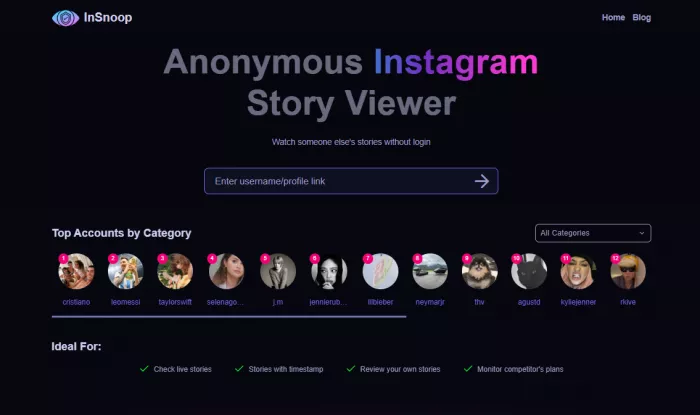
Below the search area is a collection of popular public Instagram accounts grouped by category. These provide another way to reach public profiles without manually entering every username.
The search process follows four steps:
1. Open insnoop.com in a browser and locate the username search field.
2. Enter a public Instagram handle, such as nasa, without needing to connect an Instagram account.
3. Submit the search to retrieve the account's available public Stories and Highlight collections.
4. Open the media, check its timestamp, or use the download control where supported.
One useful interface detail is the distinction between a failed profile search and an account with no available Stories. A nonexistent username can return a "No profile found" message, while a valid profile without retrievable content can display "No stories found."
That separation makes the service easier to understand. A blank result does not automatically mean the website is broken.
InSnoop also provides options for sorting available Stories and retaining recently searched usernames in the browser. These are small conveniences, but they reduce repeated typing when returning to the same public profiles.
Viewing Instagram Stories Without Logging In
This is the feature that gives InSnoop its purpose. The Story viewer retrieves publicly available media and displays it outside Instagram's normal interface. A successful search brings up the relevant profile information and its available Story collection.
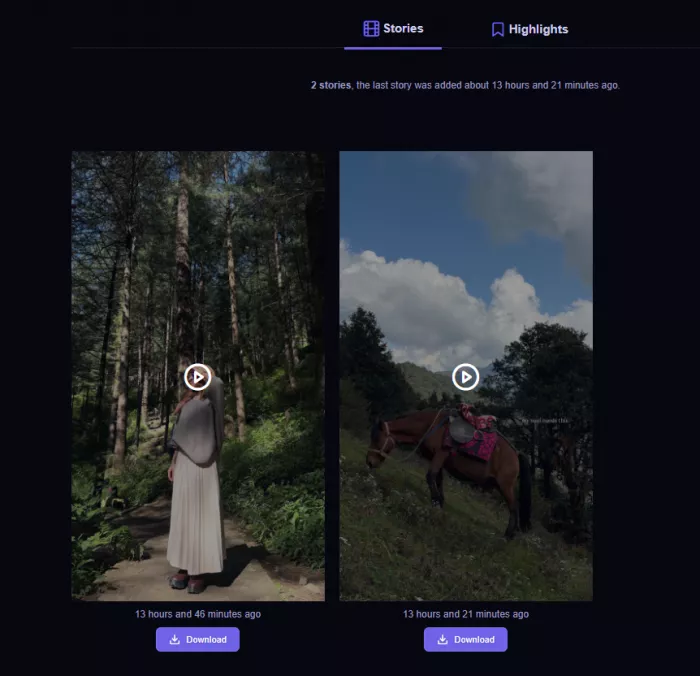
The result includes a useful mixture of visual and textual information. Alongside the media, InSnoop can display the number of retrieved Stories and indicate when the content was published.
That timestamp is more valuable than it initially appears. Instagram Stories normally remain active for 24 hours. InSnoop, however, can display cached copies that remain accessible beyond that period. A Story appearing in its results is not necessarily still active on Instagram.
This makes it important to look beyond the thumbnail. The publication time tells you whether you're examining a recent update or older content retained by the viewer.
The interface also includes sorting controls, which help when several Stories are available from the same account.
What works well: InSnoop gives visitors a way to find and open public Story content without navigating through Instagram's account-based interface.
What deserves attention: Its results can contain cached material, and the available collection should not be treated as a guaranteed live copy of everything currently visible on Instagram.
For checking public Stories casually, that difference may be minor. For following a time-sensitive announcement or monitoring a campaign, it becomes important.
Exploring Instagram Highlights
Highlights give InSnoop more value than a viewer restricted to active Stories. On Instagram, Highlights are collections of Stories that account owners choose to preserve on their profiles. Businesses often use them for product information, announcements, events, tutorials, and frequently requested details.
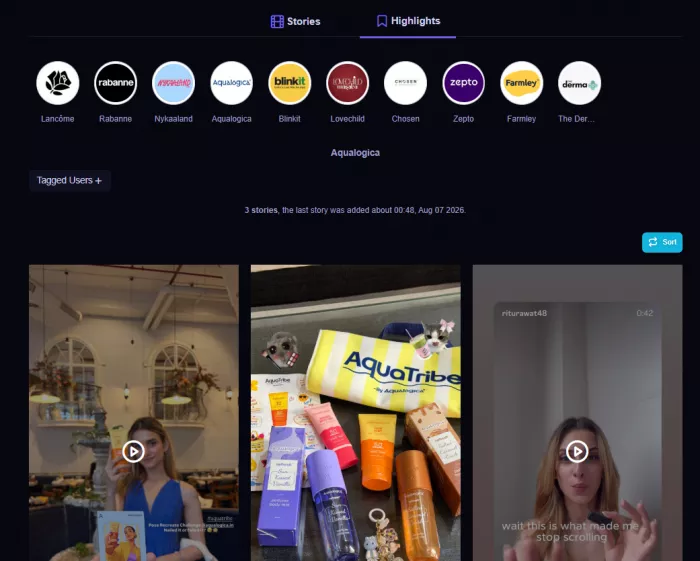
InSnoop organizes these saved collections separately from regular Stories.
The Highlights area displays available albums and allows visitors to open individual collections. Album information can include the collection name, Story count, and the date of its most recently saved content.
This organization is useful because it separates two different kinds of Instagram content: temporary daily updates and material the account owner has deliberately preserved.
For a public business account, Highlights can provide a clearer picture of its recurring promotions, services, or communication style than a single day's Stories.
There is one limitation worth understanding. A Highlight collection appearing on InSnoop does not guarantee that every original item has been retrieved.
The tool depends on accessible media, and some albums or individual Stories may fail to load. It is therefore better suited to browsing available public Highlights than maintaining a complete historical record.
Downloading Stories and Videos
The download feature is one of the reasons people look for third-party Instagram viewers in the first place. InSnoop offers a download control for supported Story media, with JPEG and MP4 listed as its image and video output formats.
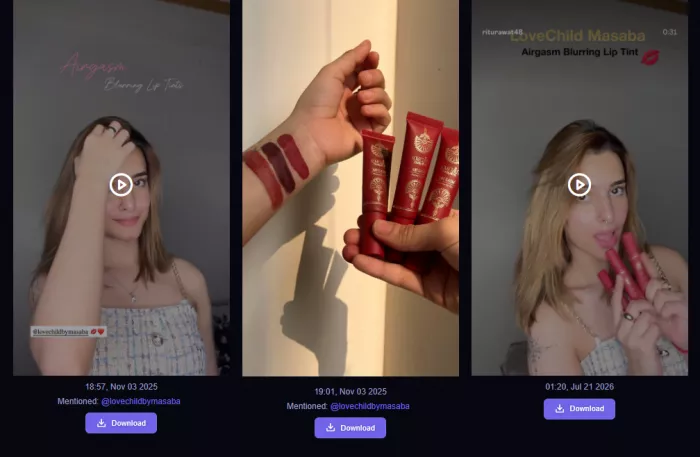
The process is designed around the individual Story. Rather than exporting an entire Instagram profile, the user opens the relevant content and selects its download control. There is an important distinction between viewing a Story and successfully saving it.
A Story can display correctly inside InSnoop while its download request fails. The viewer and downloader depend on different parts of the retrieval process, and successful playback doesn't establish that a usable file will be delivered.
Download failures have included server errors, so this is the feature I would be most cautious about relying on.
For downloads, three things matter:
● The correct media must be retrieved. An image or video should correspond to the Story selected rather than an unrelated preview.
● The file must actually save. A visible download button or a completed click does not establish that the browser received a usable file.
● The saved file must open properly. For video, playback, audio, duration, and resolution are more important than simply seeing an MP4 extension.
The availability of a free downloader is useful, but InSnoop is more convincing as a viewer than as a dependable media-saving service. It is also worth remembering that downloading public content does not grant permission to republish it. Public visibility and copyright ownership are separate matters.
How Fast and Reliable Is InSnoop?
InSnoop has a relatively lightweight workflow. There is no account authentication, no profile dashboard to configure, and no separate installation process. A successful search retrieves profile information, available Stories, and related metadata. The viewer can also reuse cached content, allowing repeated searches to return results without fetching everything again.
That caching helps explain why a public profile can load quickly during one search but take longer during another. It also explains why older Stories sometimes remain available.
The more useful question is not simply how fast InSnoop loads. It is whether the information returned is complete, current, and accessible.
| Action | What to Expect |
| Search a valid public username | Profile details and available Story content |
| Search an invalid username | A "No profile found" message |
| Open Highlights | Available saved collections and individual Stories |
| Repeat a recent search | Previously cached results may appear |
| Download Story media | A file request that can succeed or encounter a server error |
This distinction is important because search performance and download reliability are not identical. InSnoop's relatively simple interface is a strength, but its dependence on Instagram content retrieval means the results are not always consistent.
Where InSnoop Falls Short
The most noticeable weakness is that InSnoop does not provide a complete view of an Instagram account. It focuses on Stories and Highlights, so anyone expecting a full profile browser with regular posts, Reels, comments, and engagement statistics will find the experience limited.
Media availability is another issue. Not every Story is guaranteed to appear, and a missing result doesn't explain exactly what happened behind the scenes.
The main limitations fall into three areas.
1. Incomplete Content
InSnoop retrieves available public media rather than the complete history of an account. Stories that have been removed, restricted, or made unavailable may not appear. Conversely, cached copies can remain visible beyond their normal expiry.
This creates a content collection that is useful for browsing but not necessarily complete or perfectly current.
2. Download Reliability
The downloader is less dependable than the basic viewer. A working Story preview does not guarantee a successful JPEG or MP4 download.
For someone who primarily wants to watch public content, that may be acceptable. For someone trying to save multiple videos, repeated failures can become frustrating.
3. Advertising
InSnoop is free and supported by advertising. The number and placement of advertisements can vary between desktop and mobile browsing.
A desktop page can feel relatively uncluttered, while the same service on a phone may contain more advertising elements. The important precaution is to distinguish the media download control from unrelated advertisements and installation prompts.
These weaknesses don't make the core viewer unusable, but they narrow the situations where I would recommend relying on it.
Is InSnoop Really Anonymous?
InSnoop's strongest marketing claim is anonymous Instagram Story viewing. The service does not require visitors to log into Instagram. As a result, a visitor's personal Instagram username is not directly involved in the normal Story-viewing process.
That is the main difference between using InSnoop and opening a Story through Instagram while signed in.
However, anonymity has more than one meaning.
1. Anonymous to the Instagram creator means the person's own username is not displayed in the Story viewer list.
2. Anonymous to InSnoop would mean the website cannot identify or track the visitor's browsing activity.
These are not the same thing. InSnoop's privacy information describes the collection of technical and usage data, including IP addresses, device information, and details about how visitors interact with the service.
Its advertising and analytics systems can also create additional tracking activity. This means a visitor can avoid signing into Instagram while still sharing ordinary website data with InSnoop and its service providers.
There is another distinction: not requiring an Instagram login does not independently prove that every viewing session leaves no trace in Instagram's systems. InSnoop's anonymous-viewing claim is therefore best understood as a feature of its account-free browsing approach, not a guarantee of complete online anonymity.
Is InSnoop Safe to Use?
The absence of an Instagram login requirement is one of InSnoop's more reassuring qualities. It doesn't need your Instagram password to perform its advertised public Story search. There is no account authorization screen, no required browser extension, and no need to install unfamiliar software.
That removes some of the risks associated with third-party applications that ask for direct access to social media accounts.
Still, a website that doesn't request a password is not automatically private. InSnoop's privacy policy permits certain forms of visitor data collection, and its legal pages do not clearly identify the company operating the service.
The lack of transparent ownership makes it harder to determine who is responsible for data handling and how visitors can exercise privacy rights. For ordinary public Story browsing, the sensible approach is to use the official domain, avoid entering Instagram credentials, and decline unexpected requests to install software.
I would also avoid treating the service as a privacy tool for sensitive browsing. Its account-free functionality and its website data practices should be evaluated separately.
Using InSnoop on Mobile
One of the practical benefits of InSnoop is that it works through a mobile browser. There is no need to install a dedicated application simply to search for public Stories. The same username-based workflow is accessible on phones and desktop computers.
Mobile viewing is particularly relevant because Instagram content is designed for vertical screens. Stories themselves are naturally suited to portrait displays.
However, the surrounding website experience is different from the Story format. Advertising can occupy more noticeable space on a smaller screen, and download controls may require additional scrolling.
The absence of an app also means there are no native account-management features, saved media libraries, or notification controls associated with the service. For quick checks, browser access is convenient. For repeated professional monitoring, its limited organization becomes more apparent.
Is InSnoop Completely Free?
Yes. InSnoop currently provides its main viewing functions without paid membership.
There is no subscription requirement before searching for public accounts, and the website does not require a credit card to open Stories or Highlights. Its monetization comes from advertising rather than a conventional premium plan.
That makes the service accessible to someone who wants to check public Stories occasionally without paying for an Instagram-related tool. The trade-off is that the experience depends partly on advertising and the reliability of the website's retrieval system.
I wouldn't consider the absence of a subscription a reason to overlook those limitations. Free access is valuable only when the feature being used performs its intended function.
What InSnoop Cannot Access
InSnoop is not a way to bypass Instagram's privacy settings. A private account is visible only to approved followers, and InSnoop does not provide a legitimate method for accessing restricted Stories.
The same applies to Close Friends content, which is intended for a selected audience. Its other limitations are mainly functional:
● It doesn't provide the complete Instagram feed, including all regular posts and Reels, as part of its core Story-viewing experience.
● It doesn't expose private analytics such as Story reach, sticker interactions, audience retention, or viewer demographics.
● It doesn't support direct Instagram interactions such as following profiles, replying to Stories, or sending messages.
● It cannot guarantee recovery of deleted Stories or provide a complete archive of an account's publishing history.
Understanding these restrictions helps avoid confusing InSnoop with a full Instagram management or analytics service.
My Overall Assessment
After examining how InSnoop is organized and what its features actually provide, I see it as a focused public Story viewer rather than an all-purpose Instagram tool.
The service has a clear purpose, and its approach is easy to understand. Visitors can search for public accounts, access retrieved Stories, browse available Highlights, and attempt media downloads without connecting an Instagram account.
Its Story timestamps are particularly useful because they help identify content that may have been retained beyond Instagram's normal 24-hour window.
At the same time, the downloader deserves caution, and the privacy claims require a more careful reading than the homepage suggests.
| Area | Assessment |
| Story viewing | Its strongest demonstrated function |
| Highlights | Useful for browsing saved public content |
| Downloads | Available but not consistently reliable |
| Ease of use | Simple, search-focused interface |
| Privacy | No Instagram login, but website tracking exists |
| Value | Free and useful for occasional viewing |
The most important distinction is between being able to see content and being able to depend on the service for complete or permanently accessible content. InSnoop handles the first task better than the second.
Who Is InSnoop Best For?
I see InSnoop as most useful for someone who occasionally wants to browse public Instagram Stories without logging into the platform. That includes casual visitors interested in public creator updates and people researching how businesses organize their Story content.
It also has some value for marketers who want to observe public promotions, launches, and recurring Highlight topics.
However, it provides content visibility rather than performance measurement. It cannot reveal how many people completed a competitor's Story or which call-to-action generated the most clicks. I wouldn't choose it for serious Instagram analytics, long-term campaign archiving, or bulk video collection.
Those tasks require more dependable retrieval, structured records, and measurement capabilities that InSnoop doesn't offer.
Final Verdict: Is InSnoop Worth Using?
InSnoop is a useful option for accessing public Instagram Stories and Highlights without signing into Instagram. It is free, works through a browser, and keeps the search process relatively simple.
Its strengths are concentrated in the viewing experience. Public profile searches, organized Highlight collections, and Story timestamps provide practical information without requiring an Instagram account.
The weaker areas are download reliability, cached content, advertising, and limited transparency about website tracking.
I would consider InSnoop for occasional public Story browsing, but I wouldn't depend on it for downloading every video or monitoring Instagram content with complete accuracy.
My verdict: InSnoop is worth considering as a free anonymous Story viewer, provided its account-free approach is not confused with a guarantee of complete privacy. Its narrow functionality is both its biggest advantage and its main limitation.



Comments