Sound effects can make a simple edit feel finished. A footstep, glitch, door slam, whoosh, rain layer, impact hit, or background ambience can change how a viewer reads a scene.
AI sound effect tools are useful because they let creators generate sounds from prompts, video context, presets, or open-source models. The best tool depends on the workflow. Some are built for video editors, some for sound designers, some for social media creators, and some for developers who want model-level control.
Quick Comparison of the Best AI Sound Effect Tools
| Tool | Best For | Input Style | Starting Price |
| ElevenLabs Sound Effects | Realistic prompt-based SFX | Text prompt | Free, paid from $6/month |
| Adobe Firefly Sound Effects | Adobe video and creative workflows | Text, audio, creative controls | Free trial, paid from $9.99/month |
| Stable Audio | Longer audio beds and sound design | Text-to-audio | Paid from $11.99/month |
| MyEdit AI Sound Effect Generator | Fast browser-based SFX | Text prompt | Free, paid from $5/month billed yearly |
| SFX Engine | Credit-based AI sound generation | Text prompt | Paid from $10/month or $8/month billed yearly |
| Krotos Studio | Professional sound design workflow | Preset, performance, video-to-sound | Free trial, paid from $19.99/month |
| Filmora AI Sound Effect Generator | Video editors using Filmora | Text prompt inside editor | Paid from $49.99/year |
| AudioCraft / AudioGen | Developers and researchers | Open-source model workflow | Free/open-source |
1. ElevenLabs Sound Effects

ElevenLabs Sound Effects is one of the strongest options for creators who want realistic sound effects from simple text prompts. It fits best when a video, podcast editing, game scene, or short-form edit already has a clear direction but still needs custom audio around the action. A creator can describe the sound they want, such as footsteps in an empty hallway, heavy rain on glass, a futuristic alert, or a sharp cinematic impact.
Its main advantage is precision. The tool works better when the prompt explains the environment, object, movement, distance, and mood. That makes it useful for creators who need audio that feels tied to a specific scene rather than a generic stock clip.
| Area | Details |
| Workflow stage | Post-production sound filling |
| Best output | Ambience, object sounds, impacts, weather, transitions |
| Main strength | Realistic text-to-sound generation |
| Main limitation | Complex layered sounds may still need editing |
Useful when
● A YouTube video needs quick scene-matched effects.
● A podcast needs background atmosphere or room tone.
● A game prototype needs footsteps, alerts, hits, or object sounds.
● A creator wants custom audio without recording Foley manually.
Not ideal when
● The project needs full audio mastering.
● The sound must be placed exactly on the timeline without editing.
● The scene needs several layers mixed together professionally.
Pricing: ElevenLabs has a free plan at $0/month with 10,000 credits. Paid plans start with Starter at $6/month, while Creator is listed at $11/month during the current first-month offer and Pro costs $99/month.
Verdict: ElevenLabs is the best starting point for creators who want realistic, prompt-based sound effects without using a traditional sound library.
2. Adobe Firefly Sound Effects

Adobe Firefly Sound Effects is built for creators who already work inside Adobe’s creative ecosystem. It is useful for video editors, marketers, short-film creators, and social media teams that want sound effects connected to a broader design, video, and AI workflow. The tool supports custom sound generation and is positioned around commercial creative use.
The biggest reason to choose Firefly is workflow comfort. It makes sense when sound effects are part of a larger Adobe project rather than a standalone audio task. A creator building product videos, brand ads, social clips, or explainers can generate sound effects while staying close to the same creative environment used for visuals and editing.
| Area | Details |
| Workflow stage | Creative production and post-production |
| Best output | Commercial-friendly SFX for videos, ads, tutorials, and social content |
| Main strength | Strong fit for Adobe users |
| Main limitation | Credit-based plans can become expensive for heavy use |
Useful when
● A video team already uses Adobe tools.
● A project needs sound effects for ads, explainers, or branded content.
● A creator wants AI audio inside a wider visual workflow.
● A marketer needs fast effects for short-form assets.
Not ideal when
● The user only needs occasional free sound effects.
● The workflow is outside Adobe tools.
● The creator wants a simple pay-per-effect model.
Pricing: Firefly has limited free access. Firefly Standard starts at $9.99/month with 2,000 monthly generative credits. Firefly Pro costs $19.99/month with 4,000 credits. Firefly Pro Plus is regularly $49.99/month, and Firefly Premium is regularly $199.99/month.
Verdict: Adobe Firefly is best for creators who want AI sound effects as part of a larger Adobe production workflow.
3. Stable Audio
Stable Audio is better suited for creators who want broader audio generation rather than only short sound effects. It can be useful for ambient beds, transitions, music-like textures, mood-based audio, and longer sound design pieces. For editors working on cinematic clips, games, background sequences, or experimental videos, Stable Audio gives more room than a basic sound effect button.
Its strength is range. It can create longer audio outputs, which makes it different from tools focused only on quick hits, beeps, pops, or footsteps. The tradeoff is that it may feel less direct for creators who only need a single, short, practical sound effect.
| Area | Details |
| Workflow stage | Sound design and audio bed creation |
| Best output | Longer audio, ambience, mood layers, music-like textures |
| Main strength | More flexible audio generation range |
| Main limitation | Not always the fastest option for tiny SFX needs |
Useful when
● A video needs background atmosphere instead of one short effect.
● A creator wants longer audio textures for scenes.
● A game or film project needs mood-based sound design.
● A sound designer wants material to edit further.
Not ideal when
● The creator only needs simple one-click effects.
● The workflow requires built-in video editing tools.
● The project needs a large library of ready-made preset sounds.
Pricing: Stable Audio pricing starts at $11.99/month. Its Pro plan includes 250 monthly track generations, track duration up to 3 minutes, and 30 minutes of monthly upload allowance.
Verdict: Stable Audio is a better fit for sound designers and video creators who need longer audio material, not just quick sound buttons.
4. MyEdit AI Sound Effect Generator
MyEdit is a simple browser-based option for creators who want quick AI sound effects without installing desktop software. It works well for beginners, social media editors, casual YouTubers, and podcasters who need short effects in common formats. The tool lets users generate sounds from text and download outputs in formats such as MP3, WAV, FLAC, or M4A.
The biggest advantage is accessibility. MyEdit does not try to be a professional sound design suite. It is more useful when the creator wants to generate a few usable effects quickly, test variations, and download the result for a simple editing workflow.
| Area | Details |
| Workflow stage | Quick browser-based generation |
| Best output | Simple SFX, casual video audio, podcast effects |
| Main strength | Easy access with multiple download formats |
| Main limitation | Less advanced than studio-grade sound design tools |
Useful when
● A beginner wants fast sound effects online.
● A podcast needs simple background or reaction sounds.
● A social video needs a quick whoosh, pop, alert, or comic effect.
● A creator wants free daily generations before upgrading.
Not ideal when
● The project needs detailed sound layering.
● The user wants video-to-sound matching.
● The creator needs professional timeline-based audio editing.
Pricing: MyEdit has a free tier. Its pricing page lists Audio Pro at $5/month when billed yearly, equal to $60/year. Creator Pro costs $7/month when billed yearly, equal to $84/year.
Verdict: MyEdit is best for beginners and casual creators who want fast sound effects from a browser.
5. SFX Engine
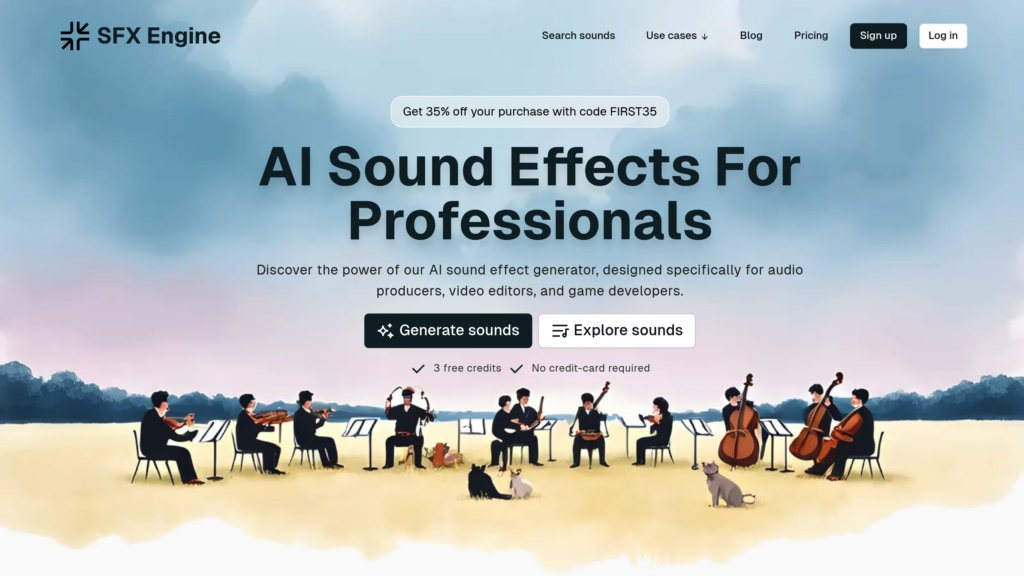
SFX Engine is focused directly on AI sound effect generation, which makes it more specialized than many broader creative tools. It is useful for video editors, game developers, filmmakers, podcasters, app developers, and advertisers who want custom sound effects from prompts. The platform also includes background music creation and API access depending on the plan.
Its pricing model is clearer than many AI audio tools because it uses plans with credit limits. That makes it easier for frequent users to estimate how much generation capacity they are buying. The tool is especially practical when sound effect generation is a repeated need rather than a one-time experiment.
| Area | Details |
| Workflow stage | Repeated prompt-based SFX generation |
| Best output | Custom effects, background music, studio-quality audio |
| Main strength | Clear credit-based plans |
| Main limitation | No strong free tier shown on the pricing page |
Useful when
● A creator needs many custom sound effects every month.
● A game developer needs quick audio for prototypes.
● A podcast or ad project needs original effects.
● A developer wants API access for audio generation.
Not ideal when
● The user wants a completely free tool.
● The project needs manual editing controls inside the same platform.
● The creator only needs occasional one-off sounds.
Pricing: SFX Engine starts with Starter at $10/month, or $8/month when billed yearly at $96/year. Creator costs $25/month, or $20/month billed yearly at $240/year. Pro costs $90/month, or $72/month billed yearly at $864/year.
Verdict: SFX Engine is a strong pick for users who want a dedicated AI sound effect generator with predictable credit-based pricing.
6. Krotos Studio

Krotos Studio is different from basic prompt-based tools because it is built around professional sound design. It is useful for editors and sound designers who want to create, perform, and control sounds rather than only type a prompt and download a file. The platform covers categories such as Foley, ambiences, whooshes, footsteps, transitions, vehicles, creatures, and cinematic effects.
Its value is in control. Krotos Studio is closer to a sound design instrument than a simple generator. Users can shape sounds in real time, drag results into editing timelines, and use more advanced options on higher plans. It is better for serious creators than casual users who only need a few quick effects.
| Area | Details |
| Workflow stage | Professional sound design and timeline delivery |
| Best output | Foley, ambiences, cinematic effects, performable SFX |
| Main strength | Real-time control and professional workflow |
| Main limitation | Higher learning curve than text-only generators |
Useful when
● A video editor wants cinematic results without building every layer manually.
● A sound designer needs Foley, ambiences, impacts, or whooshes.
● A project needs royalty-free effects for client or commercial work.
● A professional workflow benefits from drag-and-drop timeline delivery.
Not ideal when
● The user wants only a free prompt box.
● The creator does not need professional control.
● The project is too simple to justify a dedicated sound design tool.
Pricing: Krotos Studio offers a free trial. Monthly pricing starts at $19.99/month for Studio and $49.99/month for Pro. Annual billing shows Studio at $6.99/month and Pro at $16.32/month, billed yearly. Max costs $83.33/month billed yearly.
Verdict: Krotos Studio is best for serious editors and sound designers who need more control than a basic AI SFX generator can provide.
7. Filmora AI Sound Effect Generator
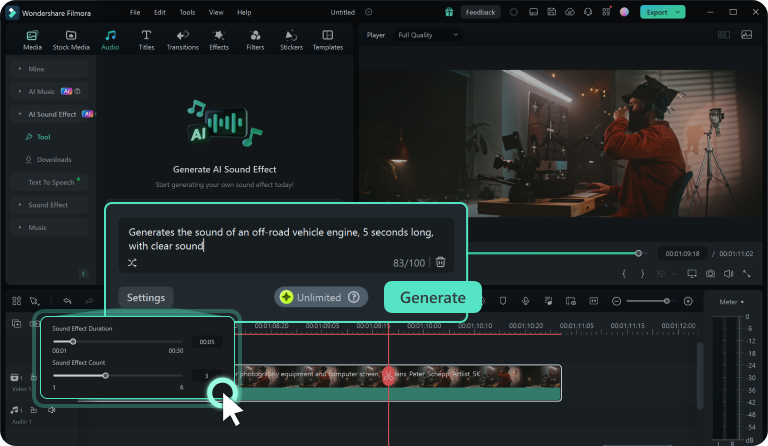
Filmora’s AI Sound Effect Generator is a practical option for creators who already edit videos inside Wondershare Filmora. Instead of generating sound effects in a separate browser tool, users can create audio from descriptions inside the video-editing workflow. That makes it useful for YouTubers, tutorial creators, vloggers, and small teams that want editing and AI audio in the same software.
The main benefit is convenience. Filmora is not only an AI sound tool, so it makes sense when the creator also needs trimming, transitions, text, subtitles, effects, and exports. It is less attractive if someone only wants sound effects and does not need another video editor.
| Area | Details |
| Workflow stage | Video editing with built-in AI audio |
| Best output | Scene effects, creator videos, social edits |
| Main strength | AI SFX inside a full video editor |
| Main limitation | Not ideal as a standalone sound effects platform |
Useful when
● A creator already edits inside Filmora.
● A YouTube or social video needs sound effects during editing.
● A beginner wants one tool for video and audio tasks.
● A small team wants a lower-cost editor with AI features.
Not ideal when
● The user already has a professional editing setup.
● The creator only needs sound effects and nothing else.
● The project requires advanced audio post-production.
Pricing: Filmora has a free download/trial. Paid individual plans start with Basic at $49.99/year. The Advanced plan costs $59.99/year and includes 1,000 Filmora AI credits per month. The Perpetual plan is listed at $79.99 as a one-time payment.
Verdict: Filmora is best for video creators who want AI sound effects inside a complete editing workflow rather than a separate audio tool.
8. AudioCraft / AudioGen
AudioCraft is Meta’s open-source audio research framework, and AudioGen is the part most relevant to sound effects and environmental audio. It is not built like a simple consumer website. Instead, it is better suited to developers, researchers, technical creators, and audio engineers who want to experiment with generative audio models.
The main value is flexibility. Because it is open-source, users can study the code, test models, build custom workflows, and experiment beyond the limits of commercial prompt boxes. The tradeoff is setup complexity. It is not the right choice for a casual creator who wants a polished web interface and instant downloads.
| Area | Details |
| Workflow stage | Research, development, and custom audio experiments |
| Best output | Model-based audio, sound effects, generative experiments |
| Main strength | Free open-source framework |
| Main limitation | Requires technical setup and model knowledge |
Useful when
● A developer wants to build custom audio tools.
● A researcher wants to test generative audio models.
● A technical creator wants more control than a web app offers.
● A studio wants to explore open-source sound generation.
Not ideal when
● The user wants a beginner-friendly interface.
● The creator needs commercial support and simple licensing.
● The workflow depends on quick drag-and-drop audio exports.
Pricing: AudioCraft is free and open-source. The real cost is technical setup, compute, and time rather than a subscription fee.
Verdict: AudioCraft is best for technical users who want open-source control over sound generation instead of a ready-made creator platform.
How to Choose the Right AI Sound Effect Tool
The right tool depends on the production workflow. For most creators, ElevenLabs is the easiest first choice because it gives strong text-to-sound results without much setup. Adobe Firefly makes more sense for creators already using Adobe tools, while Filmora is better for users who want sound effects inside a video editor.
For deeper sound design, Stable Audio, Krotos Studio, and SFX Engine offer more specialized workflows. Stable Audio works better for longer audio and mood-based sound design. Krotos Studio is stronger for professionals who want to perform and control sound. SFX Engine is useful when a creator wants a dedicated, credit-based AI sound generator.
For beginners, MyEdit is the easiest browser-based option. For developers and researchers, AudioCraft is the better choice because it gives open-source flexibility instead of a polished consumer interface.
Common Limits of AI Sound Effect Generators
AI sound effect generators are fast, but they are not perfect replacements for skilled sound design. A prompt can produce a usable sound, but the final result may still need trimming, volume balancing, EQ, compression, or layering inside an editor.
Creators should also be careful with licensing. Some tools allow commercial use only on paid plans, while others offer royalty-free outputs with specific restrictions. Before using generated audio in ads, games, paid client work, or monetized videos, check the license terms of the exact plan.
AI sound tools are best treated as production accelerators. They reduce the time spent searching, recording, or building first drafts of effects, but serious projects still benefit from manual editing and final mix work.
Final Verdict
ElevenLabs is the best overall starting point for realistic AI sound effects. Adobe Firefly is the stronger choice for Adobe users, while Filmora works well for creators who want sound effects inside a video editor. MyEdit is the easiest beginner option, and SFX Engine gives frequent users a dedicated credit-based workflow.
Stable Audio is better for longer audio textures and mood-based sound design. Krotos Studio is the most professional option on this list for hands-on sound designers. AudioCraft is not for casual creators, but it is valuable for developers and researchers who want open-source control.
For most readers, the best practical combination is simple: use ElevenLabs or MyEdit for fast custom effects, use Adobe Firefly or Filmora if the workflow is video-first, and move to Krotos Studio or Stable Audio when the project needs deeper sound design.



Comments