A photographer’s social profile may attract attention, but it rarely contains enough space to explain services, display specialist portfolios, collect enquiries and promote products. A link-in-bio page closes that gap by giving visitors one organized route to the photographer’s most important destinations.
The right tool should do more than stack several buttons. Photographs need enough visual space to remain persuasive, while booking links, client galleries and stores must be easy to find. This guide compares six strong options based on visual presentation, customization, lead generation, analytics, selling tools and cost.
Quick Comparison
| Tool | Best for | Free option | Paid pricing starts at |
| Linktree | A simple all-purpose photography hub | Yes | $6 per month with annual billing |
| Later Link in Bio | Making Instagram posts clickable | Yes | Link-in-bio tools are available free |
| Beacons | Selling presets and digital products | Yes | $8.33 per month with annual billing |
| Milkshake | Creating a visual page from a phone | Yes | $2.99 per month |
| Carrd | Building a custom-branded mini-site | Yes | $9 per year |
| Taplink | Collecting enquiries and presenting packages | Yes | $4 per month with annual billing |
Prices were checked on July 23, 2026. All amounts are shown in US dollars unless stated otherwise. Regional prices, taxes and app-store charges may differ.
What Photographers Should Look For
Generic link-sharing ability is not enough to separate these platforms. Nearly every tool can send someone to a website or social profile. The meaningful differences appear in how those links are presented and what visitors can do without leaving the page.
A useful photography link-in-bio tool should provide:
● Image-led layouts that preserve visual impact. Portfolio thumbnails, image cards and clickable social grids are more effective for photography than long collections of identical text buttons.
● Clear routes to services and enquiries. A prospective client should be able to find the relevant portfolio, review the service and contact or book the photographer without searching through unrelated links.
● Enough branding control to build trust. Fonts, colors, button styles, backgrounds and custom domains should complement the photographer’s website rather than make the page look like a disconnected third-party profile.
● Campaign flexibility. Mini sessions, seasonal bookings, workshops and print releases often run for limited periods, so links should be easy to feature, schedule, hide or reorder.
● Useful performance data. Click analytics should reveal whether visitors are opening wedding galleries, portrait packages, print stores or enquiry forms.
● Support for additional income. Photographers selling presets, editing guides, templates, prints or courses may need checkout, digital delivery and email collection tools.
1. Linktree: Best Overall for Simplicity
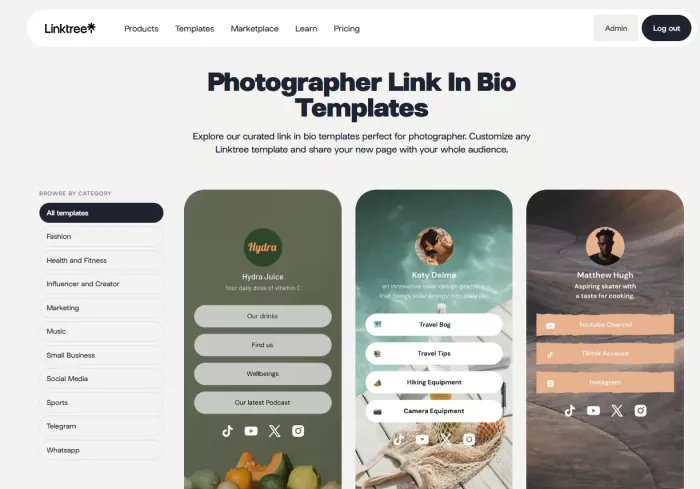
Linktree is the easiest recommendation for photographers who need one dependable page connecting several existing platforms. It works well when the photographer already has a main website, external booking system, proofing gallery and online store but needs a cleaner way to organize them for social visitors.
Key Features
● Unlimited links can be used for specialist galleries, service pages, client logins, booking forms and social profiles.
● Featured and animated links can give a current promotion more prominence than permanent portfolio links.
● Themes, color palettes, backgrounds, button styles and logos provide several levels of visual customization.
● Built-in analytics help compare page traffic and individual link performance.
● Email collection can be connected with services such as Mailchimp, Kit, Klaviyo and Google Sheets.
● Digital products, images and courses can be sold through supported Linktree monetization tools.
Advantages and Limitations
| Advantages | Limitations |
| The editor is straightforward, so portfolios and campaigns can be added or reordered quickly. | The familiar stacked-link format may not feel distinctive enough for a premium photography brand. |
| It works alongside almost any portfolio, gallery, store or scheduling platform. | It displays links effectively but does not provide the depth of a full photography website. |
| Featured links are useful for mini sessions, print releases and newly published galleries. | Stronger design controls and comprehensive analytics are reserved for higher plans. |
| The platform combines links, audience collection and basic selling tools in one account. | Seller fees may make lower plans less attractive for photographers with regular digital sales. |
Pricing
| Plan | Price |
| Free | $0 |
| Starter | $6 per month billed annually, or $8 monthly |
| Pro | $12 per month billed annually, or $15 monthly |
| Premium | $30 per month billed annually |
The Free plan includes unlimited links, embeds, essential analytics and a QR code. Starter adds custom themes and subscriber collection, while Pro adds deeper branding, highlighted links, comprehensive analytics and email integrations.
Best for: Photographers who want a recognizable, low-maintenance page connecting several existing services.
Choose it when: Fast setup and easy campaign changes matter more than complete control over the page structure.
Avoid it when: The bio page must resemble a custom editorial portfolio rather than a creator-style link page.
2. Later Link in Bio: Best for Instagram Portfolios
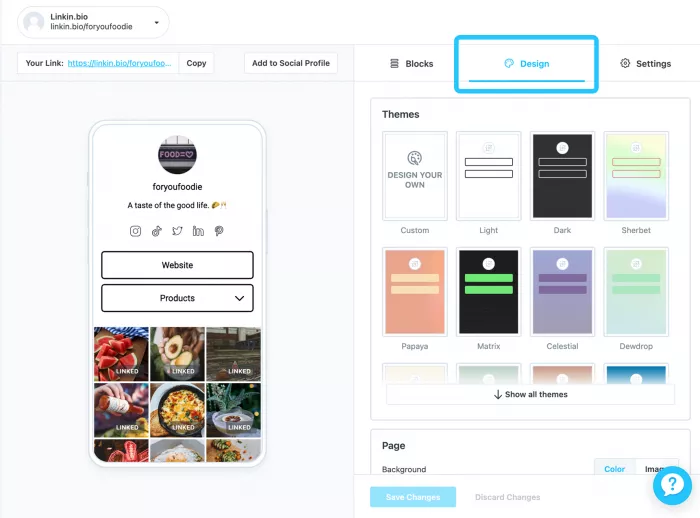
Later Link in Bio is particularly useful for photographers whose Instagram feed already functions as their main showcase. Instead of asking visitors to locate a matching gallery or service through a list of buttons, the tool can recreate the visual feed and attach links directly to individual posts.
A wedding photograph could lead to a wedding portfolio, a studio portrait to session pricing and a behind-the-scenes Reel to a workshop registration page.
Key Features
● Instagram posts and Reels can be connected to external pages, turning the social grid into a clickable portfolio.
● Free accounts can attach one link to each Instagram post, while eligible paid tiers support up to five links per post.
● Featured media and banners can promote a current gallery, booking window or photography product.
● Buttons can be added for general destinations such as the main website, contact page or client gallery.
● Page colors, fonts, backgrounds, button shapes and themes can be adjusted to match the photographer’s visual identity.
● Google Analytics, email collection, Mailchimp integration and click analytics provide additional campaign data.
Advantages and Limitations
| Advantages | Limitations |
| Visitors can select the exact image or Reel that originally caught their attention. | The system is most valuable to photographers who publish consistently on Instagram. |
| The feed-based structure feels more visual than a standard list of links. | Linked posts must be configured and maintained as new content is published. |
| Core Link in Bio functions are available without a separate paid subscription. | The free page includes Later branding and shorter analytics history. |
| It can combine social scheduling and link management within the same workflow. | Photographers who only need a basic link page may find the wider Later platform excessive. |
Pricing
| Plan | Price |
| Free Link in Bio | $0 |
| Starter | $18.75 per month billed annually |
| Growth | $37.50 per month billed annually |
| Scale | $82.50 per month billed annually |
The standalone free option is enough for many photographers. Paid Later plans become relevant when social scheduling, longer analytics history, collaboration or management of several profiles is also required.
Best for: Instagram-focused photographers who want each post to lead to a related gallery, service or product.
Choose it when: The Instagram grid already acts as the photographer’s strongest portfolio preview.
Avoid it when: Social posts are irregular or most leads arrive from platforms outside Instagram and TikTok.
3. Beacons: Best for Selling Presets and Resources
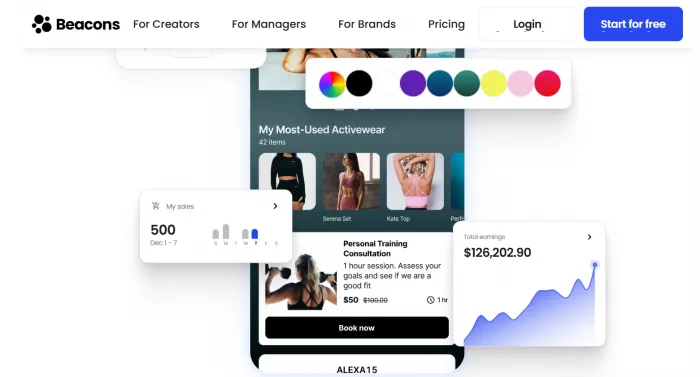
Beacons is closer to a compact creator-business platform than a simple collection of links. It is well suited to photographers who combine client work with digital income from Lightroom presets, editing guides, templates, courses, affiliate recommendations or memberships.
The store, email and media-kit tools reduce dependence on separate services, although photographers only looking for portfolio navigation may not use enough of the platform to justify a higher plan.
Key Features
● Customizable link pages support different fonts, colors, backgrounds, layouts and link styles.
● The built-in store can sell unlimited digital products, including presets, guides and educational downloads.
● Email collection and campaign tools can be used to announce workshops, print releases or seasonal sessions.
● Real-time analytics cover traffic sources, clicks, conversions and sales activity.
● A media-kit builder can organize audience information and partnership details for brand collaborations.
● Paid plans add custom domains, higher email limits, lower seller fees and expanded website features.
Advantages and Limitations
| Advantages | Limitations |
| Store, email, analytics and media-kit tools are managed from one platform. | The number of features can make setup feel heavier than a simple link page. |
| Digital products can be sold without connecting a separate storefront. | The free plan charges a 9% seller fee in addition to payment-processing costs. |
| The media kit is useful for photographers pursuing creator campaigns or equipment partnerships. | Some tools are designed for the wider creator market rather than photography businesses specifically. |
| Paid plans provide custom domains and more developed marketing functions. | The most attractive selling terms require the $30-per-month Creator Plus plan. |
Pricing
| Plan | Annual-billing price | Monthly price |
| Free | $0 | $0 |
| Creator | $8.33 per month, billed as $100 yearly | $10 |
| Creator Plus | $25 per month, billed as $300 yearly | $30 |
| Creator Max | $75 per month, billed as $900 yearly | $90 |
The Free plan permits unlimited digital products but applies a 9% seller fee. Creator Plus removes Beacons seller fees and adds unlimited email sends, courses, memberships and expanded selling tools.
Best for: Photographers earning from presets, education, affiliate partnerships and other creator products.
Choose it when: Selling and audience building are as important as directing visitors to a portfolio.
Avoid it when: The photographer only needs a clean page containing four or five external links.
4. Milkshake: Best for Mobile Visual Storytelling
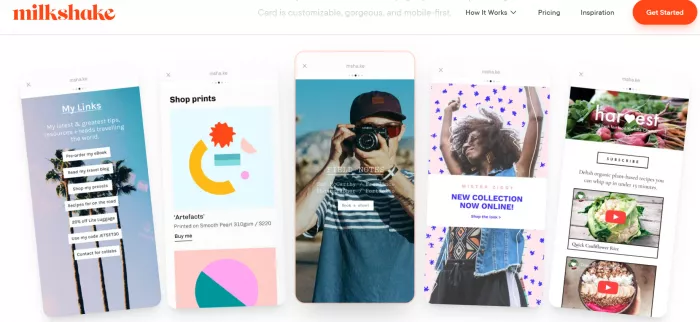
Milkshake builds a small mobile website from a collection of swipeable Cards. Instead of placing everything on one long page, a photographer can create separate Cards for an introduction, featured portfolio, services, products, contact form and social links.
The page can be created and managed through the mobile app, which suits photographers who handle most of their social publishing from a phone.
Key Features
● Unlimited Cards allow the site to be divided into clear sections instead of one continuous list.
● Templates, images, colors and fonts can be customized without coding.
● Top Picks, About, Links, YouTube and Sell Cards support different content types.
● Digital files such as presets, guides and templates can be sold through Stripe on every plan.
● Pro adds contact forms, mailing-list integrations, marketing tools and 365 days of analytics.
● Pro+ adds a custom domain and Google Analytics integration.
Advantages and Limitations
| Advantages | Limitations |
| The card format can tell a clearer visual story than a plain stack of buttons. | Sites are built through a mobile app, which may not suit desktop-first workflows. |
| The free plan includes substantial design control and unlimited links. | Custom domains are restricted to the highest subscription level. |
| Photographers can sell presets or guides without paying for a subscription first. | Milkshake charges a percentage on digital sales in addition to Stripe processing. |
| The editor is convenient for updating campaigns while working away from a computer. | Advanced forms, mailing lists and longer analytics history require Pro. |
Pricing
| Plan | Price |
| Free | $0 |
| Lite | $2.99 per month |
| Pro | $5 per month billed as $59.99 yearly |
| Pro+ | $8.33 per month billed as $99.99 yearly |
Milkshake’s selling fee is 12% on Free and Lite, 9% on Pro and 7% on Pro+, excluding Stripe processing fees.
Best for: Photographers who want a visually structured mini-site they can build and update from a phone.
Choose it when: Image presentation and mobile editing are more important than complex business automation.
Avoid it when: A custom domain, detailed integrations and low digital-selling fees are required at the lowest possible price.
5. Carrd: Best for Custom Branding
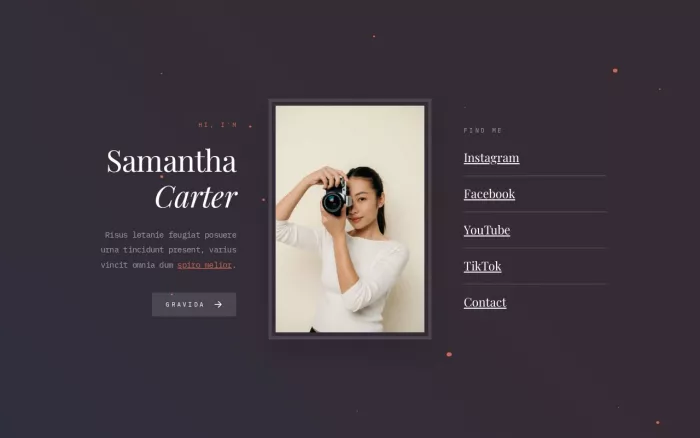
Carrd is technically a one-page website builder, but it works extremely well as a custom link-in-bio site. Unlike tools built around a fixed profile layout, Carrd allows photographers to control the hierarchy of images, text, buttons, forms and embedded content.
A photographer could create a full-width hero image, place wedding and portrait portfolios in separate visual panels, add testimonials, embed a scheduling tool and finish with a short enquiry form.
Key Features
● Flexible one-page templates provide more control over layout than standard link-in-bio themes.
● High-quality images, slideshows, videos and custom backgrounds support visual portfolios.
● Pro Standard includes custom domains, forms, widgets, embeds, analytics and metadata controls.
● Third-party booking, payment and form services can be embedded through supported widgets or custom code.
● Carrd branding can be removed on paid plans.
● One account can publish several sites, allowing separate pages for different photography brands or campaigns.
Advantages and Limitations
| Advantages | Limitations |
| The page can look like part of the photographer’s main brand rather than a standard creator profile. | Building a polished custom layout takes more time than filling in a Linktree template. |
| Pro Standard offers strong value at $19 per year. | Carrd does not include a native photography booking or client-gallery system. |
| Forms and embeds can connect external scheduling, payment and email tools. | Some integrations require additional setup or subscriptions to third-party services. |
| Multiple sites can be created for campaigns, specialties or separate brands. | Its analytics and commerce functions are less centralized than those offered by Beacons. |
Pricing
| Plan | Price |
| Free | $0 |
| Pro Lite | $9 per year |
| Pro Standard | $19 per year |
| Pro Plus | $49 per year |
Pro Lite removes branding and unlocks higher-quality media, but it does not include custom domains or forms. Pro Standard is the practical choice for most professional photographers because it adds ten sites, custom domains, forms, embeds and analytics.
Best for: Photographers who care about visual identity and want the bio page to resemble a custom mini-site.
Choose it when: The photographer is willing to spend more time designing the page in exchange for greater control.
Avoid it when: The main priority is a ready-made store, automatic Instagram grid or built-in booking workflow.
6. Taplink: Best for Enquiries and Service Packages
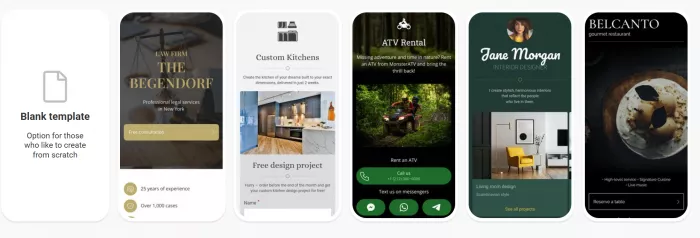
Taplink is a strong option for service-based photographers who want to explain packages and collect leads directly from the bio page. It offers more content blocks than a basic link tool, allowing the page to contain images, price lists, forms, FAQs, countdown timers and internal pages.
That makes it useful for wedding, family, newborn, property and event photographers whose visitors may need information before submitting an enquiry.
Key Features
● Images, carousels and video blocks can present portfolios or show the differences between photography packages.
● Price-list blocks can summarize session lengths, deliverables and starting rates.
● Forms collect names, email addresses, phone numbers and project information.
● Internal pages can separate services such as weddings, portraits, events and commercial work.
● Business users can accept payments, sell digital products, connect a custom domain and manage leads through a built-in CRM.
● Scheduled blocks and countdown timers can support limited mini-session campaigns.
Advantages and Limitations
| Advantages | Limitations |
| Visitors can review packages and submit an enquiry without moving through several external pages. | Most photography-relevant media features require the Pro plan. |
| Forms and pricing blocks are useful for service businesses with structured packages. | Custom domains and branding removal require Business. |
| Internal pages prevent the main screen from becoming an excessively long list. | The large collection of blocks can produce a cluttered page without careful editing. |
| Annual pricing remains lower than many competing business-focused tools. | It provides a mini-site, but it is not designed for large, high-resolution client galleries. |
Pricing
| Plan | Price with annual billing |
| Basic | $0 |
| Pro | $4 per month |
| Business | $8 per month |
Pro unlocks images, carousels, videos, professional themes and click analytics. Business adds forms, digital products, payments, internal pages, CRM tools, removal of Taplink branding and custom-domain support.
Best for: Service photographers who want to present packages and capture detailed enquiries.
Choose it when: The bio page needs to operate as a compact sales and lead-generation page.
Avoid it when: The photographer mainly wants a minimal page linking to an established portfolio and booking system.
Which Tool Fits Your Workflow?
The best choice depends less on the number of available features and more on what should happen after someone opens the page.
| Photography workflow | Recommended tool | Why |
| Several portfolios and external services need organizing | Linktree | It provides the simplest central directory. |
| Most potential clients discover work through Instagram posts | Later Link in Bio | Individual posts can lead to matching galleries or service pages. |
| Presets, courses or guides generate meaningful revenue | Beacons | Store, email and creator-business tools are integrated. |
| The entire page will be managed from a phone | Milkshake | Its mobile Card editor is built for this workflow. |
| Brand presentation matters more than rapid setup | Carrd | It provides the greatest layout freedom at a low annual cost. |
| Visitors need to compare services before enquiring | Taplink | Forms, price lists and internal pages support a compact booking funnel. |
Build Around One Main Action
A link-in-bio page becomes less effective when every destination receives equal emphasis. A photographer may have 15 useful links, but presenting all 15 at once forces the visitor to decide what matters.
Start with the main business objective and organize the page around it:
● A wedding photographer seeking bookings should lead with a wedding portfolio and enquiry button, not six social icons.
● A portrait photographer promoting mini sessions should place the current offer, date information and booking link before permanent resources.
● A commercial photographer should prioritize selected work, client industries, contact details and a downloadable portfolio.
● A photography educator should place the main course, preset collection or email sign-up above general social links.
● A print seller should feature the current collection and delivery information before unrelated content.
Supporting links can remain lower on the page, but the first screen should answer two questions quickly: what kind of photography is offered, and what should the visitor do next?
Final Recommendation
Linktree is the strongest general choice because it is easy to maintain and works with almost any existing photography setup. It is suitable for photographers who already have a professional website and need a simple route from social media to portfolios, bookings and client galleries.
Later Link in Bio is the better visual choice for Instagram-led discovery. Connecting individual photographs and Reels to matching pages removes much of the friction created by a standard button list.
Beacons is the best commercial option for digital sellers, while Taplink is more useful for service packages and enquiries. Milkshake suits photographers who prefer a mobile visual builder, and Carrd provides the strongest design control for those prepared to create a more customized page.
The link-in-bio page does not need to replace a full portfolio. Its job is narrower and more practical: preserve the visitor’s interest, show the most relevant next step and make that step easy to take.



Comments