Creating a voiceover sounds simple until pronunciation, pacing, and repeated recordings start taking up more time than the video itself. TTSMaker addresses that problem with a browser-based text-to-speech generator that turns written scripts into downloadable narration.
What caught my attention was its free commercial-use license and the amount of control available without a subscription. However, a useful voice generator needs more than an impressive voice library. The real questions are how easily creators can prepare narration, correct the delivery, and use the result in their videos.
What TTSMaker Offers
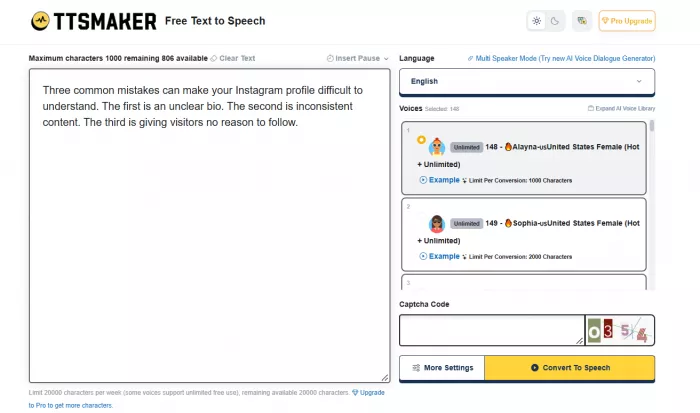
TTSMaker is an online AI voice generator available at ttsmaker.com. It converts written text into speech and supports more than 100 languages and 600 AI voices across its catalog. The platform offers a permanent free tier, with paid subscriptions providing longer conversions, additional character allowances, and advanced voice-editing features.
Its interface is built around a text editor, language and voice selectors, conversion settings, and audio downloads. The approach is refreshingly straightforward. There are no timelines or complicated production dashboards to navigate for a basic voiceover.
The main features include:
● Text-to-speech conversion: Generate spoken narration from written scripts using synthetic voices in supported languages.
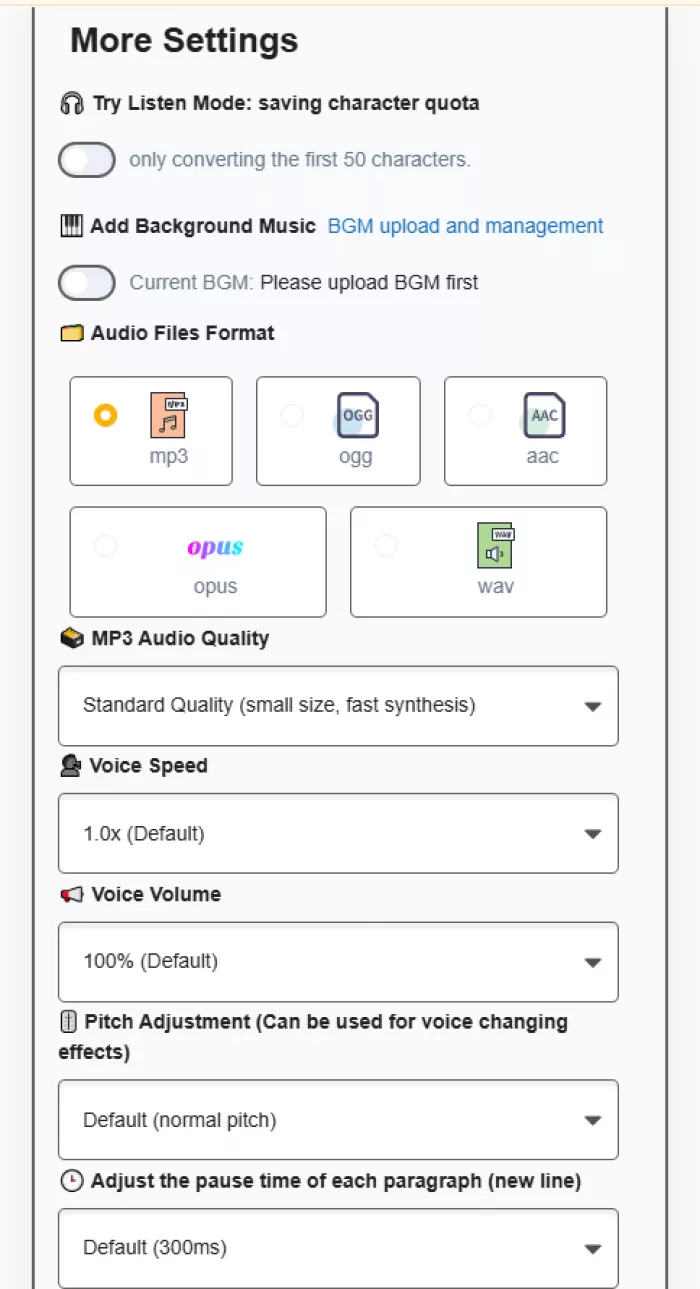
● Voice customization: Change speaking speed, pitch, volume, and paragraph pauses to control the delivery.
● Multiple audio formats: Export narration in MP3, WAV, AAC, OGG, or OPUS.
● Background music support: Add background audio through the available music controls.
● Multi-speaker dialogue: Create conversations using different AI voices through the dedicated dialogue generator.
● Commercial usage rights: Use generated audio in lawful commercial content without mandatory attribution.
The feature set covers the basics of social media voiceovers and educational narration. However, TTSMaker is primarily an audio generation tool. It does not replace a full video editor or provide the level of detailed performance direction available in some specialized AI voice platforms.
The Voiceover Creation Process
The main interface brings the essential controls together. The workflow starts with entering a script, choosing a language, and selecting a voice. Additional settings are available through the More Settings section.
One detail I appreciate about this arrangement is that the basic conversion controls remain separate from the more technical adjustments. A creator preparing a straightforward narration doesn't need to configure every audio setting before getting started.
The actual workflow consists of five steps:
1. Enter the narration: Paste the prepared script into the text field. The character allowance appears on the page, making it easier to monitor the available quota.
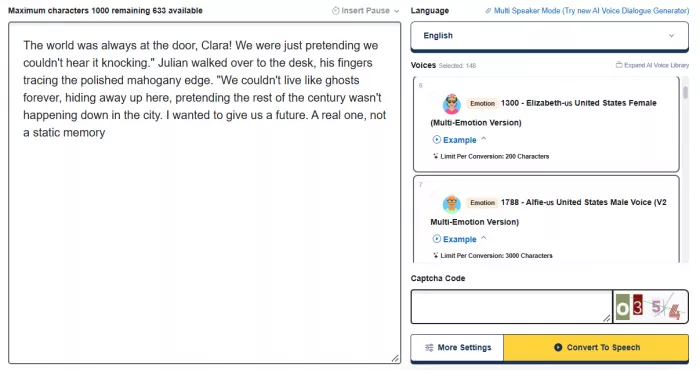
2. Choose a language and voice: Select the required language, then browse the available voice styles.
3. Open More Settings: Adjust the speech speed, volume, pitch, paragraph pauses, and audio format.
4. Convert the script: Complete the CAPTCHA when required and click Convert to Speech.
5. Save the audio: The conversion interface provides online playback and a download option for completed recordings.
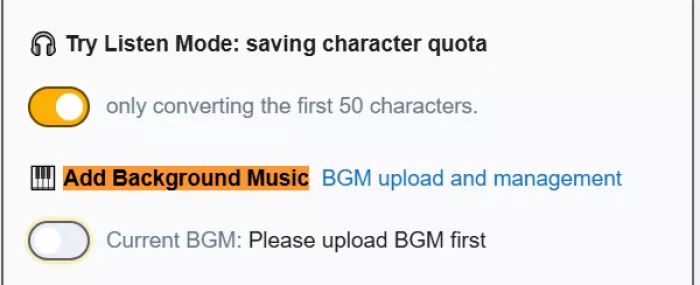
There is also a Try Listen Mode that processes only the first 50 characters. This is a useful addition because full conversions consume character allowances for standard voices. A creator can use the short preview to narrow down voice choices before processing an entire script.
The main inconvenience is the free plan's conversion restrictions. Its pricing page currently lists a maximum of 500 characters per conversion, although the live interface may display a different voice-specific limit. That is enough for brief narration segments, but it becomes restrictive when producing longer scripts.
Choosing the Right AI Voice
TTSMaker advertises a library of more than 600 voices, but I wouldn't treat that number as evidence of better narration quality. A voice library is only valuable when its voices suit the content and provide clear, consistent pronunciation.
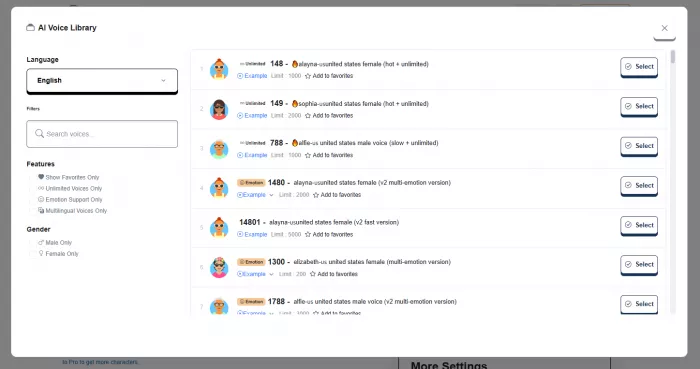
The available language selection includes English, Hindi, Spanish, French, German, Japanese, Korean, Arabic, and several other languages. This gives multilingual creators access to different narration options without switching platforms.
For content production, I would separate voice selection into three categories.
| Content type | Voice characteristics to prioritize |
| Instagram Reels and Shorts | Conversational delivery, clear articulation, and a moderate speaking pace |
| Educational videos | Consistent pronunciation, steady rhythm, and understandable pauses |
| Product explanations | Professional tone, natural emphasis, and clear sentence endings |
The important test is how a voice handles a complete sentence, not how impressive its name or description appears in the library.
Pronunciation deserves particular attention. Brand names, abbreviations, technical expressions, and mixed-language scripts can expose weaknesses in automated speech systems. TTSMaker provides pause and pacing adjustments, but those controls do not guarantee that every unfamiliar word will be pronounced correctly.
My assessment is that the platform provides enough selection to explore several narration styles. The quality of any particular voice still needs to be judged from its actual recording rather than the size of the catalog.
How Useful Are the Voice Settings?
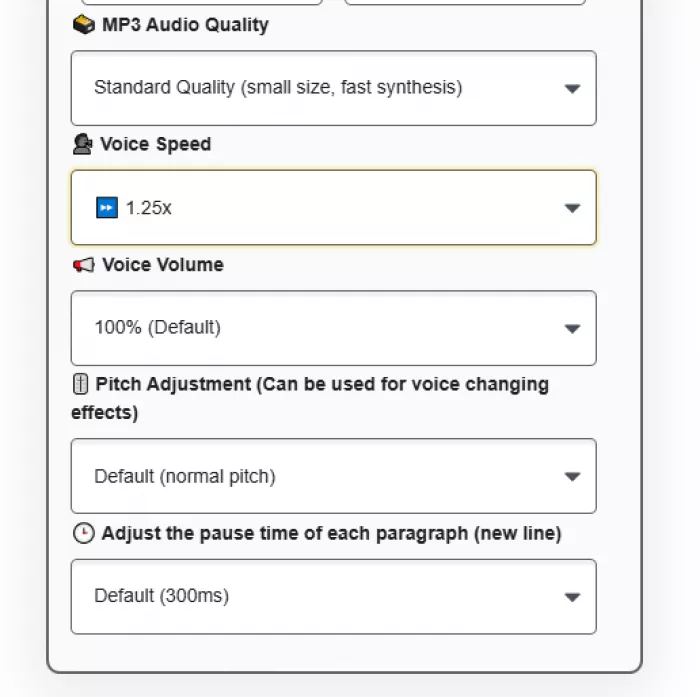
TTSMaker's customization features are more interesting than the basic text conversion itself. The free interface provides preset adjustments for speed, volume, pitch, and paragraph pauses. Custom numerical values and more advanced controls are available with eligible paid plans.
These settings affect different parts of the narration, and they shouldn't be treated as interchangeable.
Speed and pacing
The speech-speed control changes how quickly a selected voice reads the script. This matters because creators frequently work with fixed video durations, particularly for short-form content.
Increasing speed is not necessarily the best way to make narration fit a video. A rushed voiceover becomes harder to understand, especially when the script contains several important points. Editing the script for spoken delivery is generally more effective than accelerating every sentence.
For explanatory videos, I prefer a moderate pace with enough separation between ideas. The narration should support the visuals rather than force viewers to process too much information at once.
Pitch and volume
TTSMaker also provides pitch and volume adjustments. Volume changes the loudness of the generated audio, while pitch affects its perceived vocal character.
Pitch is a useful creative adjustment, but it is not the same as emotional expression. A higher pitch doesn't automatically create excitement, and a lower pitch doesn't guarantee a convincing documentary-style voice.
For video production, volume should also be checked after importing the narration into an editor. The final balance depends on the background music, sound effects, and overall mix.
Paragraph pauses
The pause controls are one of the platform's most practical features for structured narration. TTSMaker supports paragraph pause adjustments and manual pause insertions.
For instance, the documented instruction ((⏱️=1000)) inserts a one-second pause. The service supports manual pauses of up to 10 seconds, with the free plan allowing up to 50 pause insertions.
This gives creators a way to separate sections deliberately instead of relying entirely on punctuation. It is particularly relevant to tutorials, instructional narration, and videos that introduce several distinct points.
The limitation is that precise timing control does not necessarily make a synthetic voice more expressive. It improves the organization of the speech, while the underlying voice model determines much of the vocal delivery.
Multi-Speaker Dialogue and Background Music
TTSMaker also provides a dedicated AI Voice Dialogue Generator. Unlike ordinary single-speaker text conversion, this feature allows users to organize spoken content into separate dialogue blocks and assign different voices.
Each block can contain its own text and supported voice settings. The dialogue workflow also provides controls for the pauses between blocks and options to export the resulting conversation.
This is relevant to creators producing educational conversations, interview-style explanations, animated characters, and narrated exchanges.
However, the advanced Dialogue Editor is a paid feature. Pro Mini and higher plans provide more extensive multi-speaker project controls, while the free plan does not include the same editing capabilities.
Background music is another available function. TTSMaker provides music upload and management controls, with limits depending on the subscription.
I consider this a secondary feature rather than a major reason to choose the platform. For most video projects, keeping speech and music as separate tracks offers better control over timing, transitions, and final audio levels.
Downloading Audio for Content Creation
TTSMaker supports MP3, WAV, OGG, AAC, and OPUS, giving creators several ways to save generated speech.
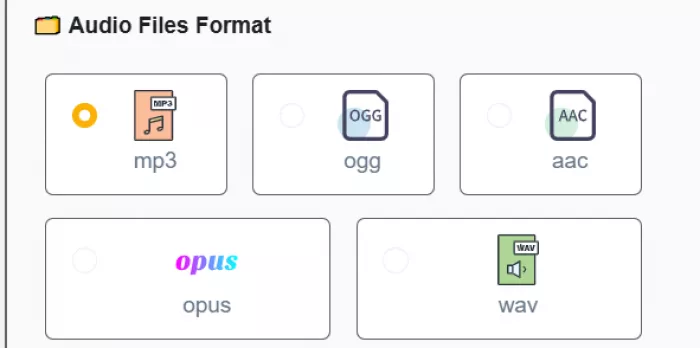
MP3 is the most practical default for ordinary social media content. It offers a manageable file size and works with widely used video editing applications. WAV is useful for editing workflows that favor uncompressed audio, although converting a synthetic recording to WAV does not automatically improve the voice model's original quality.
The conversion interface also provides an option to export an SRT subtitle file for generated audio. This is a worthwhile addition because captioning is often part of publishing videos for social platforms.
There are still a few production steps worth handling outside TTSMaker:
● Trim unnecessary silence at the beginning and end of the recording before placing it on a video timeline.
● Balance narration against background music so that speech remains clear without excessive loudness.
● Check subtitle accuracy and timing, particularly for names, technical terms, and abbreviations.
● Review the complete recording for pronunciation errors before publishing rather than relying only on a short preview.
Another important detail is file retention. TTSMaker states that free conversion history is available for only 30 minutes. That makes downloading finished audio immediately an essential part of the workflow.
This is not a platform designed to serve as a permanent media library. Creators should organize recordings in their own project folders and keep copies of their scripts and preferred voice settings.
TTSMaker Free Plan and Pricing
TTSMaker's free plan is a major part of its appeal. It provides 20,000 characters per week, unlimited downloads, selected unlimited-use voices, and permission to use generated audio commercially.
However, there is a difference between a generous weekly quota and a convenient production workflow. The free plan's individual conversion restrictions, temporary history, advertisements, and CAPTCHA requirements become more noticeable with frequent usage.
The current monthly pricing is:
| Plan | Price | Character allowance |
| Free | $0 | 20,000 per week |
| Lite | $13.99/month | 300,000/month |
| Pro Mini | $23.99/month | 600,000/month |
| Pro Max | $32.99/month | 1.2 million/month |
| Studio | $140/month | 6 million/month |
The Lite plan raises the conversion limit to 10,000 characters and removes advertisements and CAPTCHA requirements. It also extends conversion history to 24 hours.
Pro Mini is a more significant upgrade because it introduces advanced emotional voice settings, multi-speaker dialogue editing, API access, and a maximum of 20,000 characters per conversion.
From a creator's perspective, I see more value in paying for longer conversions and better editing controls than simply purchasing a larger character allowance.
A creator producing occasional short narration can work within the free tier's basic features. Longer tutorials, frequent publishing schedules, and multi-speaker projects create stronger reasons to consider the paid subscriptions.
Commercial Rights for YouTube and Social Media
Commercial licensing is one of TTSMaker's strongest selling points. The platform allows users to incorporate generated audio into lawful commercial projects without purchasing an additional voice license.
Its terms permit commercial applications including YouTube narration, TikTok videos, advertising, podcasts, and educational recordings. Attribution to TTSMaker is not mandatory.
There are two distinctions creators should understand.
1. First, permission to use generated speech does not automatically provide rights to the script, music, or other copyrighted material included in a project. Those elements still need appropriate permission.
2. Second, commercial licensing does not guarantee platform monetization. YouTube and other publishing services apply their own content policies, including requirements relating to originality and reused or repetitive material.
For creators publishing original videos with AI narration, TTSMaker's licensing removes an important potential cost and permission concern. The creator remains responsible for the legality and originality of the finished content.
Where TTSMaker Falls Short
TTSMaker handles the basic requirements of AI speech generation, but several limitations affect its suitability for regular production.
The most noticeable restrictions are:
● Short free conversions: The published 500-character limit per conversion makes the free tier inconvenient for lengthy narration that needs to be divided into smaller segments.
● Limited expressive control: Basic pitch and speed adjustments do not provide the same control as directing a human narrator. Advanced emotion settings require paid access and compatible voices.
● Temporary conversion history: Free recordings remain available for only 30 minutes, so unfinished download management creates a risk of losing access to generated files.
● Restricted advanced editing: Multi-speaker dialogue projects and finer customization are more developed in the paid versions.
● Dependence on script preparation: TTSMaker provides speech synthesis rather than detailed script editing or automatic correction of awkward spoken phrasing.
I also wouldn't assume that every voice in such a large catalog delivers the same quality. The platform's strengths are its accessibility, selection, and output options. Naturalness and pronunciation must be assessed voice by voice.
The difference matters most for content that depends heavily on personality, storytelling, or emotional performance. Adjusting technical settings helps with delivery, but it cannot fully substitute for expressive narration.
Verdict: Is TTSMaker Worth It?
TTSMaker is a sensible choice for creators who need affordable text-to-speech generation with basic customization and straightforward downloads. Its free commercial license, large language catalog, multiple export formats, and pause controls are genuinely useful features for content production.
The free plan is best suited to short-form narration and occasional voiceover work. Its conversion restrictions become less attractive as scripts grow longer, while the more advanced creative controls require a subscription.
I would choose TTSMaker for its accessible workflow and commercial-use permissions rather than assuming it offers the most natural-sounding voices available. The final quality depends on the selected voice, the script, and the editing completed after generation.
My overall assessment: TTSMaker provides a practical starting point for AI-powered voiceovers, particularly for creators who want to keep costs low. It covers the essential production steps without complicated software, but its suitability for polished, expressive narration still depends on the actual voice output and the amount of correction required.



Comments