Your bio page is probably the most-visited and least-touched thing you own. One screen, a handful of links, and almost everyone you meet online passes through it. This is about getting a little more out of it without turning it into a science project.
Here is the honest version first. A bio page is tiny. You are not redesigning an airline booking flow. You have a photo, a line or two about who you are, and maybe five or six links. There is not much surface area to work with, which is exactly why people assume testing it is pointless.
It is not pointless. It is just that the wins are small and they stack up slowly. If a page sends two thousand people a month toward your real links and you nudge the click rate from six percent to seven and a half, that is thirty extra humans landing where you wanted them, every month, for a change you made once. Do that three or four times across a year and the page is quietly doing a lot more work than it used to, and you never had to beg for more followers to get there.
So the goal of this piece is not to hand you a checklist of growth hacks. It is to show you how to tell, with some confidence, whether a change you made actually helped, or whether you are just looking at random wiggle and calling it a result. That second trap catches far more people than bad ideas ever do.
What we mean by a bio page?
When people say bio page they usually mean one of two things. There is the link-in-bio page, the standalone screen you point your social profiles at, the Linktree or Beacons or a custom one you built yourself. Then there is the profile or about page on your own site, the one with your face, your pitch, and the buttons that send readers to your newsletter, your shop, or your work.
The mechanics in this article apply to both. If it is a single screen whose job is to send a visitor somewhere else, it is a bio page for our purposes, and everything here holds.
The reason this page is worth the attention is that it sits at a pinch point. Traffic funnels into it from a dozen places and then fans back out. A change here touches everyone, not just the slice of people who happened to read one post. That leverage is real, and it is why a half-percent improvement is worth measuring instead of guessing at.
A/B testing, without the lab coat
Strip away the vocabulary and A/B testing is one plain idea. You show one version of something to half your visitors and a different version to the other half, at the same time, and you watch which one gets more people to do the thing you care about. Same days, same traffic mix, same weather. The only difference is the change you are testing.
The same time part is the whole trick. If you run version A this week and version B next week, you have not tested anything. You have compared two different weeks that happened to have different versions of your page, and a hundred other things changed too. A post went semi-viral, a holiday landed, your biggest referrer had an off day. Running both at once is the only way to keep those out of the result.
Change one thing, and be able to say out loud why you expected it to help, before you look at the numbers.
The other half of the discipline is changing one thing at a time. Swap the button wording, or reorder the links, or try a new photo. Not all three. If you change three things and the page does better, you have learned that the page did better, which you could have guessed, and you have learned nothing about why. Next time you want to reuse the win, you will not know which piece to keep.
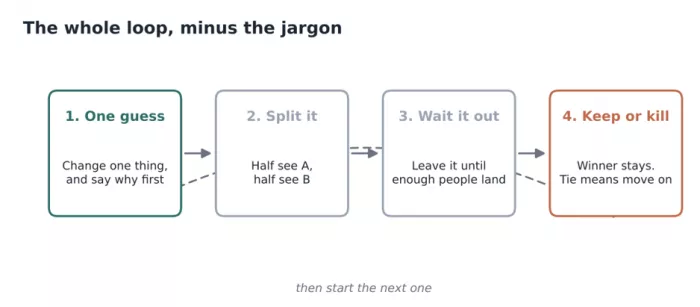
Figure 1. The actual loop. It is shorter than the explanations of it usually are.
The part nobody puts in the headline: traffic
Here is where most bio-page testing advice quietly falls apart. Every guide shows you a clean chart where B beats A and everyone goes home happy. What they skip is how many visitors it took to earn that chart, and whether you have anywhere near that many.
A bio page for a mid-sized creator might see forty or fifty visitors a day. At that volume, catching a change worth a point or two of click rate is genuinely slow. You are not waiting a weekend. You are waiting weeks, sometimes months, because the day-to-day noise in a small sample is larger than the effect you are hunting for.
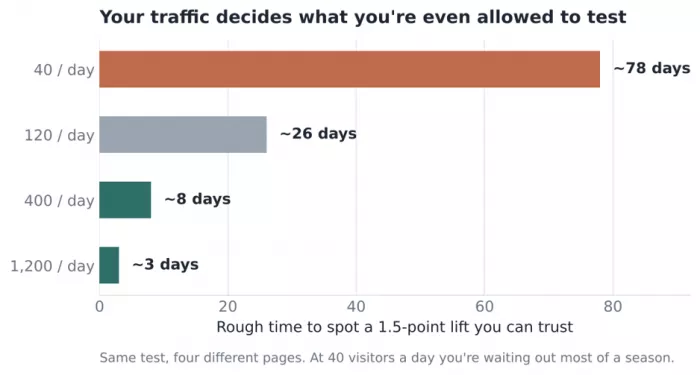
Figure 2. The same test takes wildly different amounts of time depending on how much traffic the page already gets.
This is not a reason to give up. It is a reason to be honest about what you can test. At low traffic, only big, obvious changes will ever show up clearly, so test those and skip the fiddly ones. Reorder the whole link stack instead of agonizing over a single word. Save the subtle stuff for when the page is busier, or run it knowing you will treat the result as a hint rather than a verdict.
If your page is quiet enough that a proper test would take two months, that is useful information on its own. It tells you to make your best judgment call, ship it, and spend your energy on getting more people to the page in the first place. Optimizing a trickle rarely beats widening the pipe.
What is actually worth testing?
Not every change is equal, and the ones people reach for first are often the weakest. Fonts and background colors feel like progress because they are visible, but they almost never move behavior on a page this simple. Here is a rough ranking of where the payoff tends to live, from most reliable to least.
| What to change | Why it tends to move the needle | Effort |
|---|---|---|
| Order of the links | The top slot soaks up most clicks, so reordering is often the biggest free win | Low |
| The one-line bio | It tells a cold visitor whether they're in the right place | Low |
| Button label wording | "See what I'm using" reads differently from "My links" | Low |
| Profile photo / thumbnail | A face or a clear product shot changes the first half-second | Medium |
| Number of links shown | Fewer choices can lift clicks on the ones that matter | Medium |
| Full layout or theme | Big swings are hard to read, because you can't tell which part did it | High |
Notice that the cheapest changes sit at the top. Reordering links and rewriting one line of text cost you nothing and tend to matter most, because they change what the visitor sees and reads in the first second. The expensive full-redesign sits at the bottom, not because it can't help, but because when it does help you will have no idea which part was responsible.
That top row deserves a closer look, because position does an outsized amount of the work on any list of links.
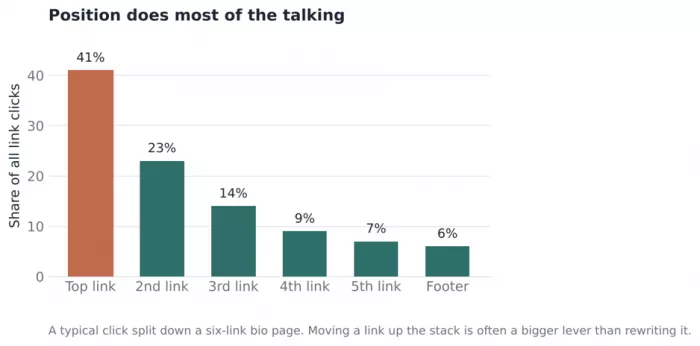
Figure 3. A typical click split down a six-link page. The top slot alone usually takes more than a third of everything.
Look at that drop-off. The top link pulls more than the bottom four combined. So before you spend a week testing button copy, ask the dumber question first: is the link you most want people to click actually sitting at the top? Moving it up is a bigger lever than almost any wording change, and it takes ten seconds.
A realistic run, numbers and all
Let me walk through one the way it actually goes, wobbles included. Say your top link is a button that reads My links, and you have a hunch that something warmer would pull better. You write a variant that reads See what I'm using, because it hints at a payoff instead of just naming the destination. One change, and you can say why you expect it to help. Good start.
You split traffic down the middle and let it run. After the first week the variant is ahead, 7.4 percent to 6.1 percent. That looks like a clear win, and the temptation to call it and move on is strong. This is the exact moment most tests go wrong.
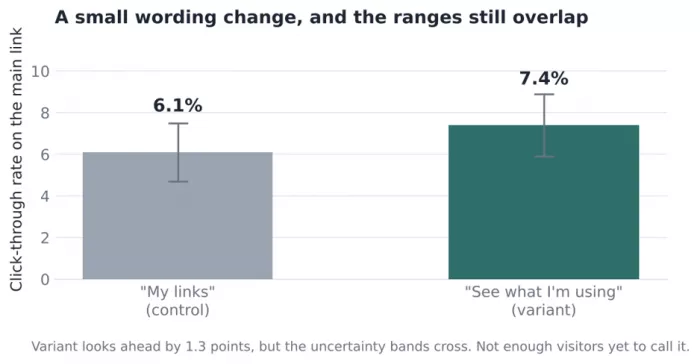
Figure 4. The variant is ahead. The uncertainty bands tell a more cautious story.
The bars show the variant in front. The thin whiskers show the range the true number could plausibly sit in given how few people have seen each version so far, and those ranges overlap. When the ranges overlap like that, the gap you are looking at could easily be luck. If you flipped which half saw which version, the result might flip too.
So you leave it running. Maybe after three more weeks the gap holds and the ranges finally pull apart, and now you have earned the right to say the warmer wording wins. Or maybe the variant drifts back toward the control and you learn the wording never mattered, which is also worth knowing, because now you will not waste another week on it. Both outcomes are a real result. The only bad outcome is the one where you called it after week one and told yourself a story.
How to call a winner without fooling yourself?
You do not need statistics coursework for this, but you do need three habits. They are boring and they are the entire difference between testing and guessing.
Decide the finish line before you start. Pick how long you will run it, or how many visitors you want on each side, and write it down. If you leave the end open, you will stop the moment the numbers look good, which guarantees you stop on noise.
Wait for the ranges to separate, not just the averages. One number being bigger than another means almost nothing on small traffic. The question is whether the gap is bigger than the wobble, and that is what those uncertainty bands are for.
Run full weeks, never partial ones. Tuesday behaves nothing like Saturday on a bio page. If you stop mid-week you are comparing a chunk that is heavy on weekdays against one that is heavy on weekends, and the day of the week, not your change, is driving the gap.
If you want a single rough rule to carry around: a change is worth keeping when a clear lead survives at least two full weeks and the ranges no longer overlap. Below that bar, treat it as interesting rather than proven, and do not rebuild your whole page around it.
The mistakes that quietly waste a month
Most failed tests do not fail because the idea was bad. They fail in ordinary, avoidable ways. These are the ones worth watching for.
Peeking and stopping early. You check on day three, the variant is up, you ship it. You have just let random noise make the call. Set the finish line and hold to it.
Testing when nobody is visiting. If the page gets a handful of people a day, a tidy little test will take months to mean anything. Know your traffic before you design the test, not after.
Changing five things and claiming the win. The page improved, wonderful, but you cannot carry the lesson anywhere because you do not know which change earned it.
Measuring the wrong click. Total clicks can rise while clicks on the link you actually care about fall. Pick the one action that matters and track that, not the cheerful-looking total.
Forgetting the test is still live. Weeks later the page is still split and half your visitors are seeing a version you meant to retire. Put a reminder on the end date.
A plan you can start this week
If you want something concrete to do, this is a sensible order. It front-loads the cheap, high-payoff moves and leaves the fussy stuff for later.
- First, with no test at all, make sure the link you most want clicked is sitting at the top. This is not a test, it is just fixing an obvious thing, and it often matters more than anything you will test afterward.
- Then run one wording test on that top button. One change, both versions live at once, a fixed two-week window written down in advance.
- While it runs, check your actual daily traffic so you already know, before the end date, whether this volume can even produce a trustworthy answer.
- At the end, apply the rule. Clear lead that held for two weeks with ranges apart, keep it. Anything short of that, let it go and move to the next idea.
- Only once the easy wins are spent should you reach for the photo, the link count, or a layout change, and even then, one at a time.
The takeaway
A bio page rewards patience more than cleverness. The changes that work are usually small and slightly dull, the wins arrive one modest percentage point at a time, and the whole thing only pays off if you are honest about when a result is real. Change one thing, show both versions at once, wait longer than feels comfortable, and keep only what clearly earned its place. Do that a few times and the same page, with the same traffic, quietly starts sending more people exactly where you wanted them.



Comments